Halos.

Dale.

Bo Derek
Suspended / Banned
Messages
13,716
Name
Dale.
Edit My Images
Yes
Halos, hate them, but why do they happen?

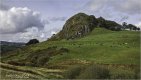
I took this image last Monday, it's a local beauty spot, Loudoun Hill, which is actually a volcanic plug.

It was a decently exposed image, and has had fairly light processing. The halo is visible on the RAW file too and is more pronounced after processing. No shadow recovery, a small amount of sharpening and clarity, levels done etc but nothing heavy.

Taken with my 5Div and a 24-105L mk1. I've noticed horizon distortion with this lens at 24mm too, maybe to be expected fairly wide but not quite as much as this with one of Canon's L lenses? Distortion is easily fixed and I can live with that but those halos, grrrrr. :oops: :$

I'm blaming the lens, I have noticed quite a lot of halos looking back on previous images but is it more to do with conditions?

TA.
tp.jpg
 
Last edited:
I used the Canon MK1 24-105mm f4L lens for a few years (until I dropped it into the sea) and found it to be a great lens, probably the best walk about lens they did imo.
 
Sometimes halos are visible when firmware has removed chromatic aberration and fringing. It removes the colour but does nothing about the difference in apparent brightness.
 
I used the Canon MK1 24-105mm f4L lens for a few years (until I dropped it into the sea) and found it to be a great lens, probably the best walk about lens they did imo.

Agreed - its an excellent lens.

The horizon does look over-sharp. If it hadn't been a RAW file I would have suspected an over-sharpened jpeg but no....... Personally I never use clarity - could that be the problem?

At 24mm barrel distortion in that lens does need correcting but that's easily done.
 
Thanks guys.

Sometimes halos are visible when firmware has removed chromatic aberration and fringing. It removes the colour but does nothing about the difference in apparent brightness.

Maybe this, here is the original unprocessed RAW file, cropped, I think that's aberration?

IMGL3902 tp2.jpg
 
Yes, this is chromatic aberration which is easily corrected in LR. I used to have the 24-105mm L Mk1 but upgraded to a Mkii when I changed my traded my 5D2 for a 5D4. I do think the Mkii is a little better but not really had a significant problem even with the Mki. It was only visible in high contrast areas near the edge. For most images it is not a problem but I always apply lens correction automatically anyway as a first step. It is particularly important if you use HDR software though I now only use Merge to HDR in LR which does not have this effect. I also have stopped using Clarity in LR but mainly because I have a various Topaz AI filters which work better.

Many years ago a club member wanted to compare his 24-105 with mine as it seemed to be a bit soft at f4. There was a clear difference so he returned his lens to Canon who replaced it as there was a faulty batch. You may wish to check that your lens is not on that list of s/n which was published by Canon but about ten years ago.

Dave
 
Yes, this is chromatic aberration which is easily corrected in LR. I used to have the 24-105mm L Mk1 but upgraded to a Mkii when I changed my traded my 5D2 for a 5D4. I do think the Mkii is a little better but not really had a significant problem even with the Mki. It was only visible in high contrast areas near the edge. For most images it is not a problem but I always apply lens correction automatically anyway as a first step. It is particularly important if you use HDR software though I now only use Merge to HDR in LR which does not have this effect. I also have stopped using Clarity in LR but mainly because I have a various Topaz AI filters which work better.

Many years ago a club member wanted to compare his 24-105 with mine as it seemed to be a bit soft at f4. There was a clear difference so he returned his lens to Canon who replaced it as there was a faulty batch. You may wish to check that your lens is not on that list of s/n which was published by Canon but about ten years ago.

Dave


Awesome, thank you, I will check.
 
It's been so long since I last used Lightroom that I've forgotten some of the things it does.
However, these days I use On1 and it has a "structure" slider, which adjusts mid tone contrast, which I seem to recall was what "Clarity" does in LR.
I've found that judicious use of the "Structure" slider can introduce halos, so it may be worth exploring your "Clarity" settings, in case that is contributing.
 
It's been so long since I last used Lightroom that I've forgotten some of the things it does.
However, these days I use On1 and it has a "structure" slider, which adjusts mid tone contrast, which I seem to recall was what "Clarity" does in LR.
I've found that judicious use of the "Structure" slider can introduce halos, so it may be worth exploring your "Clarity" settings, in case that is contributing.


It does look like LR has removed the aberration (I always tick that box) but left a white edge line in its place, which has been made more noticeable by using the clarity slider. There is a halo/aberration on the RAW file too before processing which might be caused by the difference in light/tones between the sky and the hill. I'll reconsider the clarity slider from now on. (y)
 
I'll have to look out for the same thing in my files. I've hardly ever noticed halos except in extreme conditions; I certainly wouldn't expect to see them in the conditions you experienced here.

Does removing CA in LR actually just remove the colour, I wonder? It certainly does a good job of that and I wonder if your own train of thought is actually correct - that adding clarity actually accentuates what is left after the colour has been removed.
 
Clarity in lightroom is a complex effect. its aim is to increase the differential between middle tones. However when a middle tone falls next to a highlight it also accentuates the difference between them, in much the same way as an unsharp mask does. which can produce a distinct halo, just as any sharpening does. In most cases this is not obvious but in some situations it can be so., especially along long edges.
 
Back
Top