Haloing

Merlin5

Suspended / Banned
Messages
2,295
Name
Lee
Edit My Images
No
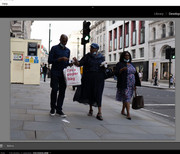
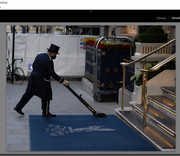
Hi chaps. I was looking at some photos today that I published to my Flickr page a couple of months ago. I was looking at them on my 32" tv instead of my monitor. Because of the tv being larger and probably because of the backlighting, it made me notice haloing on two photos that I hadn't picked up on from my monitor. I can now see it on my monitor but it definitely looks worse on the tv. It horrified me. How bad does it look to you on these two photos? Would you have looked at them and immediately said there's terrible haloing or is there an acceptable tolerance with haloing?

When I look at the raw images before processing they were both on the dark side, so I think increasing the exposure in post has probably created the haloing? I haven't over sharpened them at all. Thing is, I usually set to manual but with auto ISO. Do you think I would have had better exposure and avoided haloing by just setting to aperture priority? I can't be absolutely sure however if I used auto ISO on these or had manually set it to 125. Perhaps an ISO of around 400 might have exposed them better.

Below are the settings for each photo. And below the photos I added screenshots of how they looked out of camera, you can click on the thumbnails. Thanks for any advice.

ƒ/1.4, 56.0 mm, 1/800, ISO 125


Housework by Merlin 5, on Flickr

ƒ/1.8,16.0 mm, 1/400, ISO 125


Out of The Blue by Merlin 5, on Flickr


The unprocessed Lightroom screenshots of each photo:


Last edited:
Looking on my phone may not be the best device but haloing I was under the impression is primarily due to oversharpening (poor use of sharpening controls?)...........???
 
Don't think it matters how you set the camera - though the judgement of exposure is certainly a craft. But yes haloing can arise in processing, so maybe you should be looking at what might be on auto there, and what your inputs are in that arena.

It might help to explain your entire processing workflow ... all the adjustments made. Without that info, we're guessing ...
 
Looking on my phone may not be the best device but haloing I was under the impression is primarily due to oversharpening (poor use of sharpening controls?)...........???

I must admit Box Brownie, I ran both of these through Topaz Denoise after I'd processed them (should have run them through topaz before processing, I know), and comparing my processed images to the Topaz processed images, the haloing is more prominent in the Topaz edits. Probably Topaz added sharpening and increased haloing. I need to be careful of that. However, I read a bit of an article about removing haloing and it says

"Halos can form in your post-processed images for a variety of reasons including clarity adjustments, oversharpening, chromatic aberration removal, and sweeping changes to the luminosity in shadows, highlights, and overall exposure".
 
Don't think it matters how you set the camera - though the judgement of exposure is certainly a craft. But yes haloing can arise in processing, so maybe you should be looking at what might be on auto there, and what your inputs are in that arena.

It might help to explain your entire processing workflow ... all the adjustments made. Without that info, we're guessing ...

I can do screenshots of my Lightroom slider positions if that helps?
 
I can do screenshots of my Lightroom slider positions if that helps?
It might do a bit, but I think you could be educating yourself better by making adjustments & watching what the effect of them is. It's all in your court, really. It's good that you're alert to this stuff, and by noticing it you're equipped to do your own digging. Move those sliders, & watch what happens. Develop your feel.
 
It might do a bit, but I think you could be educating yourself better by making adjustments & watching what the effect of them is. It's all in your court, really. It's good that you're alert to this stuff, and by noticing it you're equipped to do your own digging. Move those sliders, & watch what happens. Develop your feel.

You're absolutely right! I've been doing photography for a year now and am always looking for my flaws and trying to iron them out. I do think I need to stop running my photos through topaz after processing for one thing. They're meant to be run through it before processing but sometimes I forget. Now that I'm more aware of haloing, I'll always be looking out for it and trying to avoid it. I'll need to try and expose my photos better in the first place and then as you say, being aware of haloing appearing as I make PP adjustments.

How noticeable is the haloing to you in my photos and is it within the realms of acceptability or not? Would it have screamed at you if I just posted the photo and not said anything?
 
IIRC, Flickr does its own sharpening after any resizing it does. This can be reduced by uploading to Flickr at the size you want to use so it doesn't need to do any resizing itself.

Over the years, my eyes have got so used to the halos that a lot of posted shots show that they seem to ignore it!
 
IIRC, Flickr does its own sharpening after any resizing it does. This can be reduced by uploading to Flickr at the size you want to use so it doesn't need to do any resizing itself.

Over the years, my eyes have got so used to the halos that a lot of posted shots show that they seem to ignore it!

I've been looking at my other photos and fortunately most don't have haloing, so I think a combination of getting better exposure and being careful how I process them is the key. I can see the haloing in Lightroom so Flickr isn't the culprit although it no doubt adds to it as you mentioned.
 
I've been looking at my other photos and fortunately most don't have haloing, so I think a combination of getting better exposure and being careful how I process them is the key. I can see the haloing in Lightroom so Flickr isn't the culprit although it no doubt adds to it as you mentioned.
It is very easy to remove the haloing using the Healing Brush in Photoshop.
 
I've been looking at my other photos and fortunately most don't have haloing, so I think a combination of getting better exposure and being careful how I process them is the key. I can see the haloing in Lightroom so Flickr isn't the culprit although it no doubt adds to it as you mentioned.


If you can see it at the processing stage, something's (usually) over sharpened, either in camera or during processing.

Far better to avoid the problem than to try to cure it in PP.
 
It is very easy to remove the haloing using the Healing Brush in Photoshop.

Right, I'll have to try that, I hardly use PS but need to learn it more. Would it be a case of drawing around the edges with a brush and it disappears? But I imagine I'd have to be careful that the brush is very precise and doesn't remove more of the subject than I want?

If you can see it at the processing stage, something's (usually) over sharpened, either in camera or during processing.

Far better to avoid the problem than to try to cure it in PP.
I00% agree with this.
 
Your biggest issue is the metering mode used and not compensating for it's error. If you record something as very dark that means very little light which is very little data available for editing. And you will find exposure corrections tend to affect mid tones more than the others... in LR you can select a slider (exposure/shadows/highlights/black/white) and the histogram will highlight where that slider's adjustment is focused on.

Maybe this will help:
View: https://youtu.be/9pV7zX0qC7Q
 
Your biggest issue is the metering mode used and not compensating for it's error. If you record something as very dark that means very little light which is very little data available for editing. And you will find exposure corrections tend to affect mid tones more than the others... in LR you can select a slider (exposure/shadows/highlights/black/white) and the histogram will highlight where that slider's adjustment is focused on.

Maybe this will help:
View: https://youtu.be/9pV7zX0qC7Q
Thanks Steven. I've seen that video before but forgot most of its tutorial so will re-watch. Yes, good point about metering mode. For a long time I used the multi meter mode on my Sony and recently have been using spot metering more. It might be that those photos used multi and may have benefitted from spot metering. Do you think that would have exposed better?
 
Probably. Either with exposure lock, or w/ spot metering tied to the focus point and moved over the subject.

I would use exposure lock if in aperture priority but not in manual, is that correct?

I looked at your flickr, excellent bird and wildlife shots. I really like 'Stairway to Nowhere', great mood in it. On that photo, it doesn't zoom much on Flickr. One click and it only enlarges slightly. I want to do that on some of my photos as sometimes they don't look great when zoomed too much. I use Lightroom to export. Would I need to resize it when exporting by going to 'Image Sizing'/ Resize to Fit' and what sort of size (width and height, dimensions, megapixels or percentage) for most photos would give me a similar zoom to yours once uploaded to Flickr?
 
TVs do tend to apply a lot of sharpening. They’re not meant to view stills on
 
I would use exposure lock if in aperture priority but not in manual, is that correct?

I looked at your flickr, excellent bird and wildlife shots. I really like 'Stairway to Nowhere', great mood in it. On that photo, it doesn't zoom much on Flickr. One click and it only enlarges slightly. I want to do that on some of my photos as sometimes they don't look great when zoomed too much. I use Lightroom to export. Would I need to resize it when exporting by going to 'Image Sizing'/ Resize to Fit' and what sort of size (width and height, dimensions, megapixels or percentage) for most photos would give me a similar zoom to yours once uploaded to Flickr?
You would still need to use exposure lock if in manual with auto ISO.

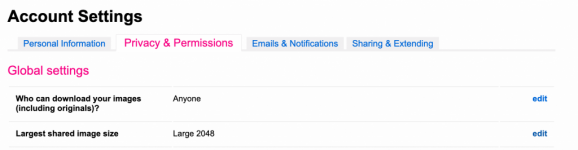
Yes, resize to the maximum display size desired during export... I think that one is at 1024px long edge. But you can also limit the max display size in a setting.

Screen Shot 2021-08-11 at 12.44.57 PM.pngScreen Shot 2021-08-11 at 12.45.39 PM.png
 
You would still need to use exposure lock if in manual with auto ISO.

Yes, resize to the maximum display size desired during export... I think that one is at 1024px long edge. But you can also limit the max display size in a setting.

View attachment 326864View attachment 326865

Thanks Steven. I'll try resizing using long edge. Not sure about using the Flickr size settings in your screenshots as apparently whatever image size I set changes it for every photo.


TVs do tend to apply a lot of sharpening. They’re not meant to view stills on

That's a good point. However, I looked through a page of photos on talk photography on my tv and most other people's photos looked pretty smooth and natural as they should, whereas some of mine looked grainy so I think the tv can still be used as way to see if the photos look good or over processed.
 
That's a good point. However, I looked through a page of photos on talk photography on my tv and most other people's photos looked pretty smooth and natural as they should, whereas some of mine looked grainy so I think the tv can still be used as way to see if the photos look good or over processed.

FWIW mine look s*** on a TV. Don’t be fooled by comparing online photos with your own. They’ll be at a massively low res by comparison
 
Back
Top