Got my new lighting kit - a couple of questions.

FlyTVR

Suspended / Banned
Messages
4,234
Edit My Images
No
My lighting kit has arrived. Only had 5 mins to play with it so far but I am chuffed. Example shot below.

lightingkit.jpg


Anyway, here are my questions -

1. Kit came with a wrinkled white cloth backdrop. To isolate the backdrop I have -

a) Tried to over-expose it
b) Used shallow dof
c) Positioned my subject away from it (in conjunction with 'b').

Is there anything I am missing? Do professionals use simple cloth backdrops or something else?

2. I'd like to attempt to take a shot of a subject where one side of the face is well illuminated and the other not. Now, I know how to do this, but I'm guessing in the confined space I have it will be more difficult because the main light source will bounce of the wall and illuminate the side of the face I don't want to illuminate.

So, I was thinking about minimising the wall reflection using a mat black surface. Is this the best way to achieve this, or have you any further tips?

Cheers.

TeaVR
 
if possible, use a flash behind your model and point it up at a 45 degree angle, with the power set to 2 stops higher than what you are exposing for. this will blow out the background. in regards to your question for background selection, seamless paper is always the best way to go. ive used cloth backgrounds before and all they do is like you said, wrinkle as well as pick up dust and pet hair. my suggestion for your lighting question is to feather the light. you dont need alot of room really to do this. place your subject in one spot, and instead of pointing the main light directly at the side of your subject, slowly move the light away (towards the camera). there might be a little of wrapping light but hey, its worth a shot. youtube searches for lighting techniques work well.
 
Nice image, and I like the lighting which is giving soft shadows but the final image is lacking a little contrast in the processing i.e the image is a bit flat. Also to have been really good you need a bit of eye contact. I suspect that you have someone else with you and they are keeping the childs attention away from the camera. If this is the case, it is important to have the person talking to the child as near to the camera position as possible, ideally directly behind and slightly above the camera.
 
You can get rid of the wrinkles simply by clamping the material to the sides of the background support stand and taping it to the floor. That, plus having enough distance to put any creases out of focus should be fine. If that still isn't enough, spray the background with a plant sprayer - it works wonders.
And see this video on the Lencarta website

As for the lighting, Yes - using a black absorber is a big help. Haven't you already got a 5-in 1 reflector kit with a black absorber built into it? And you can also use short lighting, gives and interesting and slimming effect and isn't affected much by bounced light.
 
never tried it with a backdrop but steaming other cloth stuff (like clothes sheets ect) smoothes out the wrinkles what about setting it up and then steaming it where it hangs and letting it pull itself smooth
 
Got in from work - kids to bed - setup and tried Garry's suggestion (from video) of a 3 light setup - one dedicated to over exposing the background. Works beautifully. Cheers Garry.

Also agree with Garry in that getting it right in the real world saves effort in PS later!

TeaVR
 
No comment!

Take it we've go to pay to see the rest of the video!

There isn't a rest of the video. Lencarta is building a series of short videos on basic techniques, all free, to go with their free written tutorials. The videos available at the moment are on this page.
 
There isn't a rest of the video. Lencarta is building a series of short videos on basic techniques, all free, to go with their free written tutorials. The videos available at the moment are on this page.
Garry, the penultimate video on that list (Lighting with a single light) appears to be missing. Any chance it could be added?

FlyTVR: I too would like to see the end result if poss :)
 
Oi you lot - stop hijacking MY thread :)

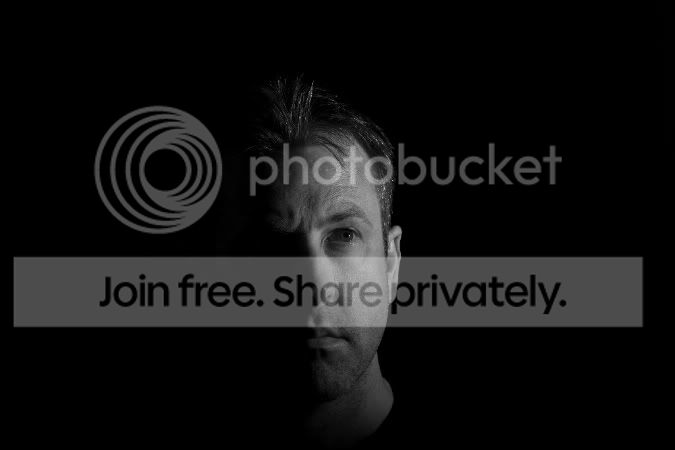
Seriously, I'm still struggling to get a picture where one side of the model's face is illuminated - the other not. I've tried using a black reflector on the side that I don't want illuminated. This does help, but I'm wondering how other photographers manage to get such contrast in their shots?
 
flags, move the light further round to side of model...

perhaps if you post what you got people could point out where your going wrong

are you after a white background as well:thinking:
 
Seriously, I'm still struggling to get a picture where one side of the model's face is illuminated - the other not. I've tried using a black reflector on the side that I don't want illuminated. This does help, but I'm wondering how other photographers manage to get such contrast in their shots?
Can't you use a harder light and further round to the left of the camera? Try taking off the softbox/umbrella and using the light straight as it is unless you have barn doors or some other method of preventing the light from falling to the right. Also the black absorber on the right should help too I'd think.
 
OK - thanks for the suggestions - will try tonight.

With regards to posting pics, my subject will probably be one of my kid's toys as the wife (and kids) are getting bored of sitting. Whilst on the subject, what do you guys do to tempt volunteers?
 
Garry, the penultimate video on that list (Lighting with a single light) appears to be missing. Any chance it could be added?

FlyTVR: I too would like to see the end result if poss :)

Now fixed
 
Oi you lot - stop hijacking MY thread :)

Seriously, I'm still struggling to get a picture where one side of the model's face is illuminated - the other not. I've tried using a black reflector on the side that I don't want illuminated. This does help, but I'm wondering how other photographers manage to get such contrast in their shots?

I mentioned short lighting - this is where the side of the face less visible to the camera has more light than the side more visible to the camera, as in the shot below.
shortlight.jpg

Of course, you can do this with any kind of background
 
I mentioned short lighting - this is where the side of the face less visible to the camera has more light than the side more visible to the camera, as in the shot below.
shortlight.jpg

Of course, you can do this with any kind of background

But how is the sinister look achieved? i.e. face on, one side of face pretty much like the dark side of the moon, the other illuminated?

Cheers.

TeaVR
 
where you put the lights, the further towards the back, the less face is lit.
 
No idea what camera you have but if your struggling to get contrasty shots just check that you haven't got any dynamic range thingy turned on in the camera because it will be trying it's hardest to even things up. Not sure if your still struggling with blowing out the white backdrop but it will try to stop this happening as well. I had this problem once & it was ages before i thought of it. :shrug:
 
No expert by a long shot but I think this is purely a case of the distance of the light to the subject's face (you would want it further away for a harder light and more defined shadows) and/or removing whatever is being used to diffuse the light. If you're using a shoot through umbrella then perhaps try a reflector umbrella as the light is a tad harder from what I've learned. Of course you could try removing whatever it is you've attached to the front of the light and that should produce a much harder light.

It's going to be mostly about experimenting. If you post what you get here as you go along then those with more experience can probably guide you even further.
 
No expert by a long shot but I think this is purely a case of the distance of the light to the subject's face (you would want it further away for a harder light and more defined shadows) and/or removing whatever is being used to diffuse the light. If you're using a shoot through umbrella then perhaps try a reflector umbrella as the light is a tad harder from what I've learned. Of course you could try removing whatever it is you've attached to the front of the light and that should produce a much harder light.

It's going to be mostly about experimenting. If you post what you get here as you go along then those with more experience can probably guide you even further.

Thanks - will try some more experiments.

With regards to moving the light further from the subject, I think I'll have to reorg the room as I'll be running out of witdh :(

TeaVR
 
The further away you move the light the less easy it will be to create an image similar to that below unless you have some modifiers to control the spread of light. If you point a torch at somethind and then move further away the beam of light spreads out, you do not want this for this effect.

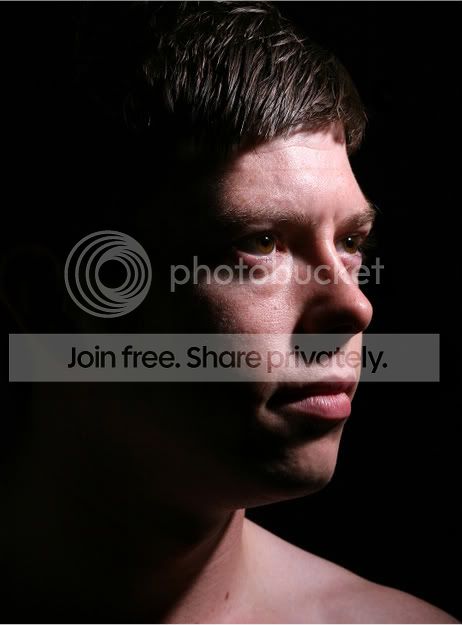
If it is something like the image below you are after, that was taken with a single studio flash, placed high and to his left very slightly behind him, the head was about 3 ft from the model. Dark backround and expose for the face.

Scott1cropped-1-1-1.jpg
 
Thanks - will try some more experiments.

With regards to moving the light further from the subject, I think I'll have to reorg the room as I'll be running out of witdh :(

TeaVR
I'd try the shot without any modifiers on the flash head first. That would be the easiest starting point. Ed above knows his onions and so his advice will be better than mine.

I'm following the thread though and will be interested to see what you end up with as well as how you achieve it
 
I'd try the shot without any modifiers on the flash head first. That would be the easiest starting point. Ed above knows his onions and so his advice will be better than mine.

I'm following the thread though and will be interested to see what you end up with as well as how you achieve it

Not had chance to try, but I will post once I have.

Once again - thanks for the advice!

TeaVR
 
You can get rid of the wrinkles simply by clamping the material to the sides of the background support stand and taping it to the floor. That, plus having enough distance to put any creases out of focus should be fine. If that still isn't enough, spray the background with a plant sprayer - it works wonders.
I'm having some of my own inherent crease problems. It being seamless, some of the above remedies aren't optimal. It is very frustrating. Part of the problem possible stems from my unravelling of the paper :bonk: , so never do this!
 
Ok - finally got 5 mins to try the dramatic (low key) shot. Here is the result -

IMG_1633_edited-1-1.jpg
 
Back
Top