
and please use their services
You are using an out of date browser. It may not display this or other websites correctly.
You should upgrade or use an alternative browser.
You should upgrade or use an alternative browser.
GoPro 5.3k/60 Footage File needed
- Thread starter KIPAX
- Start date

swanseamale47
Suspended / Banned
- Messages
- 10,876
- Name
- wayne clarke
- Edit My Images
- Yes
Mine only goes to 4k (it's a hero 4 black) I'll ask around if I can find a newer one to borrow mate.
OP

- Messages
- 21,370
- Name
- KIPAX Lancashire UK
- Edit My Images
- No
Mine only goes to 4k (it's a hero 4 black) I'll ask around if I can find a newer one to borrow mate.
THANKS
mine are 7 black up to 4k.. just wanted to try a 5.3k/60 file on my computer software make sure all supported


DaelpixPhotography
Suspended / Banned
- Messages
- 1,801
- Name
- David
- Edit My Images
- No
Just for you I've recorded a 5 minute clip today  Not sure how to send it. Any ideas? Dropbox? Google Drive? Something else?
Not sure how to send it. Any ideas? Dropbox? Google Drive? Something else?
OP
- Messages
- 21,370
- Name
- KIPAX Lancashire UK
- Edit My Images
- No
Just for you I've recorded a 5 minute clip today
lovely thank you
www.wetransfer.com any good for you ? files at kipax com
DaelpixPhotography
Suspended / Banned
- Messages
- 1,801
- Name
- David
- Edit My Images
- No
I tried the website, but says I need to pay to get bigger storage?
I'm tryingGoogle Drive, but will take an 1hr 40mins to upload.
I'm tryingGoogle Drive, but will take an 1hr 40mins to upload.
DaelpixPhotography
Suspended / Banned
- Messages
- 1,801
- Name
- David
- Edit My Images
- No
58 minutes left. I'll send you a DM when it's uploaded
DaelpixPhotography
Suspended / Banned
- Messages
- 1,801
- Name
- David
- Edit My Images
- No
DaelpixPhotography
Suspended / Banned
- Messages
- 1,801
- Name
- David
- Edit My Images
- No
I uploaded it myself to Youtube (private), used a LUT that I normally use, but forgot to sharpen it. The video quality is so much better than 1080 what I usually record in. Looks like I'm won over using 5.3K @ 60. I'll have to upgrade my memory card to something with a larger capacity at some point.
Export settings below.
I have noticed that Davinci Resolve (free version) doesn't offer a 5.3K resolution., so I have used the given res in screenshot. Doesn't affect quality. No artefacts on video whatsoever unlike 1080.
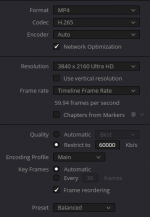
Export settings below.
I have noticed that Davinci Resolve (free version) doesn't offer a 5.3K resolution., so I have used the given res in screenshot. Doesn't affect quality. No artefacts on video whatsoever unlike 1080.
Last edited:
OP
- Messages
- 21,370
- Name
- KIPAX Lancashire UK
- Edit My Images
- No
DaelpixPhotography
Suspended / Banned
- Messages
- 1,801
- Name
- David
- Edit My Images
- No
No need to apologise. You're welcome.
OP
- Messages
- 21,370
- Name
- KIPAX Lancashire UK
- Edit My Images
- No
Right.. Loaded up fine although took an absoloute age
Had to view it at a poor resolution for it to run smooth but I wont need to test the quality when i work on my files as its always going to be the same
That resolution i will only use now and then just needed to know it owrks.. i does only just... i will stick to 4k/100
I can no go ahead and buy one without wondering if waste money.. gonna get gopro 13 i think...
thanks for the video (and commentry I was going to ask what you used but you told be gopro 10 near the end
Ta
Had to view it at a poor resolution for it to run smooth but I wont need to test the quality when i work on my files as its always going to be the same
That resolution i will only use now and then just needed to know it owrks.. i does only just... i will stick to 4k/100
I can no go ahead and buy one without wondering if waste money.. gonna get gopro 13 i think...
thanks for the video (and commentry
I was going to ask what you used but you told be gopro 10 near the end Ta
swanseamale47
Suspended / Banned
- Messages
- 10,876
- Name
- wayne clarke
- Edit My Images
- Yes
Which ones had the overheating issues? Wasnt the 13 one of them?Right.. Loaded up fine although took an absoloute age
Had to view it at a poor resolution for it to run smooth but I wont need to test the quality when i work on my files as its always going to be the same
That resolution i will only use now and then just needed to know it owrks.. i does only just... i will stick to 4k/100
I can no go ahead and buy one without wondering if waste money.. gonna get gopro 13 i think...
thanks for the video (and commentry
Ta
OP
- Messages
- 21,370
- Name
- KIPAX Lancashire UK
- Edit My Images
- No
i think they all did.. even my 7.. if using top rs for some time indoors.... but mines either outdoors or at ice hockey (even colder haha) so i can curretly run 4k for an hr thats neededWhich ones had the overheating issues? Wasnt the 13 one of them?
OP
- Messages
- 21,370
- Name
- KIPAX Lancashire UK
- Edit My Images
- No
OK so first time out with the gopro 12 as apposed the the gopro 7s
flashing red light.. thats new .... just to left of netminder
View: https://youtu.be/GDJ3__9BMIU?si=iumApuIuR1Z0lEfI
as for the files... not sure how the 5k file sent by @Dael_Pix worked OK but the 2.7 and 4k etc are unusable straight out of the gopro... ?????
so i discovered proxy The gopro produces lower quality videos that you see in playback... you can use those as proxy files and just before rendering swap (its an option in vegas pro) so a bit of fiddling about but works a treat
flashing red light.. thats new .... just to left of netminder
as for the files... not sure how the 5k file sent by @Dael_Pix worked OK but the 2.7 and 4k etc are unusable straight out of the gopro... ?????
so i discovered proxy
The gopro produces lower quality videos that you see in playback... you can use those as proxy files and just before rendering swap (its an option in vegas pro) so a bit of fiddling about but works a treat
Last edited:
DaelpixPhotography
Suspended / Banned
- Messages
- 1,801
- Name
- David
- Edit My Images
- No
Interesting. I have no trouble with 4k with the Hero 10.
Interesting. I have no trouble with 4k with the Hero 10.
Same here with the Hero 9.
What settings are you using and in what way are they unusable?
DaelpixPhotography
Suspended / Banned
- Messages
- 1,801
- Name
- David
- Edit My Images
- No
@KIPAXSame here with the Hero 9.
What settings are you using and in what way are they unusable?
Last edited: