Getting to know your camera?

Usernameuser

Suspended / Banned
Messages
181
Edit My Images
Yes
So you see a shot, adjust settings, take the picture, or in my case, I see a shot, adjust settings, its already evening and the light has gone.
How do you minimise this? Is there a way to get to know the camera to minimise the time to set it up for a shot? I know it takes practice but its that practice I dont seem to be getting, should I just practice on specific shots working to get the setting up time down? Any tips?
 
I think it's just a case of playing with your camera more, the more you use it, the quicker you'll be with it.

If you're using manual settings, try 'simpler' modes Av or Tv, Auto ISO until you know roughly the settings you need just by the light and looking at the scene.

May not be much help but thought I'd chip in...

Good luck
 
As above use the camera as much as possible.

I had a similar issues yesterday where I had to take some photos for my daughter and decided to take the Z6ii and could not quickly make the changes as it is a new to me camera.

I should have taken my d750 as I know that one well, but will keep on learning the Z6ii.
 
Practice and tutorials. I have not used my camera in anger for a few weeks and I am away on holiday next week.
So took it out at a quiet time yesterday and went through the settings and menus to make sure I had it fresh in my mind.
I also want to try back button focusing, so found a tutorial for my camera and gave it a go
 
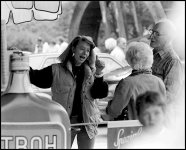
In the days of film, the advice was to set the shutter speed to the same number as the ASA (e.g. if using FP4 (125 ASA) set the shutter to 1/125th) then only change the aperture as the light changed. This is often referred to as "the sunny 16" rule.

My routine was to set the aperture as I moved the camera to my eye, focus and press the release. It worked well enough for my needs. This was taken using a Nikon F without a meter...

NIKON F AUSTRIA 1991 03-01.jpg
 
I think it's just a case of playing with your camera more, the more you use it, the quicker you'll be with it.

If you're using manual settings, try 'simpler' modes Av or Tv, Auto ISO until you know roughly the settings you need just by the light and looking at the scene.

May not be much help but thought I'd chip in...

Good luck
This^

I let the camera do some of the thinking for me, and tend to use aperture or shutter priority, plus auto ISO, for the most part. Heck for snapshots it’s in Program mode most of the time. I only use full manual when I need full control of everything such as doing panoramas or low light photography.

At the end of the day, a precisely exposed picture of a missed moment is no use to anyone, except as a lesson learned.
 
I don't generally find there's much to change.

I tend to shoot in Av (unless night skies or panoramic) and it's just focus and a click or two of the exposure compensation wheel.
 
I'm a P shooter most of the time but often use exposure compensation and/or move away from the suggested values to suit what I'm aiming for. A or S modes would work just as well TBH but P picks a suitable shutter speed minimum according to the focal length, I think rather than the camera remembering that I last used f/11 and setting a (potentially) too slow shutter speed.
 
Aperture and Shutter can be changed in seconds you can leave ISO auto on most modern cameras and have EV compensation ready to change either side of 0.0
Nothing wrong with using the other semi-auto options e.g pets or children jumping about go with set shutter maybe 1/500 and let it do everything else again using EV compensation.
 
Well, if the wind is blowing you know you need a faster shutter speed. If it's dull you know you need a higher ISO to get a decent aperture. You can set these things before you even raise the camera to your eye. But really it's only practice.
 
It's just shutter speed, iso and aperture - should take seconds to adjust. You don't really need to get to know your camera. If you're using digital, you can view the picture/histogram after a a photo is made and if necessary readjust.. only takes seconds. We make things too complicated sometimes
 
You don't mention how comfortable you are with the technicalities, or what settings you are trying to adjust.

Modern cameras are really good at allowing different settings to be placed in easy to find buttons or wheels. The question is - what settings are you hunting for, and do you know why?

E.g. The scene is pretty dark. You want to make it brighter. Do you know that you need to open the aperture, slow down the shutter, increase the ISO, or nudge up the exposure compensation and are struggling to figure out how to do it on your camera? Or is it a case of you don't know what to do to make it brighter, and are faffing with buttons trying to make it happen? If it's the former, then getting to know your camera - specifically where those controls are, is going to help you best. But if it's the latter, then you probably need to spend time understanding the basics of aperture, shutter and ISO before worrying too much about the camera itself.
 
In the days of film, the advice was to set the shutter speed to the same number as the ASA (e.g. if using FP4 (125 ASA) set the shutter to 1/125th) then only change the aperture as the light changed. This is often referred to as "the sunny 16" rule.

My routine was to set the aperture as I moved the camera to my eye, focus and press the release. It worked well enough for my needs. This was taken using a Nikon F without a meter...

View attachment 394108
What a fantastic street shot - love this! Advice re sunny 16 is good as well (y)
 
The key to most situations is to anticipate the type of image you want to get; and have the camera already set for that before the opportunity presents itself. Then when it's time to actually take a picture the settings are already correct; or they only require a minor tweak of one variable.
 
The honest answer is the more you practice, the easier it gets.

But genuinely after 30 years of knowledge building, I developed a system that means I rarely have to worry about settings.

Most of the time my primary concern is aperture*

So my camera is left in AV mode, auto ISO, generally left wide open aperture, with a choice of continuous focus or eye focus, depending which button I press.

So as I lift my camera to my eye, the only decisions are:
Do I need more DoF
Is it a thing or a person
Will I need exp comp

That's very simple to evaluate and react to.

*Occasionally, I'll decide that it's shutter priority I need, so I choose TV and set the shutter speed I need leaving just the 2nd and 3rd questions to answer.

So, IMHO this is a fairly simple process - but made so, because I set my camera up for my shooting style and for the way I like to work.
 
I use Aperture Priority most of the time, and leave the camera in that mode, aperture wide open, and Auto ISO when I turn it off. I can just pick up the camera and taken a pic.

When I get a new camera I try to get accustomed to how to change common settings, Exposure Compensation, Focusing on/off etc, mainly by playing with it whilst watching TV. There is normally a period of adjustment, especially if it is a new brand of camera from what one may have had before.

A lot of cameras have a 'my menu' option, where a lot of different settings can be grouped together for quick and easy access, such as changing focus modes, turning face detection on/off, turning Auto ISO on/off, Formatting the memory card etc. It pays to take the time to populate this menu option, if your camera has it, with the settings you may use occasionally, rather than spending ahes going through the many pages of the main menu.

Some cameras have programmable memory slots where the mode, focusing, fps etc, amongst other things, can be stored, and that is any easy way to change a whole load of settings in an instant. On one of my cameras that has that option, I have stored setting for generally walking around, and another set up for sport/action, which turns on high fps, and changes the focusing mode, as well as some other settings, which can be useful. On some of the newer cameras, this can be set up on a function button on the body, to flip between these things even quicker. :)

These things can only be found by reading the manual, and only become second nature through use. There are no shortcuts. ;)
 
Back
Top