Getting more from a flatbed scanner.

Cluster

Suspended / Banned
Messages
770
Name
Dave
Edit My Images
Yes
My Epson 4180 Photo flatbed scanner works well enough for the size of image that I need to post online in most cases.
As I push my 35mm scans to 1800x1200, images become softer. It could be that the images on the negs really are softer, and I'm sure that is the case for some of my cameras.
As the scanner holds the negs above the glass surface in a plastic mount, added to the slight curve of most film, I wondered if I might get a useful improvement by holding my negs flat on the glass.
Is this worth setting up and making new holders for this? I wondered if maybe I'd get too much interference between the glass and neg.
 
You need to get them as flat as possible for best results. (y)

IME you'll never get them as sharp as you want them to be though - most of us have been spoiled by digital. :(
 
Epson V550 user here and I use ANR glass on top of the negs straight on the scanner bed (no holder) and get superb results. Admittedly that's with 120 film though. I use a Plustek for 35mm as it does a much better job with far less hassle.

I guess it will depend on where your scanner "camera" is designed to focus and whether it's variable or not. You could try it with an ordinary piece of glass to hold the negs down and see how the sharpness looks (ignoring the newton rings). If you get satisfactory/better results, you can they try and source the glass.

Edit - I just remembered I have 2 35mm ANR glass strips that I don't use any more so if it works, I'll be happy to dig them out and put up a classified ad of some sort.
 
Last edited:
Epson V550 user here and I use ANR glass on top of the negs straight on the scanner bed (no holder) and get superb results. Admittedly that's with 120 film though. I use a Plustek for 35mm as it does a much better job with far less hassle.
I've wondered about this -- is there no focusing issue with the negatives closer to the glass?

(BTW I tried the Lomography Digitaliza holder for my 120 negs... didn't work at all. Lucky for me Freestyle Photo takes returns. :)

Aaron
 
is there no focusing issue with the negatives closer to the glass?
Not for me. I did spend a while testing it and for me, scans on the glass were sharper than in the holder.
 
What would happen if you just laid your negative directly on the scanner surface and closed the lid?
 
Not for me. I did spend a while testing it and for me, scans on the glass were sharper than in the holder.
This is what I wondered about. I'll try to get them onto the glass surface. If I remember correctly, the autoscan needs to see the holder (a hole in the border indicates to the software that it is 35mm and then determines the positions of the two strips). In "Pro" mode I think it scans the entire surface, previewed, then cropped the scan to suit. May work for the few negs that I want to scan in better detail.
 
What would happen if you just laid your negative directly on the scanner surface and closed the lid?
On my scanner (Epson 4180 Photo), the white backing that you would normally use for a document scan is removed for negs. Behind the backing is a large light that only illuminates when in negs photo scan mode. There is a large gap between the surface of the light and the scanner glass.
The negs can't really be scanned like a document, there's not enough light on/through them.
 
Another day indoors gave me the opportunity to see if i could improve the output from my negs scans on my flatbed scanner.

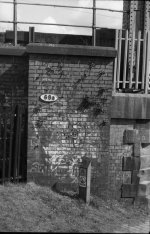
I selected a negative that gave (on the scans I have seen) good results at screen size. This was taken on my vintage Baldina with its Baldanar 2.8, 3 element lens.
It will not be the sharpest of images, but looks to be in the better group of those I have taken of the scene (I use it as a test scene).

Here's the image at 33% of scanned size:
Reg TerryResized.jpg

The negative has a gentle curve across the width of the frame. I scanned again at higher resolution both for the negative placed the usual way up, and then again with the negative the other way up (so the curve was in the other direction). There wasn't much to choose between the two.
I increased the scan size to 2400 pixels/in and scanned the negative the usual way up and then again with it placed under a piece of plain glass.
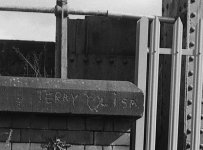
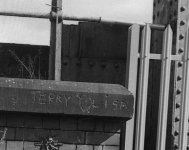
Here are crops of the 1:1 scans around the graffiti on the top of the wall.
Regular neg holder:
Large TerryNorm.jpg

next is the neg under glass:
LargeTerryGlass.jpg

These are cropped from the scans without any other action/edit being made. Note the Newton's Rings in the sky in the latter scan.
Note also, that (as far as I can see) the scan from the negative held in the regular holder is significantly better, even though the negative has a slight curve in place.

This is all not what I expected, but is quite informative. Firstly, it's pretty good on a good negative, probably good enough for my uses at present, secondly (and less welcome) is the obvious conclusion that if the regular scan lacks detail/sharpness at the smaller scan sizes i use, then it's probably that the neg is not sharp and not due to the scanner.

Ah well, this will likely trigger a new gas attack... sharper lenses (and the skill to use them) needed?
 
Last edited:
Realising that the scanner did some level of sharpening on the images, which just possibly could be different on each of the scans, I ran another few scans of a negative that I believed to be amongst the sharpest of my recent rolls. I switched off all sharpening and enhancement features and scanned them at 2400dpi. The cropped images show that the scans without the glass in place are slightly better than with. So, for my scanner, it might be that it is optimised for negatives in the holder.
 
Back
Top