GeForce GTX 1060 3or 6 GB Graphics Card

russellsnr

Suspended / Banned
Messages
3,121
Name
Russell
Edit My Images
Yes
Want to upgrade my graphics card from a Nvidia GeForce GTX 1050 TI and as I understand it a GeForce GTX 1060 Graphics Card would be a good option however I assume I should go for the one with the higher GB or would there not be that much difference in using for image editing? Thankyou, Russ.
 
Either go for the 1060 6Gb or look at the 3050 8Gb, the 3050 is more efficient and prices have dropped considerably, and supposedly should be down further in the coming days.

In the same boat myself, the gains on the 1060 are not massive compared to the 1050Ti and when factoring the inflated cost of GPU’s a new 3050 made vastly more sense
 
I would much rather have newer tech. Anyway what are the problems you are trying to solve?
Hi, I have two Windows computers both have the Nvidia GeForce GTX 1050 TI , Use only one specifically for my images, I have been trying to run with the On1 Raw 2022 but find when I do any processing to an image then try and open it again from the Browse module it takes anything from 30 seconds to a minute just to open for PP. After asking on the On1 forum it was advised that my 1050 TI card is quite old and the suggestion was to upgrade that.
I downloaded the trial version of On1's new NoNoise AI stand alone version of the noise reduction that is incorporated in the full 2022 suit to test if it was the full programme that was causing the lag but found it happened also in the stand alone option, I also tested the stand alone on my second computer and had the same result.
Cannot afford to buy a new computer so looking for a solution and hoping it is via a new graphics card.
The End:p Russ.
 
Just because it's not the latest doesn't mean it's slow and the GTX 1050 Ti is a very capable card. If you do want to replace it then going up one step on the same generation is not a very good option. A GTX 1660 Ti or, as already suggested, an RTX 3500 would be better options.

However, before buying anything, I suggest opening Task Manager's Performance tab then running On1 to see which component is maxing out. The value of the On1 forum can be judged by this not being suggested there.
 
OK will look at that, out now in woods look later, TY
 
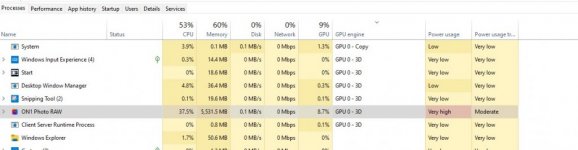
Hi, OK I reinstalled On1 and on opening an image from Browse this is the usage, now I am not a computer wiz but the CPU and memory look higher than anything else.
ON1 Usage.jpg
 
Main is sad images on hdd.
All software on ssd.
Lightroom 6 perpetual (runs fine)
Topaz Denoise, Sharpen, Gigapixel. (All fine)
Calibration software for Benq monitor
AVG anti virus.
Backup on HDD
 
Topaz Denoise, Sharpen, Gigapixel. (All fine)
That would be about the heaviest apps imaginable before going to Resolve to edit 4K videos.
 
I only run Lightroom with Topaz apps if running on1 those apps are closed.
 
I suggest you run those through on1 support. They might be able to advise better if there any specific requirements not met. Everything else like you say appear to be fine.
 
Hi, OK I reinstalled On1 and on opening an image from Browse this is the usage, now I am not a computer wiz but the CPU and memory look higher than anything else.
View attachment 351026
It's more useful to click on the performance tab at the top so you see the totals for CPU, Memory, etc. rather than by process.
 
Hi, thank you for your replies and all help received but going to give it a pass altogether, spending more time trying to get On1 to work properly than enjoying going out and then PP on what I get.
Will look for an alternative that works OTB so to speak.
Thankyou again, Russ.
 
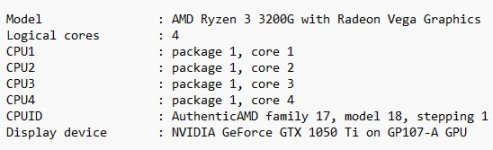
That's an expensive option and not really necessary. Having had another look at your PC configuration, the CPU seems to be the weak link as the Ryzen 3 3xxxG CPUs are not strong performers. Dropping in something like a Ryzen 5 5500 or 5600 should have a dramatic effect on performance. Make sure the motherboard BIOS is up-to-date first, though.
 
Just a thought - I would try putting the images to be edited on the SSD and see if they open faster.
 
Hi, sorry to drag this back up again but I have looked and it seems I need to update my bios, now I FAT formatted a USB drive after that I unzipped the bios to it and followed these instructions
  1. Please extract the zip file after downloading the BIOS rom file from ASRock website.
  2. Save the BIOS files on a FAT32 formatted USB disk.
  3. Press [F2] during POST to get into BIOS setup menu.
  4. Select the Instant Flash utility under [Tool] menu to execute it. However when I click on the Instant Flash Utility I get the message that the update is not found. Any help please as I don't want to ruin my PC. I have a AMD Ryzen 5 3600 - 3.6 GHz Hexa-Core (100100000031BOX) Processor With Cooler bought it used as cannot afford a new one. Many Thanks, Russ.
 
Hi, sorry to drag this back up again but I have looked and it seems I need to update my bios, now I FAT formatted a USB drive after that I unzipped the bios to it and followed these instructions
  1. Please extract the zip file after downloading the BIOS rom file from ASRock website.
  2. Save the BIOS files on a FAT32 formatted USB disk.
  3. Press [F2] during POST to get into BIOS setup menu.
  4. Select the Instant Flash utility under [Tool] menu to execute it. However when I click on the Instant Flash Utility I get the message that the update is not found. Any help please as I don't want to ruin my PC. I have a AMD Ryzen 5 3600 - 3.6 GHz Hexa-Core (100100000031BOX) Processor With Cooler bought it used as cannot afford a new one. Many Thanks, Russ.
Firstly, just because there is a BIOS update available it does not IMO mean you should(?) need to do so! What is it that the updated BIOS will fix for you???

It has been years since I updated my Gigabyte motherboard BIOS and I think I had to re- order the boot sequence to start with the usb drive(memory stick)

I did it a couple of times with some trepidation but the Gigabyte board is one with Dual BIOS chips so there is a fallback position should something go wrong and recover it ;)

Also, there is AFAIK a difference between FAT and FAT32.....noting this based on what you say above.
 
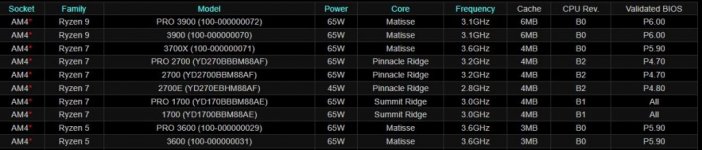
According to the chart attached it states at the bottom that the bios needs to be P5.90 for the Ryzen 5 3.600 or that is what I am understanding.
Also understand if I put the new CPU in and it is not working because of the bios I would need to reinstall the old CPU
Bios Req.JPG
 
According to the chart attached it states at the bottom that the bios needs to be P5.90 for the Ryzen 5 3.600 or that is what I am understanding.
Also understand if I put the new CPU in and it is not working because of the bios I would need to reinstall the old CPU
View attachment 352017
Ah! sorry I missed the it in #4 re: new/different CPU to be fitted ~ doh!

OK, daft question...which BIOS version is your motherboard now???

Hopefully those who might have done a BIOS update on an ASRock AMD board can chip in (no pun intended ;) ) about the process :thinking:

PS what model motherboard is it?
 
Last edited:
Hi, bios is P4.00 but I think I will take it to someone who knows what they are doing as if I blow it up would cost a lot more to fix. Russ.
 
Is the BIOS file in the root on the USB drive or in a folder? It needs to be in the root.
Otherwise you seem to be doing everything right.
 
I extracted it from a zip file direct onto the USB. I am in the process of trying again.
Have been reading that you can now update via the internet but yet again my MB does not seem to support this.
Nope will not see the USB with update so not going to take anymore chances or time let someone who knows how to.
 
Last edited:
I don't know anything about " on1" so went and had a look here. https://photography-on-the.net/forum/showthread.php?p=19132475 . not many seem very happy with it. well worth reading the colmments

I tried On1 and DXO and echo the comments there.

I quite liked On1 but it seemed a bit biased towards "filters" and the stuff I actually used was tucked away.

DXO just fitted better and does a slightly better job of the raw files I work with. 15 months on, I would honestly use nothing else other than DXO and it's the perfect solution for a landscaper shooter.
 
I tried On1 and DXO and echo the comments there.

I quite liked On1 but it seemed a bit biased towards "filters" and the stuff I actually used was tucked away.

DXO just fitted better and does a slightly better job of the raw files I work with. 15 months on, I would honestly use nothing else other than DXO and it's the perfect solution for a landscaper shooter.
I keep looking at DXO but am put off in all honesty by the price, only photograph wildlife as a hobby so really don't want to go OTT but in saying that I may look t DXO if they offer up a price reduction promotion later in the year. Russ.
 
I keep looking at DXO but am put off in all honesty by the price, only photograph wildlife as a hobby so really don't want to go OTT but in saying that I may look t DXO if they offer up a price reduction promotion later in the year. Russ.

I'd hold out until Black Friday where you can secure it usually at half price.

For wildlife the deep prime noise reduction works really well, as does the curves, and tone sliders. It's so straight forward to use.
 
I have On1. Noise reduction is really good, and I like the relative lack of automation and increased control compared to older DXO products. But compared to LR6 it's less easy to get a great image exported, and feels somewhat clunky. I use it alongside, for deeper edits and noise reduction.
 
Last edited:
Back
Top