Fomapan 120 200ASA fragile emulsion?

Sangoma

Suspended / Banned
Messages
2,951
Name
Steve, Coventry, England
Edit My Images
Yes
Yesterday I tested a Lubitel I had made a 6X4.5 mask for, results were as I expected, nice old fashioned look to the photos (call it soft lens if you prefer ! )

However I noticed dark flecks and marks mainly in sky areas. First I thought dust, for a few seconds, until I realised that dust would make light marks, not dark ones.
My daughter looked and commented that we had used the same type of film an another camera last week and that was OK. But was it? No, looked back at the photos and they had similar marks on many!

Searched for it and found this has been spoken about for a number of years, and is a known problem on their 120 200 film.

Pity I didn't know before, I think we have about 10 spools left.

The film rollers in the cameras are very smooth, not mirror polished, but almost, any suggestions on how to minimise it?
 
I'd like to know this too. It’s all very strange as some people, me included, seem to have a problem with Foma 200 and others don't. The film path in my Olympus Chrome 6, a folder, is about as straight as you can get, off the top of one spool, straight across the film plane and on to the other spool with no bends like a TLR. I've put two rolls through the Olympus so far and had problems with both rolls, after the first roll I took great care in trying to be as gentle as possible in handling the second roll but no luck, still got the black spots.

IMG_7461.jpeg

Out of interest Steve, what developer did you use? I was using Caffenol C-L. Dave (Cluster) had similar problems using Rodinal 1:50.
 
I'd like to know this too. It’s all very strange as some people, me included, seem to have a problem with Foma 200 and others don't. The film path in my Olympus Chrome 6, a folder, is about as straight as you can get, off the top of one spool, straight across the film plane and on to the other spool with no bends like a TLR. I've put two rolls through the Olympus so far and had problems with both rolls, after the first roll I took great care in trying to be as gentle as possible in handling the second roll but no luck, still got the black spots.

View attachment 386121

Out of interest Steve, what developer did you use? I was using Caffenol C-L. Dave (Cluster) had similar problems using Rodinal 1:50.
One was Hydrophen, and the other was a monobath, which is quick and useful for testing, and actually gives good results.
We have just decided to use folders to use up the rest of the spools, but reading your post it may not help!
 
Thanks Steve, I hope you have better luck than me.

I did see a post on Photrio (by a Dutch member, MrclSchprs, which had the following:
There is a post in the archives where a former Kodak employee and very knowledgeable former member of the community (PE or Photo Engineer) briefly talks about the problems Kodak faced with TMax 400 in 120 format when they first started making it. For some reason or the other t-grain emulsion is very susceptible to mechanical stress. The mechanical stress a film endures is greater in a Hasselblad type camera's where the film path consists of various sharp turns and bends than in TLR or Pentax 67 style camera's where the path of the film does not contain any of those curves and bends. That is why it manifests itself less in a Rollei TLR than in a Bronica ETRS.

Kodak fixed it. Foma did not. We can only speculate why Foma does not fix this issue. Maybe due to financial reasons or marketing stuff. Or perhaps, they do not have the technology to do so.
I'm not sure how one can get a straighter path than a folder. I did wonder whether the spool tension springs in the Olympus caused an issue but as the spotting covered the whole negative and not just the centre part where the tension springs press I assumed that they weren’t the cause.

I've a roll in my TLR at the moment but not holding out much hope!

nb PE or Photo Engineer was Rowland 'Ron' Mowrey, a former Kodak engineer and chemist who, in retirement ran courses on making emulsions and coating.
 
Last edited:
I'd like to know this too. It’s all very strange as some people, me included, seem to have a problem with Foma 200 and others don't. The film path in my Olympus Chrome 6, a folder, is about as straight as you can get, off the top of one spool, straight across the film plane and on to the other spool with no bends like a TLR. I've put two rolls through the Olympus so far and had problems with both rolls, after the first roll I took great care in trying to be as gentle as possible in handling the second roll but no luck, still got the black spots.

View attachment 386121

Out of interest Steve, what developer did you use? I was using Caffenol C-L. Dave (Cluster) had similar problems using Rodinal 1:50.
I'm going to try this today (if it stops raining)

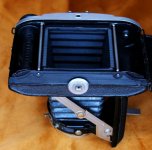
ba1.jpg


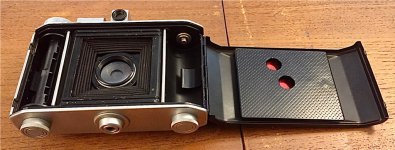
Just put the shutter back together, just have to clean the lens and check/calibrate the focus.


I don't think the path is as straight as yours, but it is certainly better that any TLR
ba2.jpg
 
  • Like
Reactions: zx9
Fingers crossed!

The film path looks fairly straight, one would hope that even a (mechanically) sensitive film could cope with the limited stress of a path like that.
 
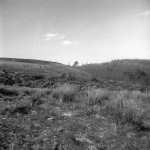
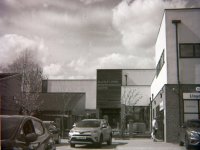
Well, the results were just about as I expected, notwithstanding a change to Microphen developer and a scrupulous was between the developer and the fixer (Tentenal Superfix Plus); black dots everywhere and a rather dirty looking sky!
IMG_7521.jpeg
 
I emailed them and have had a reply asking for sample photos, mine are worse than that

mc.jpgP1000239.jpg
 
Looking at those 2 shots, Steve, there appear to be a lot of spots in regular patterns. This suggests to me a dirty roller somewhere along the way. I've circled some of the most obvious spots.

P1000239copy.jpg
 
Looking at those 2 shots, Steve, there appear to be a lot of spots in regular patterns. This suggests to me a dirty roller somewhere along the way. I've circled some of the most obvious spots.

View attachment 387009
Yes, I noticed that, but there is nothing of the diameter needed to make marks that far apart.
The rollers are about 3mm diameter and clean, almost mirror finish but not quite, but they are clean and smooth.

I thought of the pressure tab that stops the film unravelling and keeps some tension on it, but it does not extend to the side of the photo.

If you look where your green marks are, the marks almost make a straight line across the photo, and I though that might be as I started to turn the wind on knob, pulling the film up against the roller, which could explain the spacing.

Another point is that there are no marks with any other film.

It is a pity as it is the ideal speed :)
 
I was about to suggest that it could have happened during development but with home reels, there are no rollers for the film to pass over! Are the marks in the same pattern on the negs from the other camera? If so, it would very much point at a manufacturing issue.
 
I was about to suggest that it could have happened during development but with home reels, there are no rollers for the film to pass over! Are the marks in the same pattern on the negs from the other camera? If so, it would very much point at a manufacturing issue.
Found out quite a bit later yesterday.

It is almost certain the marks are caused by the film rollers in the camera.

The two cameras tried so far have different size rollers, and the spacing of the marks is different on the two films.
Using the right measurement for each, the marks are within 10% of the circumference of the rollers, and that 10% could be down to slight slippage and/or measurement error on the negative.

I also found out from others that the film is extremely sensitive to mechanical pressure, and the slightest imperfection on a roller, or pressure from a frame counter wheel, or the tensioner spring will cause marks, and even being turned at a sharp angle over a small diameter roller that is mirror smooth.

Was given a couple of ideas to minimise it, but it seems it is very lucky not to have any marks, seems the only way is not to use the 200 film!

Still waiting for an answer from Fomapan, will be interesting to see how they reply.
 
I wonder if their film manufacturing process has a machine with rollers that could also be responsible. The fact that it only happens on Fomapan 200 also suggests a film emulsion problem. I had the same problem, with the same film, using an Ensign Selfix 1620.
 
I received a reply from Fomapan confirming that the marks were caused by the camera.

The also referred me to the data sheet for the film which states:-

" FOMAPAN 200 Creative emulsion contains T-crystals providing high resolution and
very low granularity of the film. Relating to this it may emerge its higher sensitivity to
mechanical strain mainly during movement of the rollfilm throughout some middle-
format cameras. That may result in occurrence of desensitization records on
developed negative. Within first usage of FOMAPAN 200 Creative type 120 it is
recommended to test its compatibility with the particular camera "

They also said that I should lodge a complaint with the seller, and include images showing the marks.

I did so, and have received a refund, (no communication at all, just a refund) which no doubt they in turn will receive a refund for.

I think this is a fair resolution considering that many people will buy more than one roll to save postage plus a slightly cheaper rate on multiple buys, and a very important note, there is no mention of this "feature" on any of the adverts, although obviously as it is in the data sheet, they are well aware of the issue.
I would have thought it would be better to make people aware of it so they can either make an alternative choice, or just order one roll to try.

I am disappointed in that I can't use the film, it is the ideal speed, but I am happy with the way the issue was handled, and happy to use their other products.

From what I have seen and heard, the problem is likely to occur an most TLRs and "box" type cameras, but a bit less likely to occur on cameras with a straighter path, which probably means it could be an issue for most people.
 
Thanks for the update. I've a couple more rolls to use and then it looks like it will need to be either 100 or 400 as I've nothing with a straighter path then the Olympus folder.
 
Polishing the rollers in the transport route might reduce the marking.
 
Polishing the rollers in the transport route might reduce the marking.
Yes, that is what they say in the data sheet, but I would not mirror polish the rollers on every camera I try for a "might", none of the cameras we have tried have rollers that don't look clean and shiny, and it doesn't happen on any other film, unfortunately the answer is simple :)
 
  • Like
Reactions: Nod
Yes, that is what they say in the data sheet, but I would not mirror polish the rollers on every camera I try for a "might", none of the cameras we have tried have rollers that don't look clean and shiny, and it doesn't happen on any other film, unfortunately the answer is simple :)


I might try it on one camera to see if it completely resolved the issue. As you say though, changing film is the simple answer.
 
My effort with Fomapan 200 120 also gave clouds of spots and what looks like smeared spots. Tried 4 different cameras, all rolls developed had the issue. My first FP4+ was fine in one of the same cameras.
 
I've been having 0 issues with Fomapan 200 in 120 in all of my cameras, with recent Foma batches. I will look up the batch numbers.

EDIT: one more thing worth noting is that with Foma 200 I'm NOT using a stop bath. I have read that some delicate emulsions can be negatively affected by acidic stop baths so I'm only using water at the moment. Perhaps this is also playing a role however I must adimt I have not run a full 'controlled' test :)
 
Last edited:
Black dots still here! I ran another roll of Foma 200 through a new(to me) TLR as a test roll to see how badly damaged the lens was (haze on one lens adjacent to the shutter and coatings partially removed by fungus) and still getting the black dots as before. In addition to Microphen developer I used an alkaline fixer (Eco Zonefix) to see if that would lessen the impact but no joy!

So far, Foma 200 has not been compatible with any of my 3 MF cameras (2 TLRs and 1 folder).

IMG_7988.jpeg

IMG_2023-5-29-135437.jpeg
 
I went on a coach trip to Hertsmanceux Castle and Royal Tunbridge Wells . I took my MAMIYA C220 loaded with outdated FUJI PROVIA 100F and my 1935 German Voigtlander 'BESSA 66' folder loaded with some FOMAPAN 200 which had been in fridge for ages - I decided to process it in my Home-Made DIAFINE 2-Bath formula. I had taken only 6 frames so I CUT THE FILM and processed 6 frames -- WOW !! The Black Marks were terrible and most negs were ;'THIN' except the one iof the War Memorial in Royal Tunbridge Wells . I had rated film at 200 ASA using WESTON MASTER V and in bright sun I set 1/300th @ f9 thinking that the 1/300th would be 'slow' anyway . SO I Rush exposed second half and gave more exposure and processed in my Home-Made PYROCAT HD and negs looked much 'cleaner' on first inspection but under x 6 Magnifier the 'Black Spots' were there but not so obvious. I show frames processed in the DIAFINE
52962294836_d85c2e0dd1_c.jpg52961692477_6fa97928a4_c.jpg52962748393_83277cb4df_c.jpg
 
Fomapan 200 in 120, batch n. 13456-3 (expiry: 11/2024).

Incident measurement (Sekonic L398 III) - Adonal 1+50 two inversions per min, followed by water stop bath and Fomafix 1+5 5 minutes. Tap water wash, followed by fotoflo 1:200.

PCApXzX.jpg

q6UO76M.jpg
 
Last edited:
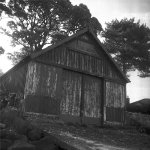
Interesting, same batch number as for my two boathouse pictures in post #22 above.
3 minute prewash, Microphen for 6mins at 20°C, 4 quick water rinses as a stopbath and then fixed in Zone Ecofix (alkaline) followed by a water wash (Levenson method with extra stage so around 20mins) and final rinse with Adox Adostab II.

Film rollers in the TLR used haven't been polished but look shiny and don't feel rough. I've now used two different TLRs (right angle bend in film path) and one folder (straight path reel to reel - post #2 above) and have had problems with them all. Two batch numbers used, 013456-2 exp 09-2024 and 013456-3 exp 12-2024.
 
Last edited:
Interesting, same batch number as for my two boathouse pictures in post #22 above.
3 minute prewash, Microphen for 6mins at 20°C, 4 quick water rinses as a stopbath and then fixed in Zone Ecofix (alkaline) followed by a water wash (Levenson method with extra stage so around 20mins) and final rinse with Adox Adostab II.

Film rollers in the TLR used haven't been polished but look shiny and don't feel rough. I've now used two different TLRs (right angle bend in film path) and one folder (straight path reel to reel - post #2 above) and have had problems with them all. Two batch numbers used, 013456-2 exp 09-2024 and 013456-3 exp 12-2024.

I am not sure what's going on. It's clearly a problematic emulsion (I've had issues in the past) but this particular batch is fine for me so far (been using it with my Fuji 6x9 and Rollei 6x6 cameras). Puzzling. I will keep persevering as I like the tonal response of the film.
 
Last edited:
Back
Top