Focussing Problems - Canon/Sigma

ashbank

Suspended / Banned
Messages
35
Edit My Images
Yes
Hi guys,

Firstly - Thank you for all of the help you gave me a couple of months back when I was selecting lenses etc.

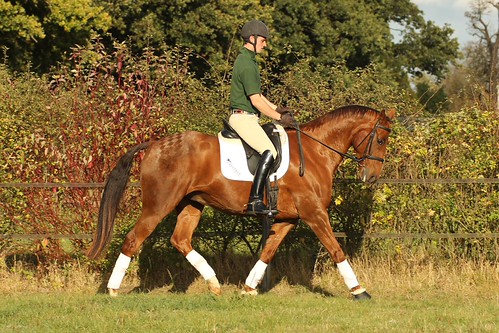
I now appear to have developed a new problem insofar as I am having problems with focus. I am sure I have probably changed a setting without realising it, but I cannot get a clear shot anymore. I have linked to a picture below so you can see the problem.. I don't know what I am doing, but the results are not good! Canon EOS 60D, Sigma 70-200 2.8 IF anyone can work out a simple solution, I would be really most appreciative - I am hoping it will be a case of a setting somwhere. The light was not great, and I do not have a monopod - it is something I may invest in given time, but not yet.

IMG_3369 by ashbank, on Flickr
 
Hi Ashbank, hard to tell from that pic imho. You need to post up a 1024 sized image on the loingest side and keep the exif intact as well, without knowing all the sttings you were using it will be guesswork.
 
Settings would help massively! It looks as if there's a degree of camera shake and its locked focus on the background (the berries to the left of the horse from looking at the large image).

Did you have all AF points selected?

For anything moving, use one AF point, either middle or slightly to the right (on this shot) and AI servo focus mode. With the 400d I would stick with the middle AF point though as IIRC this is the only cross type AF point of the lot. For ease of use, use AV mode at, say f/4 for outside, ISO 400 if its dull like this shot, and you should get something nice and sharp. Dont be tempted to shoot everything at f/2.8 just because you can!

It also takes a while to get used to hand holding f/2.8 telephotos due to the weight.
 
Last edited:
Looking at the 1024 version on Flickr the whole shot looks soft everywhere -even in the non-moving parts of the image. Rather than a focusing error I'd suspect camera shake, so shutter speed (too slow) looks to be the likely culprit.
 
:thinking:

The EXIF data is there.....

Well a 1000th of a second would seem to rule out camera shake, so it looks like a focusing error of some sort. You were using servo AF (as you should do) and high speed continuous shooting, so on the face of it you were doing everything right.

It's likely you never properly locked focus before your first shot. You really need to make sure that you obtain focus lock on the rider for that first shot, then as long as you stay on the rider, the AF system should track the rider and stay in focus for the rest of the shots in the sequence.

If you're absolutely sure you're doing all that then your camera may have developed a problem.

As Jim said earlier make sure you only use one AF point for this type of shot. If you're using all the AF points that could be the problem too.
 
Last edited:
Thanks for the tips - I will have another go tomorrow and see if I have any more luck. I shall look at the manual tonight to see if it tells me more about the autofocus - I simply cannot get this camera to do it, and I am not sure if it is my fault (I am happy to believe it is user error) or the camera.

It doesn't seem to have any AF points flashing - with my older camera (EOS20D) it flashes red when it focuses, but this 60D does not seem to do the same thing. It is really depressing!

I will definitely look into the 1 AF point thing - thank you all for that advice.
 
The other thing you need to do is dive into your camera menus and look at 'AF Tracking Speed' which has a number of setting options between fast at one end and slow at the other.

The term 'tracking speed' is actually rather deceptive as tracking speed never changes - it's constant regardless of the setting. What changes is the speed at which the AF system reacts to something coming between yourself and the subject or when you momentarily get that AF spot off the subject and onto the background during a sequence of shots. You need it set to 'slow' so that the system ignores (doesn't refocus) these minor issues and gives you time to get that AF point back onto the subject (or for whatever has come between you and the subject to have gone).

I hope that makes sense , but it's very important to get that setting right for action sequence shots.
 
Looking at the exif you've deffo used multi AF points rather than single AF point.
 
Thanks for the tips - I will have another go tomorrow and see if I have any more luck. I shall look at the manual tonight to see if it tells me more about the autofocus - I simply cannot get this camera to do it, and I am not sure if it is my fault (I am happy to believe it is user error) or the camera.

It doesn't seem to have any AF points flashing - with my older camera (EOS20D) it flashes red when it focuses, but this 60D does not seem to do the same thing. It is really depressing!

I will definitely look into the 1 AF point thing - thank you all for that advice.

Hi

If I remember right :thinking:

If you are in AF Servo and have all AF points enabled, they won't flash red when they acheive focal lock.

If you have (for arguements sake) the center AF point acitive only, in AF Servo, it does flash red when focal lock is acheived.

If you are the one shot AF then the AF points will be red when focal lock is acheived

Hope this helps ...
 
Thanks Andy - I am still wading through the documentation that came with the camera - I don't suppose you - or anyone else - know offhand how to set it to use only one AF point? I am going to take both cameras out today so hopefully I will be able to get some pics on the 20D if I can't work out how to get the 60D to behave, but it is a shame to have the kit and not be able to use it!
 
i had this problem once and i am almost embarresed to say what the answer was... probably because i know my camera inside out it confused me more and the problem was something I never ever use so i didnt realise...

the lens AF button had been knocked to OFF


Sometimes its the obvious most stupid answer... having never really used manual focus it wasnt somehting i even thought of...... like i say.. embarresing :) but worth a check?
 
Thanks for sharing the shame! Unfortunately, I did think to check that, and it was still on AF on the lens.

I am still searching the forums on here and looking through the manual, and I can't see how to have only one AF point whilst in AI Servo. It must be possible - I know people can take super pictures of moving subjects (horses in my case) with this camera/lens combo and I am getting more and more frustrated.

It's not even in focus when the animals are standing still!
 
Thank you Jim!

I will have another go this afternoon and report back. :)
 
Setting an AF point on the 60D is dealt with on Page 78 of the user manual and looks pretty straightforward.

I think the problem may be that you're shooting in High Speed Action Mode. These automated modes really are best avoided as they often limit the manual control you have over a lot of the cameras functions including selection of AF points.

Try changing to AV mode (Aperture Value) and the problem may well be resolved. You'd be far better advised using AV Mode anyway, I rarely use anything else.
 
Last edited:
Yeah my money is on a multi point focus and 2.8 combo.

Pop it on single center and see how you get on. Also do you NEED to shoot at 2.8? Anything other than a side on shot is going to give you depth of focus issues with getting the horse and rider in focus.
 
Is there a focus distance limiter on the Sigma?
 
Thanks for sharing the shame! Unfortunately, I did think to check that, and it was still on AF on the lens.

I am still searching the forums on here and looking through the manual, and I can't see how to have only one AF point whilst in AI Servo. It must be possible - I know people can take super pictures of moving subjects (horses in my case) with this camera/lens combo and I am getting more and more frustrated.

It's not even in focus when the animals are standing still!

Just a thought - you're not in the basic zones are you, if you are using one of the basic zones, you cannot choose the AF point - the camera does it automatically.

If not look at page 78 of your instruction manual (as above) and follow the instructions, should be easy to alter
 
andyred said:
Just a thought - you're not in the basic zones are you, if you are using one of the basic zones, you cannot choose the AF point - the camera does it automatically.

If not look at page 78 of your instruction manual (as above) and follow the instructions, should be easy to alter

Might be onto something there exif says action
 
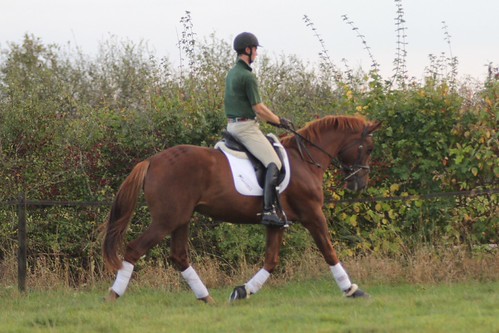
Thanks guys - I was indeed in one of the basic zones! I had made the assumption that a basic zone would suit a beginner and would be the correct setting. I switched it onto "P" for today's efforts (I had turned my computer off before I saw the "TV" suggestion) and I am hoping that they are a little better.


IMG_3583 by ashbank, on Flickr

Exif here - http://www.flickr.com/photos/ashbank/6250033237/meta/in/photostream


Here is one from today - different horse, but similar in colour and location so is probably a fair comparison. I am much happier with the image - I think the next stage is to abandon the burst feature and try to get the correct stage of the trot stride on my own. I am sure if you zoom right in it is probably still not completely in focus, but it is clearly aeons away from my last effort.
 
Last edited:
That's plenty sharp enough looking at the larger Flickr version.

Those basic modes are indeed aimed at beginners but they don't really do you any favours as you've found out. Ultimately they just hold you back. Glad you're sorted out. :thumbs:
 
Yeah, thank you all so much for the help and advice - I will just have to man up a bit and delve into the deeper recesses of the camera's capabilities. I have anxiety about learning how to use all of the different features, but clearly it is something I will have to deal with!
 
Back
Top