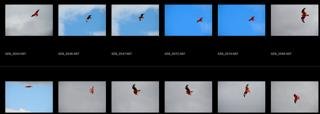
Focus Point in Lightroom?

russellsnr

Suspended / Banned
Messages
3,121
Name
Russell
Edit My Images
Yes
I use Nikon equipment and PP with Lightroom, I have the plugin to show focus point on an image but only one at a time so is there any other way to view the focus point in Lightroom when culling images? Thanks, Russ.
 
I don’t think so, and I did look into it a reasonable amount. Though I will be interested if you find something.

I even looked at the sdk for writing plugins (and wrote some test code to pull it out the exif) but didn’t see anything obvious, other than doing something fairly drastic like bulk cropping to focus area then undoing the crop to edit.
 
Have not tried this way of yet as just thought about it.
Download Nikon NX studio, insert memory card as NXS can see images on it, in NX there is an option for SHOW FOCUS POINT, rate images (just so you can export just them), options in FXS to open images in application of choice in my case going to be L/R. No it sounds like a run around and not actually tried it yet but as I say just a thought.
View: https://www.youtube.com/watch?v=ZauHfUwZu00
. Russ.
 
I have vague recollections of trying this in a previous version of Lightroom (maybe when it was a stand-alone application?) but found one issue that made it essentially useless.

If, like me at the time, you have a tendency to focus and then recompose the result in LR was that the focus point shown would be the one you used but that would not be where you actually focused with it and, therefore, it was useless for determining if you hit focus (or not).
 
I have vague recollections of trying this in a previous version of Lightroom (maybe when it was a stand-alone application?) but found one issue that made it essentially useless.

If, like me at the time, you have a tendency to focus and then recompose the result in LR was that the focus point shown would be the one you used but that would not be where you actually focused with it and, therefore, it was useless for determining if you hit focus (or not).
Hi, thing is now with cameras you don't really need to focus and recompose so much as the focus point moves around so easily and with so many focus options available. Russ.
 
Hi, thing is now with cameras you don't really need to focus and recompose so much as the focus point moves around so easily and with so many focus options available. Russ.
I think that depends on the camera. Yes, mirrorless cameras have hundreds of focus points and you'd be hard pressed to not find one close enough to your subject to not need to recompose. But even the last of the breed DSLR's have only 50 or so congregated around the central portion of the viewfinder so, whilst not as prevalent as it once was, recomposition does sometimes rear its ugly head. With my D40 and it's staggering three focus points it is very prevalent :D
 
I know that using the Canon Raw software with a Canon DSLR will show the focus point(s) but subject to the limitations mentioned by Bristolian. I looked once out of curiosity but normally use Lightroom Classic anyway but have not really found any need for this feature.

Dave
 
I use Nikon equipment and PP with Lightroom, I have the plugin to show focus point on an image but only one at a time so is there any other way to view the focus point in Lightroom when culling images?

Which plugin are you using?

If you say, 'one at a time', do you mean that you have to start the plugin for each individual image, or do you want to see a grid-like presentation of images with the focus points visualized?

At least, the plugin I am working on enables users to navigate a selection of images and displays the relevant focusing parameters alongside visualized focus points and subject detection elements.

- Karsten


ReadMe%201.jpg
 
P.S. @russellsnr Your username looked familiar to me somehow. Then I recalled. Years ago, I had a conversation with a russelsnr2 about a Lightroom plugin for SNS-HDR. Was that you?
 
P.S. @russellsnr Your username looked familiar to me somehow. Then I recalled. Years ago, I had a conversation with a russelsnr2 about a Lightroom plugin for SNS-HDR. Was that you?
It was me. Change my subject matter from Land/Seascape to wildlife. You have a good memory. Was looking for a plugin for Lightroom that shows the focus point across a selection of images the free options although very good only allow the user to view one image at a time. Russ.
 
Last edited:
What Nikon Camera(s)? Most of them lie in most modes... e.g. my Z9 only shows the actual focus point used for focus by the camera when in Auto Af area. That's also the only time it accurately reports when focus wasn't achieved (no focus point shown). It also shows the actual focus point in other modes when subject recognition is active and it has stepped down/tracked away... but it doesn't show when AF is not achieved accurately.


It's been similar to that for every camera since about the D850; maybe earlier.
 
Last edited:
Been looking for options to do this (show focus point on images) the only way as far as I have found with Nikon images is with the NX studio, still working on how to rate images to save and the downside again as far as I can see is to export rated images as tiffs to program of choice.
Screen shot from a MAC.
Russ.
thumbnail.jpg
 
Been looking for options to do this
The focus point plugin Karsten showed works with LR. It can't fix issues where the focus point exif is "wrong/misleading"; but it is better than the basic point/area display during camera review and in NX studio.
 
Last edited:
The focus point plugin Karsten showed works in LR. It can't fix issues where the focus point exif is "wrong/misleading"; but it is better than the basic point/area display during camera review and in NX studio.
Thanks but as far as I can see you can only open one image at a time in Karsten rather than a grid view to see the focus point in all the images at once to be able to grade them, I don't have any RAW images in camera just now but after looking at RAW images from computer in NXS I found you can as I tried to show in the screen capture I posted see all the focus points in a grid view, rate them and then open/import into software of choice as RAW files also you can view images from the memory card I think and then import them but not tried that option as yet. My aim with this is only to import images that are close to or bang on the subject. It's an itch I need to scratch.
 
Thanks but as far as I can see you can only open one image at a time in Karsten rather than a grid view to see the focus point in all the images at once to be able to grade them,
I missed the part about wanting to use the focus point display for culling/sorting...

I would recommend against that; certainly not as a primary discriminator over a close inspection of actual focus. There are just too many times where the focus point information isn't useful/accurate in relation to actual subject focus. There's a lot of reasons for that, and it varies a little between camera models, but it just isn't that reliable/good for action photography. I basically find focus point review to be pretty useless unless I am trying to figure out a possible issue.

E.g. in your example grid it shows focus "on the bird", but that means nothing in terms of DOF and the focus being where you actually want it (head/eyes). Similarly, there may be many times where the camera reports no focus, or focus on the BG, but the subject is actually in focus.

Here's some examples I was able to find pretty easily (it's harder for me to find images that are not reasonably sharp as I don't usually keep them)

In this pair the first shows no focus point/area but reports focus in the exif; and the subject is in focus. The second shows the focus area selected as in focus but reports out of focus, and the subject is actually in focus (plus, a camera can't actually use/focus an entire area).
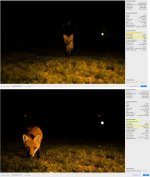
z9focusPoints.jpg


This pair both show and report focus on the BG. In the first image nothing is actually in focus, and in the second the subject is in focus.
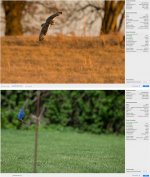
z9focusPoints2.jpg


And I have seen plenty which show the focus achieved on the subject/eye/etc; but the subject is not sharp, either due to misfocus or settings.
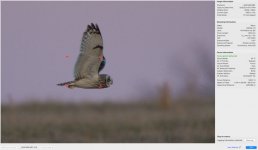
z9focusPoints3.jpg


(I realize focus is hard to discern in these resized screen grabs)

 
Last edited:
It can't fix issues where the focus point exif is "wrong/misleading"; but it is better than the basic point/area display during camera review and in NX studio.

Obviously, the plugin cannot do magic. It uses the maker-specific AF metadata to visualize focus points etc and display related information. Which is difficult enough, because this data does not follow standard specs (like EXIF). Making it visible and available is a collaborative effort of nerds and enthusiasts that are willing to spend time to decode camera settings etc. and add this information to ExifTool. Sometimes this is straight-forward but especially if it comes to autofocus this can become tricky. For Nikon, there are multiple entries relating to focus points (some with unknown meaning) which have changed over the years across the various lines and models.

For Nikon, the focus point display should be basically identical to NXStudio but I believe the overall presentation including AF-related information can help with a better assessment of the focus result.

Thanks but as far as I can see you can only open one image at a time in Karsten rather than a grid view to see the focus point in all the images at once to be able to grade them

Like Steven, I don't think the display of the focus point (even in a reduced view) is a reliable way of deciding whether an image should be included or excluded. However, this depends on the precision of recorded focus points. I am shooting Olympus/OM and like Nikon the focus point recorded by the camera can be off sometimes, especially with fast moving subjects.

This plugin can be a great help to beginners (whether they are new to photography or have just bought a new camera) in understanding how the autofocus works.

For advanced users who are familiar with their camera's autofocus system, it can be helpful to understand why certain images are not sharp (and perhaps learn from that).
 
Back
Top