
and help to keep the site free for all
You are using an out of date browser. It may not display this or other websites correctly.
You should upgrade or use an alternative browser.
You should upgrade or use an alternative browser.
Fish eye effect!
- Thread starter DJMorgan
- Start date


robhullfury
Suspended / Banned
- Messages
- 380
- Edit My Images
- Yes
am I missing something bud, dont want to sound rude but I cant see what the image is meant to be?
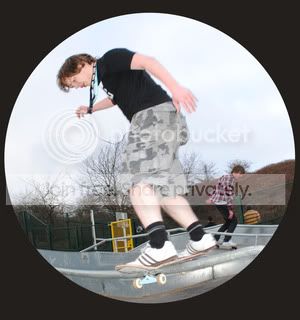
I haven't got a solution but how many % are you zoomed in for the top pic?
I'm guessing alot.
The only reason I say this is I'm frequently guilty of pixel peeping and it looks like *cough* so it seems are you.
At pixel level a curve will always be a mixture of graduated blocks it's how the sensor works AFAIK.
Sorry can't be much help but at least can put you out of your misery.
joe
I'm guessing alot.
The only reason I say this is I'm frequently guilty of pixel peeping and it looks like *cough* so it seems are you.
At pixel level a curve will always be a mixture of graduated blocks it's how the sensor works AFAIK.
Sorry can't be much help but at least can put you out of your misery.
joe


Nigey
Suspended / Banned
- Messages
- 895
- Edit My Images
- Yes
Hi What software do you have? I may have a solution for you that I use in CS4
Never mind, I have just seen...doh!! *note to self, try and read more siggy's!.
This will remove the white pixels for you so make it less obvious.
1. Create a new layer, hold down the alt /option key as you click the create new layer icon.
2. Choose "Darken " as your blend mode.
3. Select the brush tool and choose a suitable brush size.
4. Now sample the grey colour above the black and start to brush out the pixels, resample the colour as required.
Very quick and easy, here is what I managed in 30 seconds.

Never mind, I have just seen...doh!! *note to self, try and read more siggy's!.
This will remove the white pixels for you so make it less obvious.
1. Create a new layer, hold down the alt /option key as you click the create new layer icon.
2. Choose "Darken " as your blend mode.
3. Select the brush tool and choose a suitable brush size.
4. Now sample the grey colour above the black and start to brush out the pixels, resample the colour as required.
Very quick and easy, here is what I managed in 30 seconds.
OP

DJMorgan
Suspended / Banned
- Messages
- 1,105
- Name
- Daniel
- Edit My Images
- No
Hi What software do you have? I may have a solution for you that I use in CS4
Never mind, I have just seen...doh!! *note to self, try and read more siggy's!.
This will remove the white pixels for you so make it less obvious.
1. Create a new layer, hold down the alt /option key as you click the create new layer icon.
2. Choose "Darken " as your blend mode.
3. Select the brush tool and choose a suitable brush size.
4. Now sample the grey colour above the black and start to brush out the pixels, resample the colour as required.
Very quick and easy, here is what I managed in 30 seconds.
Thank you
 In my case 30 minutes xD!
The Reverend JT
Suspended / Banned
- Messages
- 430
- Edit My Images
- Yes
the white layer of horriffic pixelation above the black one is gone for a start.
that's gratitude eh??

that's gratitude eh??