

First attempts with new flash system.

Johnny Thunder

Suspended / Banned
Messages
698
Name
John
Edit My Images
Yes
Just taken delivery of my new Lencarta 3 head system.
Had a play around with it today. Here is one of my shots with it:
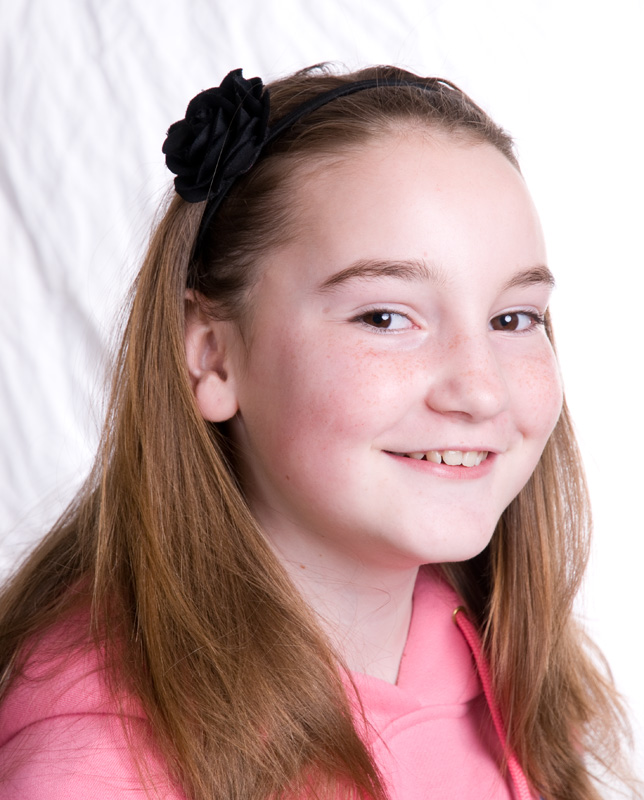


Camera settings - ISO 200, 1/125th.
One light used on the background @ f11
Keylight was Octobox @ f8
I had my third light set at around f4 as fill.

I've resized this shot, and taken out a second catchlight that was showing in the eyes. Am I setting up the lighting
wrong, or is it the positioning that causes this?


Cheers guys.
 
your not setting anything up wrong, there is no rule to how many catch lights you can have in an eye... some people are more uptight than others, but its not so often you just get one.
 
It's a good first effort.

I feel that it would have been better to have placed the subject a bit further from the background, to avoid the loss of detail in the hair, and to have lit the background a bit more evenly.

As Rob says, there are no rules - use whatever works for you - but consider using the black part of your 5 in 1 reflector to darken the right side of her face, adding more interest and making the face slimmer
 
Yes a decentr effort but the background is the problem here. Lighting a white background is much harder than a darker one. If you can whiten the background in Ps it will be a far nicer image - although better if you can do that in-camera.
 
Thanks guys. I will have another try today.


Good first effort.

I recall the first shots I took with studio kit. Everything was black :lol:

White backdrops are not as easy as they look (as already stated). Only thing I could add, consider shooting at F8 rather than F11 - DOF could help.

Gary E - if reading this, what flash heads, stands would you use to illuminate the backdrop?
 
To get rid of the backdrop you need to overexpose the back more. The light pointing to the backdrop needs upping a little. The exposure of the girl is much better.
 
Good first effort.

I recall the first shots I took with studio kit. Everything was black :lol:

White backdrops are not as easy as they look (as already stated). Only thing I could add, consider shooting at F8 rather than F11 - DOF could help.

Gary E - if reading this, what flash heads, stands would you use to illuminate the backdrop?

Any decent flashheads to illuminate the backdrop, I suggest these background stands and these background reflectors (but the background reflectors have now sold out again, some more arriving next week though:)
 
I agree good first try but the eye is drawn to the blown and creased backdrop.
To smooth out creases in PS try this:
1. duplicate the background layer.
2. select the subject using either magic wand tool or the quick selection tool then press CTRL+J or use Colour Range command to select the background colour and then press CTRL+SHIFT+I to get the inverse of the selection. Temporarily turn off this new layer by clicking the 'eye'.
3. select the background layer copy in the layers pallete and apply Gaussian blur to the entire layer.A blur radius of 6-8 pixels should work.
4. select the Clone tool and sampling from the background clone over the edges of the subject.
5. turn on the visibility of the layer containing the subject.
6. Done

Dave
 
It's a good first effort, although the lighting looks a bit flat - the first thing that caught my eye was that her eyes aren't in focus....
 
Back
Top