firefox 12

Lynton

awkward customer
Suspended / Banned
Messages
10,606
Name
Lynton (yes really!)
Edit My Images
No
hello all...

Just now upgraded to firefox 12

I really really really don't want it to remember things and attempt to autocomplete the search bar (nothing dodgy browsing wise, it just annoys me and isn't helpful)

How do I turn it off? google isn't much help at all (or it could be I am typing the wrong things into google!!!)

Ta.
 
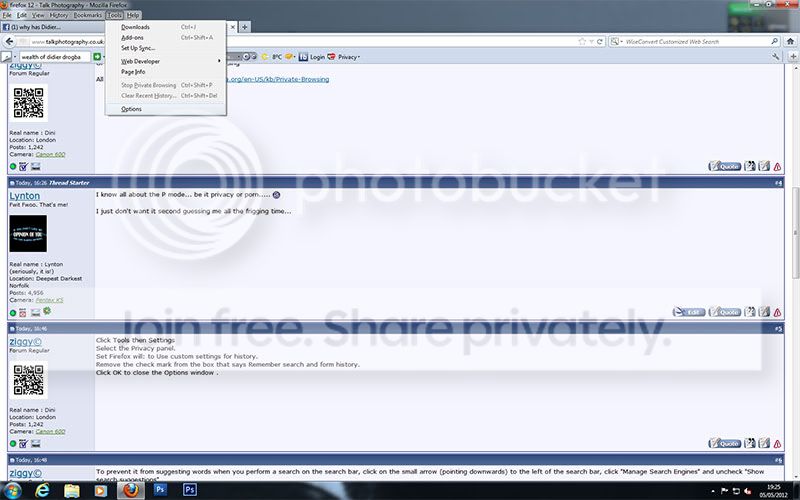
Click on "Tools" then the "Privacy" tab.
There are several options on there for allowing you to browse in "Porn Mode" :)
 
I know all about the P mode... be it privacy or porn..... :suspect:

I just don't want it second guessing me all the frigging time...
 
Click Tools then Settings
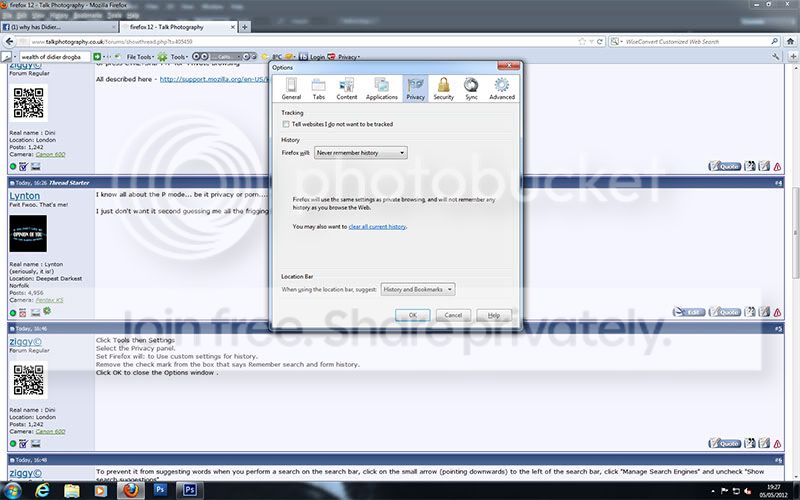
Select the Privacy panel.
Set Firefox will: to Use custom settings for history.
Remove the check mark from the box that says Remember search and form history.
Click OK to close the Options window .
 
cheers, but version 12 does not have tools (other than the one at he keyboard) .. have found privacy under options and set to "never remember history"... hopefully that will work.
 
cheers, but version 12 does not have tools (other than the one at he keyboard) .. have found privacy under options and set to "never remember history"... hopefully that will work.

Oh yes it does... Options -> check "Menu Bar" and magically the menu bar appears, replete with the "Tools" menu (At least it does here in Aurora 14 aka Firefox 14 alpha)
 
i must be being uberthick tonight then....

firefox1.jpg


firefox2.jpg
 
Back
Top