
Final PP and sharpening

testbloke

Suspended / Banned
Messages
2,451
Name
Kevin
Edit My Images
Yes
I have been playing with my first panorama shot. It was taken on a dull, rainy day but I was quite pleased with the result. I did notice however, a visible line down the water at approx the first stansion of the bridge, whether this is a visible join or the light changed slightly I have no idea but I have also been struggling to fix it. I am using CS4, could someone please advise best course of action.
I am also struggling to understand the sharpen tool, I have bought books and DVD's on photoshop, but they tend to illustrate by giving specific settings based on a start image, how do I know how to set and apply the sharpen ?
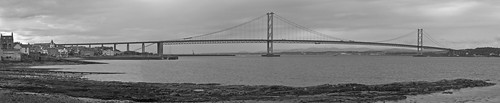
3740633064_a2f6122631.jpg
 
Can someone please advise, I would like to get this printed to see what it's actually like but need to fix this first
 
Your join does look to be due to a slight change in exposure between frames. Your best bet may be to go back to your left hand image/s and slightly change exposure/levels to compensate. I tend to use Hugin [freeware] for panorama stitching as the output is generally crisper than Photomerge and it does a better job at blending exposures if there's a slight difference IMHO.

As regards sharpening, there are whole books written on the subject nearly! Let me point you towards this useful sticky over on POTN for starters: http://photography-on-the.net/forum/showthread.php?t=466333
 
Thank you for advice, I will look into the sharpening. I joined a total of 14 images for this, done automatically through photoshop, processed all images through camera raw with same exposure settings so not sure where the line came from.
Unfortunately, in my "learning process" I deleted all the original files so only left with this final image.
I thought there must be a way to blend it a touch to make the line less obvious ?
 
You might try the healing brush with a reasonably large radius and soft opacity. Try running it down the join a few times and see if that helps.
 
You might try the healing brush with a reasonably large radius and soft opacity. Try running it down the join a few times and see if that helps.

Just had a quick play and I think it wil do the job, thank you
 
Great, glad I could help, it's a nice image.
 
Great, glad I could help, it's a nice image.

Thank you, I know it could be much better, hopefully get a chance to try again with better weather but for now it is one of my favourites. I think photoshop did an excellent job joining all the images, particularly as I had left the tripod at home !
Will have a final play tonight then start looking at getting it printed. I have a blank wall in the sitting room waiting on me taking decent images !
 
Back
Top