

Feeling frustrated

gavpedz

Suspended / Banned
Messages
38
Edit My Images
Yes
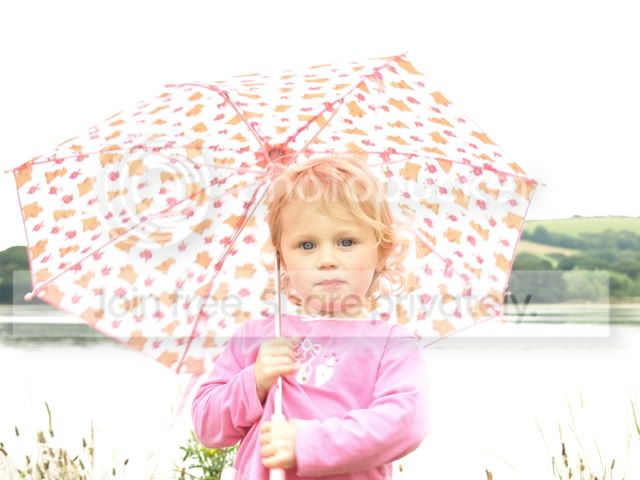
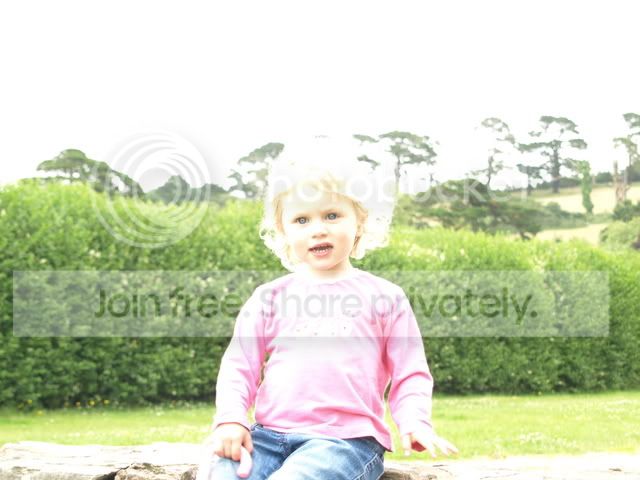
Today i have been out taking a few pics but i just can not seem to get the right lighting in the pics.

I have to bright or to dark. Every so often i get it right but this is generally by luck.


When i review them on the LCD they look ok then get home to find they are way to bright. What am i doing wrong?

P7140522.jpg


P7140395.jpg


P7140452.jpg
 
What camera and what settings do you shoot on?

The first two are overexposed so I guess we should have a look at that first.

Do you shoot JPEG or RAW.

The answers will point us in the right direction, never fear, I've not seen a situation that the intrepid TP'ers could not crack!
 
check the histograms - they usually give you a godd idea of what's going on
and do use the metering as a guide even in Manual mode
 
OK. Had a look at the EXIF data and I'm with foodpoison.

The combination of shutter speed and aperture had left the first two overexposed. There is a fair amount of light around at this time of year (even when it's cloudy it's quite bright) and you have an aperture of 5.6. That lets is quite a bit of light. Then you have relatively slow shutter speeds 1/50 and 1/80. That's not fast. So you let in even more light. Hence they are overexposed.

You are also using spot metering which has it's place but for now go back to evaluative.

Try shooting on aperture priority and let the camera sort it's own shutter speed and see how you get on with that.
 
a quick look at the exif data
#2 1/50 f/5.3
#3 1/100 f/5.3

I'd expect #3 to need a longer exposure than #2 (the subject is in shade)
conversely #2 is in bright light so would need less exposure

I'd have used 1/100 for #2 and 1/50 for #3 for starters
but do check what the meter is telling you

or ^^^ what they said ^^^
 
Ok Fist off all my cam is olympus e410

First pic
Shutter 1/80
F5.3
ISO 200
white balance 6000K (possible answer?)( i set it to the cloudy setting as it is overcast and not that bright)
Focal length 38mm


Second pic
Shutter 1/50
F5.6
ISO 200
white balance 6000K (possible answer?)( i set it to the cloudy setting as it is overcast and not that bright)
Focal length 42mm
 
As foodpoison says the EXIF shows you are using a manual exposure mode which means you will need to chose the correct shutter speed & Aperture yourself to get the correct exposure - try using one of the camera's automatic modes then when you are used to the camera you can switch to Aperture priority - where you chose the aperture or shutter priority where you chose the shutter speed .
 
it's not white balance
that (just!) changes the colour
 
try a couple on auto - see what that gives you - no shame in that
then see what you can do in manual
also - check your lcd brightness - it may be too dark
 
If you are using the on camera metering to set your exposure you'd be better off switching to evaluative/matrix metering for 90% of shots. You could easily be metering on a shadow and so the camera is recommending over-exposing based on that.
 
Yes i think i might do that next time. Yes my LCD does seem to be very misleading, i generally only use it to view pictures already taken. Thanks for the advise guys, i a bit of a perfectionist and it drives me insane when something does not tern out the way i planed lol. think i might have to get used to it in this game though!
 
I had the same problem when i adjusted my screen brightness. - also in strong light it never gives a true indication.
my 2p use the histogram - shoot raw to recover the shot later if need be.
 
How do i set the histogram?

Also just took a couple test shots outside with auto, no i know it is prob different light now from a few hours ago but all test pics ar coming back with an ISO of 100 and shutter of around 1/100 - 1/400.

But i did try some of these values earlier and i kept getting almost black image so i thought ok slow shutter let bit more light in that worked a little then i thought up iso that will brighten then when i get home they show to bright lol guess it is a lot of trial and error ad patients.
 
a quick look at the exif data
#2 1/50 f/5.3
#3 1/100 f/5.3

I'd expect #3 to need a longer exposure than #2 (the subject is in shade)
conversely #2 is in bright light so would need less exposure

I'd have used 1/100 for #2 and 1/50 for #3 for starters
but do check what the meter is telling you

or ^^^ what they said ^^^

try a couple on auto - see what that gives you - no shame in that
then see what you can do in manual
also - check your lcd brightness - it may be too dark

I had the same problem when i adjusted my screen brightness. - also in strong light it never gives a true indication.
my 2p use the histogram - shoot raw to recover the shot later if need be.


Thanks for the links i will have a read through when have more time. :)

I love it here you guys are so helpful.
 
Back
Top