Extracting someone from a picture and blending them into a new background

rabaroo

Suspended / Banned
Messages
324
Edit My Images
Yes
Hi there

as the title suggests, i am playing with a picture I took at the weekend

ive successfully removed my nephew from my conservatory, and have dropped him onto a solid backdrop (used the magnetic lasso tool in CS2 to extract him) but the edges are a bit too sharp and there are some small segments of teh original backdrop

.... Is there a technique to blend him into his new background more effectively, or even a better tool than magnetic lasso to start with
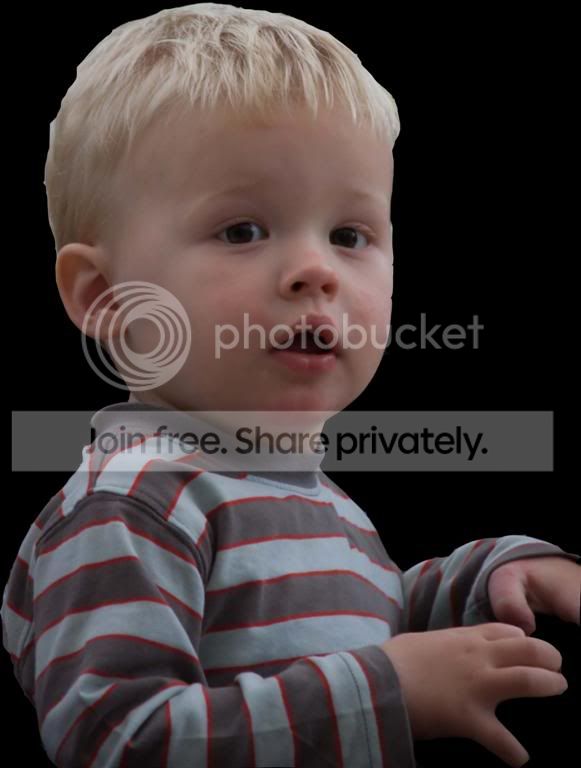
OWENWORKINPROGRESScopy.jpg
 
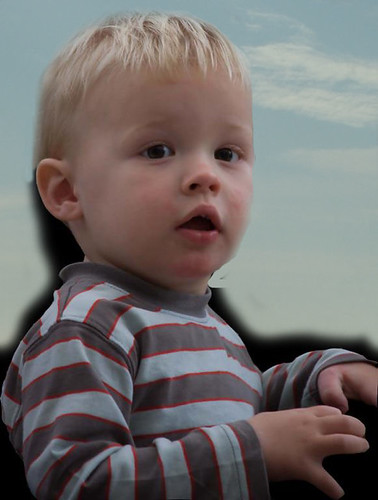
That looks exactly like he's been cut and pasted onto the new background. The main reason, is you've been none too careful about chopping him out, particularly around the top of his head. The other dead give away, is that his outline his just way too sharp. If this were an in-camera photo, the eyes would be sharp, but DOF field would drop off at greater distances, so his outline would be slightly oof. Try running the 'soften' tool around the outline for a more realistic appearance.
 
go back to the original copy it and paste into a new layer.
turn off the background original, go to the copy layer and in the magic erase find a nice soft brush and carefully brush away the edges.
as you get further away from the child increase the brush size.
you can also brush the deleted area back in but that is an extended lesson !!!
hometime
bell
bed

pace
 
on the lasso tool there will be an option to "feather" the selection, try turning this value up a bit and it will make the edges softer when you are doing your original cutting out.
 
Get the Fluid Mask plugin for Ps. Its very good. Better still, get something like the 50mm f/1.8 with some nice light (natural or otherwise) and the backdrop won't be as bad.
 
Quick job, but it really needs doing from scratch.. ;)

2960097208_fa64ea7cea_o.jpg
 
hi - thanks for the comments

it was a very rough and ready example just to identify the problem and get suggestions - which i'll test later!!!

the pics werent aimed to be portraits as such, ive just found a few good ones and thought it'd be nice to polish them up to give to his parents (my brother) - and its good way to learn how to extract people and things from the original picture
 
Personally I wouldn't practice it. I would get a decent lens with like f/1.8 on and practice getting nice portraits.
 
Have you tried the extract took in Photoshop? I used it for the 1st time last night doctoring a shot for a friend... put her son Jack being presented with a prize by Ronnie Irani on a nice digital grey background. She was very pleased.
 
Have you tried the extract took in Photoshop

Janice is this in all the recent versions of photoshop, and are there any tutorials on it that you know of ?
 
You don't want to be doing this at all if you can help it tbh, and it can often be avoided just by a bit of thought in choosing your bg in the first place.

The bg really needs to be in the same light as the subject with the light coming from the same direction or it really doesn't look right. While a black bg is a bit stark, at least it avoids the bg lighting compatibility problems.

You want the finished result to look as convincing as possible, but even when it's well done it's usually suspect at least to a trained eye. Do it when you have to do it, but don't make it part of your technique, it's no substitute for getting it right in the first place.
 
You don't want to be doing this at all if you can help it tbh, and it can often be avoided just by a bit of thought in choosing your bg in the first place.

You want the finished result to look as convincing as possible, but even when it's well done it's usually suspect at least to a trained eye. Do it when you have to do it, but don't make it part of your technique, it's no substitute for getting it right in the first place.

True, but this is a test of the extraction technique in its own right- I am sure it has many applications outside of portraiture and this was a test of that to see how effective it was, not a credible attempt at creating a portrait out of something that was never intended to be that.
 
Hi there

as the title suggests, i am playing with a picture I took at the weekend

ive successfully removed my nephew from my conservatory, and have dropped him onto a solid backdrop (used the magnetic lasso tool in CS2 to extract him) but the edges are a bit too sharp and there are some small segments of teh original backdrop

.... Is there a technique to blend him into his new background more effectively, or even a better tool than magnetic lasso to start with

OWENWORKINPROGRESScopy.jpg

Anyone tried feathering the selection ? select - modify- feather in cs3 i think it takes the edge of when you do this but practice with the radius pixels hth :)
 
Back
Top