Exposing for Panorama shots at sunset

boccers_2000

Suspended / Banned
Messages
379
Name
Andrew
Edit My Images
Yes
Hi Guys.

I'm aware of the various ways we can expose for high contract settings (ie grad filter, bracketing shots and overlaying in pp etc).

When it comes to the Panorama however 9and i'm stitching various shots) how would you go about it?

I assume the same but if doing it in pp it seems like wuite a hassle to merge all the shots together for the foreground, merge all the background shots then go through the process.

If there is anyone out there who has had this problem or makes panoramas with high contracts let me know how you go about it as id be very interested.

I have a sneaking suspicion that there is no magic way, its the sdame procees but just takes longer but let me know.

Ta
 
Hi Guys.

I'm aware of the various ways we can expose for high contract settings (ie grad filter, bracketing shots and overlaying in pp etc).

When it comes to the Panorama however 9and i'm stitching various shots) how would you go about it?

I assume the same but if doing it in pp it seems like wuite a hassle to merge all the shots together for the foreground, merge all the background shots then go through the process.

If there is anyone out there who has had this problem or makes panoramas with high contracts let me know how you go about it as id be very interested.

I have a sneaking suspicion that there is no magic way, its the sdame procees but just takes longer but let me know.

Ta

There are (at least!) three issues here I think: how to expose the images; how to stitch them together; how to deal with high contrast.

Software can help. There is paid for and free software that you can research or others may want to tell you about. I'll refer to the software I use (Autopano Pro) as an example, because it's what I know and it works for me, but there are plenty of other options, and some may be better for your purposes.

How to expose the images. Autopano advise using aperture priority mode and letting the camera's metering work out how best to expose each image. That way each individual image is the best the camera can manage. The exposures will probably be different between images, but the software smooths things out.

Have plenty of overlap between the images. With Autopano you don't have to precise about lining the images up. This one for example was done as a test of my new G3 and is made up of six portrait orientation images taken hand-held with my arms stretched out of the bedroom window.

Click for a larger version at flickr, including one 2000 pixels wide.
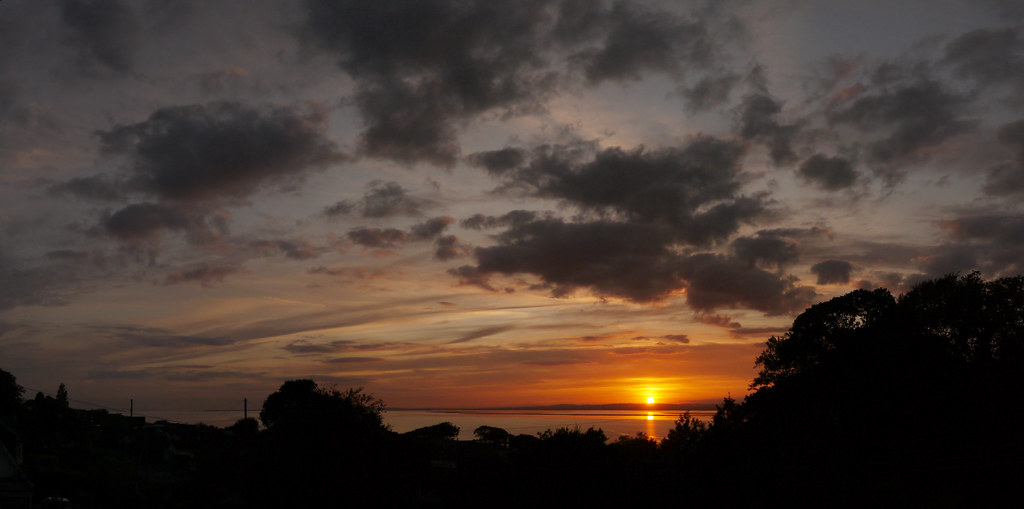

[Group 1]-P1050362_P1050367-6 images by gardenersassistant, on Flickr

This may not be what you are thinking of by high contrast, because you may want the foreground to be visible. I'll come on to that later.

How to stitch them together. Tell the software which ones you want to stitch together and let the software sort it out as best it can. The result may be a bit curvy at this stage, but the software lets you apply rotations to straighten it out. I had to rotate this one up by ten degrees or so and to the left by a degree or two to get the water line level (level may not in fact be the true situation, but that's another story).

Autopano then lets you pull in the top and/or bottom in Levels and change the Gamma. As it happens, in this case I lightened up the image a bit.

I then cropped the image and generated the jpeg as 2000 pixels wide. You might want to generate an image for adjustment is some other software, but in this case I didn't do any further processing.

I didn't time this, but I imagine it took 2 or 3 minutes from start to finish. It would take longer with more images - the processing takes longer (and this depends on how powerful your PC is, and presumably on what software you are using), and also there is more to go wrong when using larger numbers of images. For example, it takes time to take each image and clouds can move (and change shape) surprisingly fast, so the software can have a hard time (and fail) joining together things that have moved. It can also have problems where it only has wispy bits of cloud (or worse no clouds at all) rather than sharp lines to look for. Also, if you are doing sunset panos by the waterside the ripples/waves present even worse problems than the clouds as they move faster. Another issue is that very wide scenes (they can be up to 360 degrees of course) and very tall scenes do very weird things to the geometry. It doesn't seem to matter too much for clouds, but for example if planes have left vapour trails then they will come out curved rather than straight. Similar effects can happen on land too, so blacked out land might be quite a good idea in some cases!

How to deal with high contrast. The above image does have quite high contrast, and the software handles this. However, you might want the foreground visible, as in this one (which was taken back in 2007 with my then new SX10is or my previous S3is).

Click for a larger version at flickr, including one 1600 pixels wide.
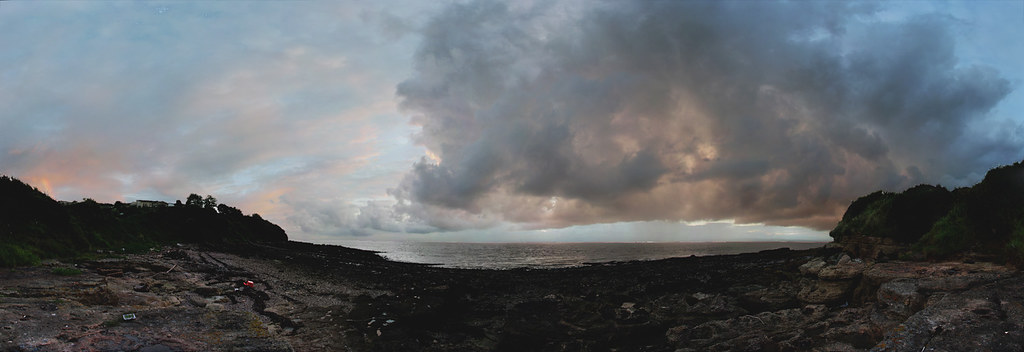

3 Sunset12a APP1 RoLeGaPSD16 PS1 WaSelBr+Df+**+SaInvSelBr1600wSS1.15 by gardenersassistant, on Flickr

This was made up of 47 portrait orientation images in three rows. It is roughly 270 degrees from side to side.

The sun is behind the glowing clouds so the contrast is fairly high. It might not be as high as the first example, which has the sun in it, but hopefully it does illustrate the principle of getting foreground visible (well, getting some of the foreground visible - there is still some silhouetting of the left hand hillside). The shots at the bottom were exposed very differently from the shots higher up, and the software merged it all together.

Autopano Pro is paid-for software. I believe there is free software that does much the same, probably doing more in some ways and less in others depending on the particular software, and no doubt more or less fiddly to use as well.

 
Last edited:
There are (at least!) three issues here I think: how to expose the images; how to stitch them together; how to deal with high contrast.

Software can help. There is paid for and free software that you can research or others may want to tell you about. I'll refer to the software I use (Autopano Pro) as an example, because it's what I know and it works for me, but there are plenty of other options, and some may be better for your purposes.

How to expose the images. Autopano advise using aperture priority mode and letting the camera's metering work out how best to expose each image. That way each individual image is the best the camera can manage. The exposures will probably be different between images, but the software smooths things out.

Have plenty of overlap between the images. With Autopano you don't have to precise about lining the images up. This one for example was done as a test of my new G3 and is made up of six portrait orientation images taken hand-held with my arms stretched out of the bedroom window.

Click for a larger version at flickr, including one 2000 pixels wide.


[Group 1]-P1050362_P1050367-6 images by gardenersassistant, on Flickr

This may not be what you are thinking of by high contrast, because you may want the foreground to be visible. I'll come on to that later.

How to stitch them together. Tell the software which ones you want to stitch together and let the software sort it out as best it can. The result may be a bit curvy at this stage, but the software lets you apply rotations to straighten it out. I had to rotate this one up by ten degrees or so and to the left by a degree or two to get the water line level (level may not in fact be the true situation, but that's another story).

Autopano then lets you pull in the top and/or bottom in Levels and change the Gamma. As it happens, in this case I lightened up the image a bit.

I then cropped the image and generated the jpeg as 2000 pixels wide. You might want to generate an image for adjustment is some other software, but in this case I didn't do any further processing.

I didn't time this, but I imagine it took 2 or 3 minutes from start to finish. It would take longer with more images - the processing takes longer (and this depends on how powerful your PC is, and presumably on what software you are using), and also there is more to go wrong when using larger numbers of images. For example, it takes time to take each image and clouds can move (and change shape) surprisingly fast, so the software can have a hard time (and fail) joining together things that have moved. It can also have problems where it only has wispy bits of cloud (or worse no clouds at all) rather than sharp lines to look for. Also, if you are doing sunset panos by the waterside the ripples/waves present even worse problems than the clouds as they move faster. Another issue is that very wide scenes (they can be up to 360 degrees of course) and very tall scenes do very weird things to the geometry. It doesn't seem to matter too much for clouds, but for example if planes have left vapour trails then they will come out curved rather than straight. Similar effects can happen on land too, so blacked out land might be quite a good idea in some cases!

How to deal with high contrast. The above image does have quite high contrast, and the software handles this. However, you might want the foreground visible, as in this one (which was taken back in 2007 with my then new SX10is or my previous S3is).

Click for a larger version at flickr, including one 1600 pixels wide.


3 Sunset12a APP1 RoLeGaPSD16 PS1 WaSelBr+Df+**+SaInvSelBr1600wSS1.15 by gardenersassistant, on Flickr

This was made up of 47 portrait orientation images in three rows. It is roughly 270 degrees from side to side.

The sun is behind the glowing clouds so the contrast is fairly high. It might not be as high as the first example, which has the sun in it, but hopefully it does illustrate the principle of getting foreground visible (well, getting some of the foreground visible - there is still some silhouetting of the left hand hillside). The shots at the bottom were exposed very differently from the shots higher up, and the software merged it all together.

Autopano Pro is paid-for software. I believe there is free software that does much the same, probably doing more in some ways and less in others depending on the particular software, and no doubt more or less fiddly to use as well.

Nick, thank you so much for taking the time to give your thoughts on it, much appreciated and I will of course consider what you say when dealing with the next Panorame I do.

Once again, much appreciated
 
Back
Top