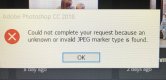
Exported jpegs from photoshop won't reopen in PS/Elsewhere

Shaun Palmer

Suspended / Banned
Messages
437
Name
Shaun
Edit My Images
Yes
Has anyone experienced this issue?

I'll export photos as usual from Photoshop, and for some reason, if I try to open them back up it comes up with an error message. Something along the lines of invalid file path or type. The same files won't show up when selecting images for print print online etc.

Other photos open up fine, it's just now and again files seem to get corrupted somehow

Any ideas what is causing this? User error, even though I export the exact same way for each file, or just a software glitch?

Thanks

Shaun
 
Sounds more like a hardware issue to me.

Are you saving to your local hard disk or an SD card, USB connected device etc ?

Cheers,
Dougie.
 
Sounds more like a hardware issue to me.

Are you saving to your local hard disk or an SD card, USB connected device etc ?

Cheers,
Dougie.

Just my hard drive Dougie. It's odd, because say for example I work through a set of ten photos, edit them all, export each on to the correct file. They will all show up in the file and thumbnails etc. but 1 or 2 of them won't re open in PS, and don't register as being in the file with the others on ALDI photos for example
 
Strange indeed, but I would definitely suspect your hardware. If it was a software issue it would be occurring with far more users, especially as you are using the online Adobe software.

Dougie.
 
It's annoying me so much. I just don't understand why it would happen to a handful of images from a batch of images all processed the same. There's a section in adobe help, that is no help what so ever, as it doesn't state why it would occour after saving from Photoshop itself. If it was hardware wouldn't they all be saving like that?

https://helpx.adobe.com/photoshop/kb/error-invalid-jpeg-marker-displays.html
 
If it's hardware not necessarily.

I would open up your computer, remove the Ram chips, rub all the gold connectors with a pencil eraser. (a rubber).

Reseat them, run your computer's in built diagnostics etc.

Douge.
 
Can you access the images if you export the suspect ones a second time?

I would be inclined to suspect the hard drive itself.

Have you run a S.M.A.R.T. check on your hard drive lately?
 
Can you access the images if you export the suspect ones a second time?

I would be inclined to suspect the hard drive itself.

Have you run a S.M.A.R.T. check on your hard drive lately?

Hi Brian. Yeah if I reopen the image from raw/scanned negative from Lightroom into PS, adjustments as normal and save again it works.

I’m steered more towards a bug of some sort. Quite a few people seem to experience when you google it, however there doesn’t really seem to be a solution.

I will run a check on the drive tonight when I’m home from work see if it shows anything
 
Bet you are using windows 10. you need to turn "Real time protection off" problem is it only stays off for a few minutes. I found a way to turning off all the time.
You will find out how in one of these which one i can't remember but it is free.

https://www.google.co.uk/search?q=d...ome..69i57.16310j0j7&sourceid=chrome&ie=UTF-8

That real time protection in Defender is a right pain in the arse ,glad I turned it off full time
 
Last edited:
Bet you are using windows 10. you need to turn "Real time protection off" problem is it only stays off for a few minutes. I found a way to turning off all the time.
You will find out how in one of these which one i can't remember but it is free.

https://www.google.co.uk/search?q=d...ome..69i57.16310j0j7&sourceid=chrome&ie=UTF-8

That real time protection in Defender is a right pain in the arse ,glad I turned it off full time

Yep windows 10, worst OS ever. My old i3 powered laptop, running Windows 8 used to run LR and PS faster than this piece of rubbish!

I’ll try that thanks
 
with me real time protection stopped me from transferring edited photos from Adobe elements back to main screen YOUR PROBLEM SHAUN I suspect. it stopped me add third party antivirus programs ( now have bitdefender) working .
 
Back
Top