
Excel help

kelack

TPer Emerita - But she's back!
Suspended / Banned
Messages
10,607
Name
Kelly
Edit My Images
Yes
I have a table and need to find the start date and end date of when development starts and ends

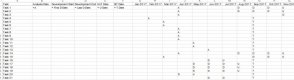
So each row has a date for Analysis, a date for Development, a date for UAT and a date for System Testing. Some development goes over several cells.

I have gone completely blank as to what formula to stick in my cells so that I can find which dates to put into column B - column F:

So if range G - R has an A, then enter row 1 corresponding month into cell B2 and so on

Can someone help please?
2017-04-06_15-54-07.jpg
 
I think the INDEX MATCH approach might be best.

So in cell B2 you'd have =INDEX($G$1 : $R$1,MATCH ("A",$G2 : $R2,0)) and so on.

(I had to put spaces in the range definitions to prevent the forum software from replacing the : and the $ with :$.)
 
Last edited:
Thanks Stewart. That works great for the Analysis column. I have had some help on the excel forum as well and they have given me the array formula I need for the Development start date. Phew. Complete mind blank, it's been ages since I did anything in excel :lol:
 
If I understand correctly this may get you started:

Start:
{=MIN(IF(G2:R2="D",$G$1:$R$1))}

End:
{=MAX(IF(G2:R2="D",$G$1:$R$1))}

If you enter these as Array formula by pressing Ctrl - Shift - Enter at the same time they will return the first and last occurrence of "D"

Is that what you were looking for?
 
Last edited by a moderator:
Not sure that happened there - replace the slightly funny looking face with a colon then a dollar!!
 
Matt, if you use the CODE bbcode tag it should ignore the smiley shortcuts..
Code:
Start:
{=MIN(IF(G2:R2="D",$G$1:$R$1))}

End:
{=MAX(IF(G2:R2="D",$G$1:$R$1))}

The above are more elegant formulas than my solutions.

Extracting data from very large episodic datasets is something I'm occasionally asked to help with. When you're pulling the dates, are you just pulling as the month or an actual day? Your month headers look like dates formatted for month and year so are probably the first day of the month. If you're wanting to extract data for calculating the project time you may want to pull the first/mid/last day of the month according to the class type of the activity (first of the month for an activity start, last of the month for activity finish). Just a suggestion. You may have thought of this already.
 
Matt, if you use the CODE bbcode tag it should ignore the smiley shortcuts.
Thanks for the tip. I fell foul of the smiley thing too, so I inserted spaces into the formulae to prevent it; but this is tidier.
 
May i suggest that the spreadsheet is structured the wrong way round?

The easier way to build that spreadsheet would be to enter the dates for the various milestones in a table, then build your visualisation from that table. As you have seen, doing it the other way round is a PITA! Always try your damnedest to get a nice clean table of data to work with, it will pay dividends as you try to manipulate and analyse that data.
 
Thanks all
Sorry for delayed reply, I had laser eye surgery on Friday morning so haven't really been able to see very well over the weekend.

@Rapscallion, it's structured that way as I needed to get it into a summary table to put into a csv importable file to import into my sprint planning application. It was all theinitial planning that I had received from the central PMO team that I just needed done quickly. I rarely use Excel for my planning as I have MS Project and Jira.
 
Back
Top