Electronic shutters - pros and cons?

Crotal Bell

Suspended / Banned
Messages
3,470
Name
Keith
Edit My Images
Yes
I was shooting at a Red Kite yesterday, and later on I had a think about shutter speeds on my Pana G80.

So far I have used the shutter at it's 3fps, however, I understand this rises to 9fps if I switch to electronic shutter.

I'll be trying this asap, but wondered if anyone can forewarn me of pros and Cons, or anything I need to consider if using the electronic shutter ?
 
Electronic shutters can give a rolling shutter effect with faster moving subjects. They can also cause banding under flickering artificial lighting.

There may also be a reduction in DR.
 
Be aware if you are shooting something like BIF you can end up with not just hundred's but a thousand or more image's when you like I did first time out with the Sony A9 because you just get carried away and just don't realize.
 
Typically, the main con with electronic shutter is rolling shutter that can make fast-moving subjects look distorted. But try it and see, if this is not an issue for the pics you're taking then great.
 
When global electronic shutters become a realistic reality. They will become the norm.

But they do have advantages even now. They are silent, they allow for extremely fast shutter speeds as well as very long ones. They allow very fast rapid fire depending only on the shutter speed readout and processor power.
They suit better integration with digital processing and camera settings.

As of now the Maine disadvantages are rolling shutter and flash integration, and less often banding under artificial lighting.
 
Be aware if you are shooting something like BIF you can end up with not just hundred's but a thousand or more image's when you like I did first time out with the Sony A9 because you just get carried away and just don't realize.
Lol I did that the other week. The next minute it popped up memory card full. I’m not making that mistake again lol plus I brought a bigger card.
 
To be honest I’ve only ever used the electronic shutter on my R5
I’ve never had any issues
 
Typically, the main con with electronic shutter is rolling shutter that can make fast-moving subjects look distorted.
Agreed.

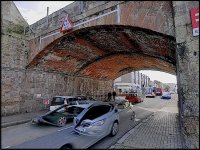
The results can be truly weird, which is fine if that's what you intended (in this case, I didn't) ...

Cars passing under railway bridge Cowick Street Exeter GM5 _1050041.jpg
 
I was shooting at a Red Kite yesterday, and later on I had a think about shutter speeds on my Pana G80.

So far I have used the shutter at it's 3fps, however, I understand this rises to 9fps if I switch to electronic shutter.

I'll be trying this asap, but wondered if anyone can forewarn me of pros and Cons, or anything I need to consider if using the electronic shutter ?
I think it is 9fps mechanical and 10fps electronic, or 6fps using AFC, on the high speeds.
Then you can have 40fps on 4K photo, electronic, AFS only.

Possibly the most likely time you may notice rolling shutter effects is fast panning with verticals, or hand held with the stabiliser on. With the latter, you can get wavy utility poles.

With wildlife it probably will not be noticed most of the time, because for example a birds wing is not straight, so you won't notice if it is slightly less straight.

A helicopter close by may end up with curved rotors, but this will be less as it becomes smaller in the frame.
 
Nikon Z9 user here. Electronic shutter has been perfect in all conditions for me and absolutely no rush to ever go back.

Also appreciate that the Z9 is not the typical user experience of electronic shutters.
 
I've been using a Pana GX80 for a number of years now, always Electronic Shutter. I do street people on short bursts 2 or 3 shots in a 1 second burst (approx). No probs.

@Andrew Flannigan pic above reminds me of creative use of HDR on my Canon G7X a few years ago.

AM-JKLVQ2vRZQGfaI3B0JRVcN7IhK1zCd5AEQcDedPeHr_HLy7Z4FTSK6e8SOOvrd3sveBl3uYLpjHyaj4JTBK4qqGvfYrJGj7UBHrE_F_OP71rh6-1g_MQlhrbvI6w6RQgyKeXz8zC9_mUK4BQJcGOU1PlvOw=w664-h590-no
 
Agreed.

The results can be truly weird, which is fine if that's what you intended (in this case, I didn't) ...

View attachment 359541
That doesn't look like an electronic shutter issue.

As @d00d says it looks more like an in-camera blend/stacking problem given how much the car has moved across the frame. That or you camera's processor is incredibly slow at reading the sensor.
 
I've been using a Pana GX80 for a number of years now, always Electronic Shutter. I do street people on short bursts 2 or 3 shots in a 1 second burst (approx). No probs.

@Andrew Flannigan pic above reminds me of creative use of HDR on my Canon G7X a few years ago.

AM-JKLVQ2vRZQGfaI3B0JRVcN7IhK1zCd5AEQcDedPeHr_HLy7Z4FTSK6e8SOOvrd3sveBl3uYLpjHyaj4JTBK4qqGvfYrJGj7UBHrE_F_OP71rh6-1g_MQlhrbvI6w6RQgyKeXz8zC9_mUK4BQJcGOU1PlvOw=w664-h590-no
No ghost removal!
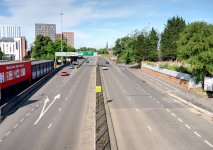
I took some yesterday morning, 5 shots HDRs of cars on a road, no sign of ghosts, with electronic shutter too.
9.jpg
 
That's a double image, not rolling shutter... even the guys walking under the bridge are doubled.
Whatever it was and however it happened it occurred on the only occassion I switched a GM5 to electronic shutter.
 
Thanks all, I'll give the electronic shutter a go and see what results I can get.
 
So I chose the electronic shutter and in "High Frame rate" it was slower than the mechanical shutter.
So then I chose "Super High Frame Rate" and the camera auto adjusted to Electric shutter and machined gunned off 42 images in a few seconds !!
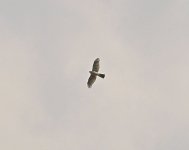
They saved as JPegs, so I assume they won't save in RAW as that's what it's set for. This is a heavy crop from the middle of the 42 shots (50% ish)
Mystery.JPG
 
So I chose the electronic shutter and in "High Frame rate" it was slower than the mechanical shutter.
So then I chose "Super High Frame Rate" and the camera auto adjusted to Electric shutter and machined gunned off 42 images in a few seconds !!
They saved as JPegs, so I assume they won't save in RAW as that's what it's set for. This is a heavy crop from the middle of the 42 shots (50% ish)
View attachment 359608
Couple of things, if you judged the speed by the sound the camera makes, the sound you hear with the electronic shutter just makes a shutter noise, fast of slow, but does not always make a sound for every exposure, where as the sound you hear on mechanical shutter obviously makes the sound on every exposure, the electronic is (or should be) faster than the mechanical.

On the super high burst speed, the picture is low resolution, only 2272 pixels wide (height depends on your chosen aspect ratio, and the width would be less if you choose 1:1)

You would not be likely to see any rolling shutter effect on your photo as the bird only took up a small part in the frame.

A very rough explanation.
Your photo had around 1700 rows of pixels.
The camera reads those rows one at a time (say it starts at the top)
If it took 1/10 second to read all the rows, and the bird billed the whole frame, the bird would have moved forward for 1/10 second between the time the camera recorded the top wingtip to the time it recorded the bottom wingtip. On a bird you probably wouldn't notice, but had that been a flying vertical lamp post, it would appear slanting on the photo.

However, assuming your bird (or the flying lamp post) only filled 1/10 the frame, it would only have moved forward for 1/100 of a second in the time the camera took to record that part of the image, so the effect would be far less.

All the figures are imaginary to try and make the explanation simpler.


The 4k with preburst is useful as well, especially if you want to catch the start/takeoff of something, but again the resolution is lower.

 
I took some yesterday morning, 5 shots HDRs of cars on a road, no sign of ghosts, with electronic shutter too.
Did you have Auto Align turned ON?

Even with it OFF, the shots might align ok as the movement is not close to the camera (?)

... just thinking out loud. hmmmmm
 
Did you have Auto Align turned ON?

Even with it OFF, the shots might align ok as the movement is not close to the camera (?)

... just thinking out loud. hmmmmm


It is not the alignment that stops ghosting, it is the "remove ghosts" setting.

I always align images in whatever software I use, as I don't use a tripod.

As the cars were moving (40mph limit there) they would have moved and caused ghosting no matter how fast the burst rate is.
 
It is not the alignment that stops ghosting, it is the "remove ghosts" setting.

I always align images in whatever software I use, as I don't use a tripod.

As the cars were moving (40mph limit there) they would have moved and caused ghosting no matter how fast the burst rate is.
Ah, I thought we were talking in-camera HDR, but no.

And ... "remove ghosts" setting? :thinking:
 
Ah, I thought we were talking in-camera HDR, but no.

And ... "remove ghosts" setting? :thinking:
In Affinity it is called "Automatically Remove Ghosts" when opening a new HDR stack, and in Fusion it is a pop-up called Ghost Control when you select the HDR operator.

Fusion does a better job, Affinity will leave some ghosting within the main are, ie on the cars, the main area of each car will be clean, but it you look carefully at the rear of the car, there will be slight ghosting of the number plate for example.

I don't think any camera I have had gives the results I like with the in camera processor.
 
Couple of things, if you judged the speed by the sound the camera makes, the sound you hear with the electronic shutter just makes a shutter noise, fast of slow, but does not always make a sound for every exposure, where as the sound you hear on mechanical shutter obviously makes the sound on every exposure, the electronic is (or should be) faster than the mechanical.

On the super high burst speed, the picture is low resolution, only 2272 pixels wide (height depends on your chosen aspect ratio, and the width would be less if you choose 1:1)

You would not be likely to see any rolling shutter effect on your photo as the bird only took up a small part in the frame.

A very rough explanation.
Your photo had around 1700 rows of pixels.
The camera reads those rows one at a time (say it starts at the top)
If it took 1/10 second to read all the rows, and the bird billed the whole frame, the bird would have moved forward for 1/10 second between the time the camera recorded the top wingtip to the time it recorded the bottom wingtip. On a bird you probably wouldn't notice, but had that been a flying vertical lamp post, it would appear slanting on the photo.

However, assuming your bird (or the flying lamp post) only filled 1/10 the frame, it would only have moved forward for 1/100 of a second in the time the camera took to record that part of the image, so the effect would be far less.

All the figures are imaginary to try and make the explanation simpler.


The 4k with preburst is useful as well, especially if you want to catch the start/takeoff of something, but again the resolution is lower.

Thanks Steve, the low pixel count explains why the image is very grainy !
 
Back
Top