El Capitan upgrade problem

bobman

Suspended / Banned
Messages
649
Name
Russell
Edit My Images
Yes
Hi, wondering if anybody can help? I upgraded my operating system yesterday from Yosemite to El Capitan, shot some pictures following this on my D610 but now the Capture NX2 transfer programme can't find the files off the camera. Has anybody got any welcome advice?
 
The only thing I can think of is that the raw converter has been corrupted or just plain does not work. You may try to update ACR to the latest.
 
Thanks, will do, not used acr since using nx2, didn't know it was the same raw convertor, been toying withe idea of changing soft wear to lr6 anybody know if this will proveproblematic with El Capitan? Used to use elements 9, will this need to be uninstalled if upgrade to lr6? Sorry about all the questions but I'm a bit rubbish when it comes to IT!
 
You can run Elements and LR on the same machine, no problems. Lightroom runs fine on El Capitan, I don't use Elements but it will probably be fine as well.
 
Do a Google search on El capitain and nx2 it should take you to Nikon rumors which has an article on comparability
 
Do a Google search on El capitain and nx2 it should take you to Nikon rumors which has an article on comparability

https://nikoneurope-en.custhelp.com/app/answers/detail/a_id/65265

Looks like you're out of luck with NX2 - alternatives are to upgrade to NX-D, revert to Yosemite or start using some different software. The good news is that NX-D is a free download from Nikon:

http://downloadcenter.nikonimglib.com/en/products/162/Capture_NX-D.html

I forgot to add that the bad news: the current version of NX-D won't work either so you'll have to wait for them to release an update.
 
Last edited:
Thanks for the responses everybody, will I be able to download acr from Lightroom 6 download if I purchase the software. I must have had acr installed already when I used elements 9 but cannot find where this is so thinking I may need to download again?
 
Thanks for the responses everybody, will I be able to download acr from Lightroom 6 download if I purchase the software. I must have had acr installed already when I used elements 9 but cannot find where this is so thinking I may need to download again?

You could try the free 30 day trial of Lightroom...
 
Something similar happened to a friend (Yosemite-Capitan), but with Canon Raw and LR, I solved it by opening the folder on his memory card (while attached to his Mac), right clicked on one of the Raw files (Cr2) and from the drop down menu....selected 'Open With' and located the LR app in the Applications folder, and it re-set the default link between the Raw file and LR, not saying it will work with your Nikon Raw files and NX2, but it's worth a try.
 
Thanks for all the suggestions, in the end I have downloaded lr6 and will start a whole new learning curve from now.
 
After I did the upgrade, my external drive (Seagate) went to Read only so I ended up doing a refreshed copy of my images to another drive, then had to formate the external drive again. That appears to have set that drive back to Read and Write. Pain having to re-copying images back to the drive but it does appear to have worked.
 
After I did the upgrade, my external drive (Seagate) went to Read only so I ended up doing a refreshed copy of my images to another drive, then had to formate the external drive again. That appears to have set that drive back to Read and Write. Pain having to re-copying images back to the drive but it does appear to have worked.

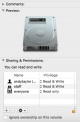
Alternatively, you could have ticked the "ignore ownership on this volume " box in the drive info screen (highlight drive and press cmd-I) If that box is greyed out, click on the padlock just above it and enter your account admin password.

Screen Shot 2015-10-21 at 19.05.53.png

NB You cannot ignore ownership on your boot drive.
 
Thanks Andy for the tip, one to remember :)
 
think I am having a similar issue, I run a Mac Mini with El Capitan, and I recently switched to running Lightroom 6 CC & Photoshop 6 cc

Inserted the memory card in to the mac Mini and open LR, asked to import the photos and it shows them, but when i selected the photos i wanted to imported, it said they were "not readable" I opened one in PS and it opened it up ok.

puzzled, what i need to update as PS working and LR isn't
 
Back
Top