- Messages
- 11,730
- Name
- Chris
- Edit My Images
- Yes
So, as mentioned, I bought 10 rolls of Ektachrome from the US fourcorners store, and they came with no expiry date. We established that Ektachrome E100S and E100 SW was replaced by E100G and E100GS in about 2003. I had 5 rolls of E100SW. The others were E200 which seems to have continued much later. So I decided to shoot the E100SW at ISO 100, and ask Peak Images for a clip test.
I got the film back on Wednesday, and scanned it over the next couple of days. I scanned the first frame with Silverfast SE Plus on my Plustek 7500i, and for fun scanned the same from on a trial version of Vuescan. The scans were astoundingly different, and the Vuescan looked quite a bit better, so after a bit I sucked in my breath and finally bought the Pro version of Vuescan, which I used for the rest of the film. I think this might have been a good thing; it certainly seemed easier to use, although there are penty of ways to get things wrong!
I'll put some shots in a later post in this thread.
There was no feedback on the clip test, but having eyeballed the shots before and after I thought they had carried on with standard processing. But I decided to call Peak and ask, and I spoke to the technician who'd done the work. He thought the film must have been in date, as he said he hadn't noticed any substantial colour cast (more on this later). When I told him I thought it must have dated from about 2003, he was a bit surprised (he might have been misled by the lovely fresh looking can). I asked advice on shooting, and he said shoot at 100, but if it was old stock he would normally shorten the processing to reduce the brown->red shift that older film tends to produce.
So I carried on scanning. However, I did get rather uncomfortable with the colours. This film is E100SW, where the W is for "warm", and at first I blamed this. Then I thought I'd try Vuescan's "Restore Fading" button. I didn't check the manual until later, but it says:
The results were immediately much better, and I carried on with this option. I didn't go back and re-scan the earlier frames, which was stupid.
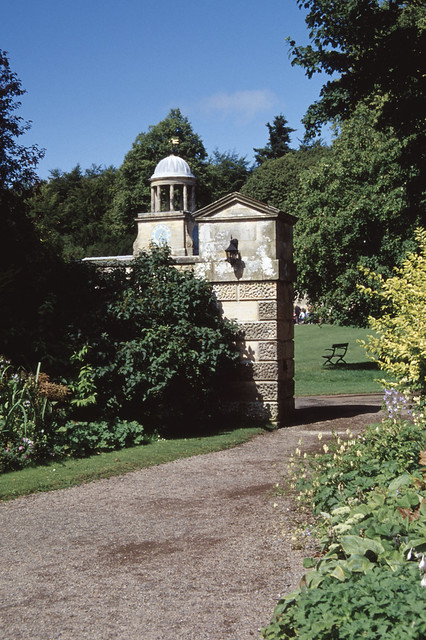
1) This was the first frame scanned with Silverfast, pretty much default options (but I'm nver sure how much it has "remembered" from previous sessions):

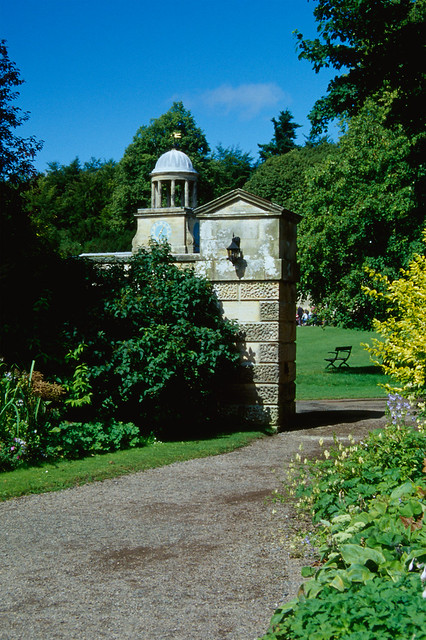
2) The same frame scanned with Vuescan, the first scan from my newly acquired version:

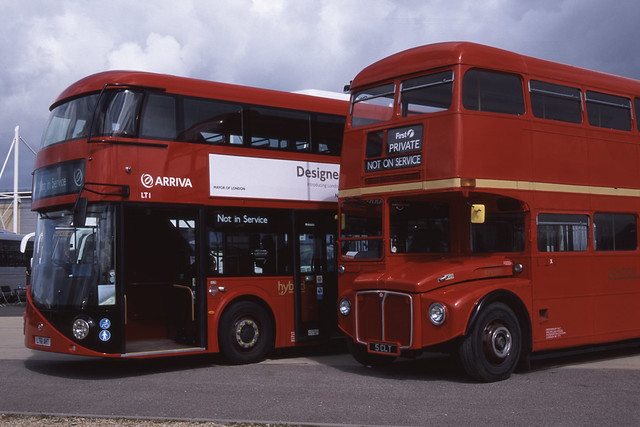
3) A later frame (all scanned with Vuescan now), at which point I was getting pretty suspicious:

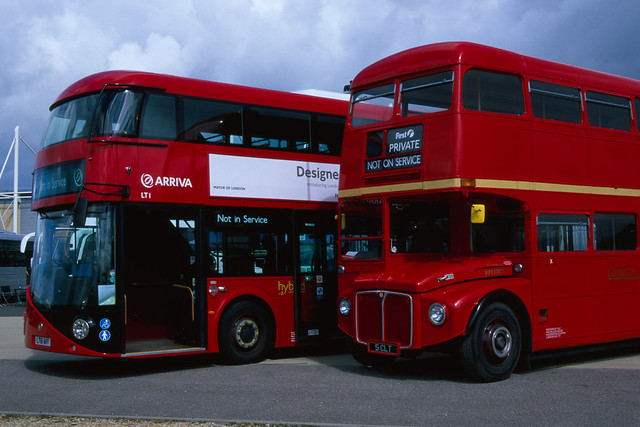
4) The next frame scanned with the Restore Fading button checked, looks much more like the real thing:

So, my feeling is that this film IS pretty faded, and for various reasons the Peak technician missed it (the first few frames don't look so obvious). I'm planning to carry on shooting it at 100, but will include a note next time it goes back to Peak giving clues on the age and (perhaps) mentioning the shorter dev times.
Silverfast really screwed up the first frame; there's really no colour to the lavender flowers, and the green is excessive. But I think I need to re-scan those earlier frames with the Restore Fading button selected.
Whatcher think?
I got the film back on Wednesday, and scanned it over the next couple of days. I scanned the first frame with Silverfast SE Plus on my Plustek 7500i, and for fun scanned the same from on a trial version of Vuescan. The scans were astoundingly different, and the Vuescan looked quite a bit better, so after a bit I sucked in my breath and finally bought the Pro version of Vuescan, which I used for the rest of the film. I think this might have been a good thing; it certainly seemed easier to use, although there are penty of ways to get things wrong!
I'll put some shots in a later post in this thread.
There was no feedback on the clip test, but having eyeballed the shots before and after I thought they had carried on with standard processing. But I decided to call Peak and ask, and I spoke to the technician who'd done the work. He thought the film must have been in date, as he said he hadn't noticed any substantial colour cast (more on this later). When I told him I thought it must have dated from about 2003, he was a bit surprised (he might have been misled by the lovely fresh looking can). I asked advice on shooting, and he said shoot at 100, but if it was old stock he would normally shorten the processing to reduce the brown->red shift that older film tends to produce.
So I carried on scanning. However, I did get rather uncomfortable with the colours. This film is E100SW, where the W is for "warm", and at first I blamed this. Then I thought I'd try Vuescan's "Restore Fading" button. I didn't check the manual until later, but it says:
This option is used to restore the effects of faded film dyes. Slide film often shifts towards red over time, and color negative film towards cyan. If you select this option, the film type in the Color tab isn't used.
The results were immediately much better, and I carried on with this option. I didn't go back and re-scan the earlier frames, which was stupid.
1) This was the first frame scanned with Silverfast, pretty much default options (but I'm nver sure how much it has "remembered" from previous sessions):

2) The same frame scanned with Vuescan, the first scan from my newly acquired version:

3) A later frame (all scanned with Vuescan now), at which point I was getting pretty suspicious:

4) The next frame scanned with the Restore Fading button checked, looks much more like the real thing:

So, my feeling is that this film IS pretty faded, and for various reasons the Peak technician missed it (the first few frames don't look so obvious). I'm planning to carry on shooting it at 100, but will include a note next time it goes back to Peak giving clues on the age and (perhaps) mentioning the shorter dev times.
Silverfast really screwed up the first frame; there's really no colour to the lavender flowers, and the green is excessive. But I think I need to re-scan those earlier frames with the Restore Fading button selected.
Whatcher think?