edit image and what to do next ?

debrito

Suspended / Banned
Messages
1,410
Name
Paul
Edit My Images
Yes
hi i am in need of some advice i think this image has got potential,i can do the odd clone here and there a bit of sat/contrast boost but im just not getting my images to pop this is a came out of camera i suppose im looking for some guidance in what to do with image then i can self learn how to do what ever anyone suggest ,as a learning curve !!!

or if someone edits the image and then tells me what they did i then could have a go to replicate what they did as a form of test !
hope this does not sound rude

can any one help ? :shrug:
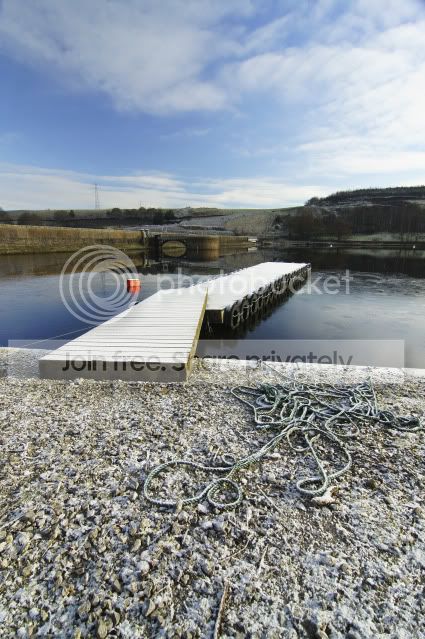
28Jan2011_4192.jpg
 
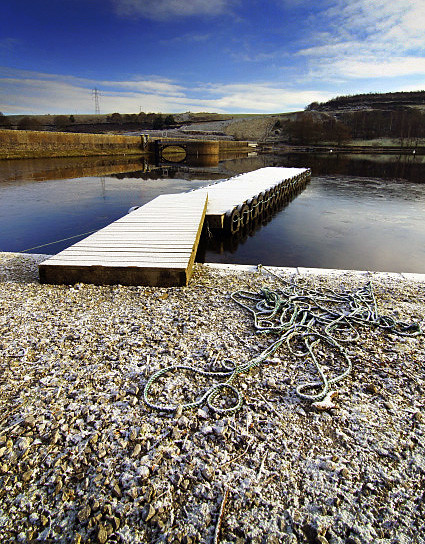
Ok here my effort.
First I duplicated the top (sky) part of the image with a feather to soften the edges, then used multiply blend mode to darken the sky part. The next step was a blue gradient on the sky to even up the right side.
Then I burned in the bottom slightly.
Next I cropped the image, I could have done this earlier but wanted to see how the image was looking first.
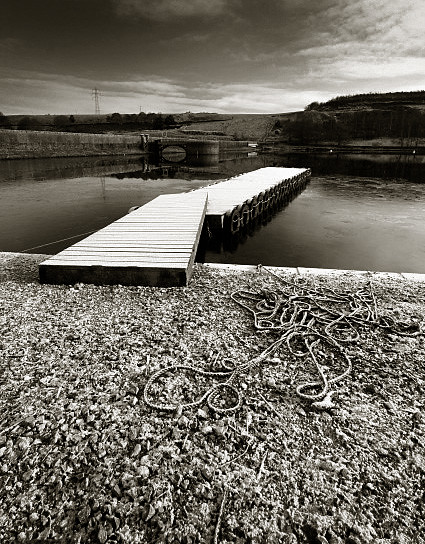
For the B+W version I use photoshops B+W palette with the red filter option.
Wayne

5399365772_bc68b387bd_b.jpg
 
hi i am in need of some advice i think this image has got potential,i can do the odd clone here and there a bit of sat/contrast boost but im just not getting my images to pop this is a came out of camera i suppose im looking for some guidance in what to do with image then i can self learn how to do what ever anyone suggest ,as a learning curve !!!

or if someone edits the image and then tells me what they did i then could have a go to replicate what they did as a form of test !
hope this does not sound rude

can any one help ? :shrug:
What is it that you don't like about the image?
 
hi i am in need of some advice i think this image has got potential,i can do the odd clone here and there a bit of sat/contrast boost but im just not getting my images to pop this is a came out of camera i suppose im looking for some guidance in what to do with image then i can self learn how to do what ever anyone suggest ,as a learning curve !!!

or if someone edits the image and then tells me what they did i then could have a go to replicate what they did as a form of test !
hope this does not sound rude

can any one help ? :shrug:

What is it that you don't like about the image?
 
Ok here my effort.
First I duplicated the top (sky) part of the image with a feather to soften the edges, then used multiply blend mode to darken the sky part. The next step was a blue gradient on the sky to even up the right side.
Then I burned in the bottom slightly.
Next I cropped the image, I could have done this earlier but wanted to see how the image was looking first.
For the B+W version I use photoshops B+W palette with the red filter option.
Wayne

5399365772_bc68b387bd_b.jpg

thanks martin but that blow my mind i tried to do it but i got confused to easily think i might be better going on a photo shop course!!
 
Last edited:
I can thoroughly recommend a photoshop course. I self taught on Paint Shop Pro, which is a package that I found very easy to learn and play with - quite intuitive. But when I went "Mac" I couldn't use PSP and got Photoshop CS2. I found PS quite complex and was completely lost with it.

My local high school was offering a 12 week short course in PS - run by a local wedding photographer. It really was covering the basics only and mostly about image enhancement, but it allowed the "penny drop" moment for me.

Another really good source for PS is Photo Radar
http://www.photoradar.com/videos
Look at the section on learning about photoshop basics or Elements if that is what you use.

This link is a topper It is called 8 essential edits for every photo and I suggest you have a play around with a few of your shots using these tips. It is the basic bread and butter for every picture.

Good Luck!
 
Hi I had a quick go cloned out the bouy, colour version levels, colour boost slight vignette, BW version as colour the red filter and a slight sepia overlay

5400905998_4f7689bced_z.jpg
.
5400906144_8156d11c03_z.jpg


Dave
 
Back
Top