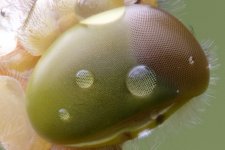
DXO Photolab 8 detail rendering

LCPete

Suspended / Banned
Messages
9,785
Edit My Images
Yes
1752139375748.jpeg

A little while ago Myotis posted about DXO and another Raw converter, sorry can’t remember which one not rendering detail of dragonfly eye accurately
Can’t find the actual thread sorry so started a new one
I am now using DXO photolab 8 and as far as I can tell it seems to work accurately now
The issue was if I am correct was under certain conditions the AI part of the Raw converter made up details that weren’t there
This is a huge crop of an 8192 by 5465 image that is focus stacked this part of the image is two frames merged
Is anyone else using DXO 8 would be interested in peoples thoughts :)
 
View attachment 457680

A little while ago Myotis posted about DXO and another Raw converter, sorry can’t remember which one not rendering detail of dragonfly eye accurately
Can’t find the actual thread sorry so started a new one
I am now using DXO photolab 8 and as far as I can tell it seems to work accurately now
The issue was if I am correct was under certain conditions the AI part of the Raw converter made up details that weren’t there
This is a huge crop of an 8192 by 5465 image that is focus stacked this part of the image is two frames merged
Is anyone else using DXO 8 would be interested in peoples thoughts :)
It was DXO PL6/PR4 vs Topaz Photo AI and Adobe Denoise AI. And yes it was only some images. "most" were fine.

I haven't tried DXO8.5 with the file I had a problem with, but I think the denoising in PL 8.5 is the same as PR4 (except for DP3)

I had no problems with Adobe, and a more recent version of Topaz PhotoAI. had "solved" the issue by just smearing the detail that had previously become well defined lines that didn't exist (created by both DXO and Topaz). Adobe Denoise AI worked fine from the start.

I should really dig out the file I had the problem with and test it with Deep Prime 3, as I'm finding that to gives nicer results than Deeprime XD2.
 
Back
Top