Duplicate disc in Time Machine

Citizen of Bath

Suspended / Banned
Messages
97
Name
Pierre
Edit My Images
Yes
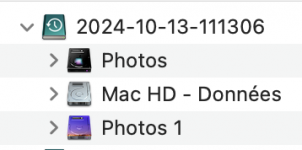
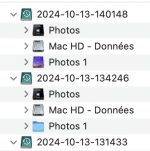
Time Machine has suddenly decided that my Photos external disc was two discs. As a result, the Photos disc is copied twice to the Time Machine disc (please see attached images). This wastes several terabytes on the backup.

I tried ejecting the Photos drive and then reinserting it, to no avail, and the same operation with the Time Machine drive produced the same lack of result. Any idea to solve this problem would be much appreciated.
 

Attachments

  • photos_duplicate_entry_1.png
    photos_duplicate_entry_1.png
    17.5 KB · Views: 3
  • photos_duplicate_entry_2.png
    photos_duplicate_entry_2.png
    26.6 KB · Views: 3
don't know if this partial response helps at all?
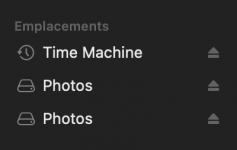
Thank you! Following that response, I could remove the second, non-existent, Photos entry in Finder's Volumes list, but Time Machine keeps thinking there are two Photos discs and it keeps copying the contents twice. Funnily, there is a difference, but it's only cosmetic: until then, Time Machine saw the non-existent Photos drive as a directory, but now it's a disc icon.
 

Attachments

  • tm.png
    tm.png
    56.7 KB · Views: 2
Last edited:
I'll answer my own question in case it might be useful to someone else: after trying every possible solution, I decided to install Sequoia, the version of MacOS that has just been released. Then I erased the Time Machine disc and I started again from scratch. This solved the problem.
 
Back
Top