Dslr to ipad wirelessly

GR3Z

Suspended / Banned
Messages
706
Name
Graeme
Edit My Images
Yes
Hi,
Im after some clarification on weather
you can have you images tether to you iPad wirelessly,

I'm aware you you'll need a eye fi card and I read that it can be done over your wifi network..... Can it be done say if I was in a field with no wifi,

I was under the impression you could? If you had the higher spec eye fi card.... I was almost sure it could be done until a friend of mine said he googled it and you said you can't....

Can it be done?
 
Last edited:
I have used wireless usb and bluetooth to control my camera and telescope (Astronomical) but what is the point under normal conditions, what is to be achieved.
 
Hi,
Im after some clarification on weather
you can have you images tether to you iPad wirelessly,

I'm aware you you'll need a eye fi card and I read that it can be done over your wifi network..... Can it be done say if I was in a field with no wifi,

I was under the impression you could? If you had the higher spec eye fi card.... I was almost sure it could be done until a friend of mine said he googled it and you said you can't....

Can it be done?

Im inclined to agree with your friend unless there is a hotspot close by that you can connect both the ipad and the camera to ,I dont think the eye fi card will see the Ipad.


Just found this
All Eye-Fi Cards except the Eye-Fi Pro and the Eye-Fi Pro X2 require the use of a wireless router or access point to upload photos to a computer. Like all Eye-Fi Cards however, the Eye-Fi Pro and Pro X2 cards still require access to a wireless network via a wireless router for initial configuration.

For instructions about connecting Eye-Fi Pro and Pro X2 cards to an Ad Hoc network please refer to How to connect an Eye-Fi Card to an Ad Hoc Network.

Instructions for setting up an Ad-Hoc (computer-to-computer) wireless network for use with the Eye-Fi Pro Card can be found in How to set up an Ad Hoc network.

I would email the makers of Eye-fi and see it it will work
 
Last edited:
I believe your friend is wrong. Shutter on here was doing exactly what you describe last weekend.

The card create a hotspot that the ipad connects to, application on the ipad then pulls the images down.

See http://nopenonlytext.tnguyen.com/?p=207
 
Last edited:
If you have an iPad with a 3G connection (possibly even without) and IOS 4.3, I think it can create its own hotspot.

Quite where you go from there, I'm not sure as I don't have an Eye Fi card or an iPad.

edit: OK seems this may be an iPhone 4 only feature unless you jailbreak the iPad.
 
Last edited:
Yes you can. I was on a shoot at the weekend where this demonstrated, with an Ipad 2 and an eye-fi card. Range can be a bit limited.
 
Yup. I have an Ipad2, and an android phone. There are apps for both of these. You insert your card into your camera and take a photo. You have your device connect to the wifi network and it will download your photo one at a time.

For downloading raw files you need the most expensive card at about £100, it is 8gb. The other cards cant transfer raw files.

The setting for this is called active mode i think.
 
Last edited:
I've got the eye fi mobile x2 card and it works very well with my ipad.

No hot spot or other wifi network needed. The card sets up it's own and you have to just connect the ipad to it then open shutter snitch and it starts transfering images.

I had some headaches to start with but I'm using the eye fi SD card in an adaptor in a Nikon D300.
Which they say you can't do.
 
I've got the eye fi mobile x2 card and it works very well with my ipad.

No hot spot or other wifi network needed. The card sets up it's own and you have to just connect the ipad to it then open shutter snitch and it starts transfering images.

I had some headaches to start with but I'm using the eye fi SD card in an adaptor in a Nikon D300.
Which they say you can't do.

Was this an SD to CF adaptor...

I bought one but it still does not work...

What make and model adaptor was this ???

:thumbs:
 
I have the eye-fi card create an ad hoc wifi network and use the shutter snitch app on my iPad. No other network needed.

My camera doesn't have an SD slot, and the eye-fi card is a bit specific on the CF adapter I needed. Most won't work.

It is a Delock CF type II UDMA adapter. I bought mine from a retailer in Germany through Amazon. I found the specific details on the eye-fi forums.
 
Last edited:
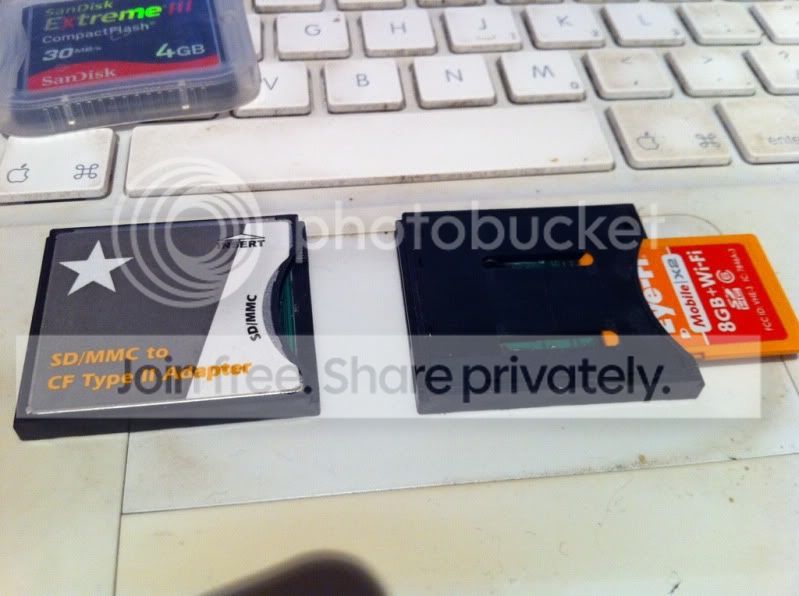
I took a gamble on super cheap SD-CF adaptors and bought 2 of these ones.
And they work.
They are completely unbranded but look like this.

The one on the right with the eye-fi card in has had the metal back cover removed to try and gain some range.

13fb1eb2.jpg
 
JKP photographic said:
I took a gamble on super cheap SD-CF adaptors and bought 2 of these ones.
And they work.
They are completely unbranded but look like this.

The one on the right with the eye-fi card in has had the metal back cover removed to try and gain some range.

I don't understand why eyefi refuse to support cf adapters. All I ever see is people reporting that they work perfectly!
 
Isn't it part of the CF standard that the cards have a metal case which severely cuts down the range?
 
Lets start by saying I do not have an ipad or eye-fi card, but this thread has intetsed me as it's something I thought about.

Could I stream the shots as I take them to an ipad and have that automaticy dispaly them in a slideshow.
 
Playing in the office this afternoon, I managed to piggyback the office network and get the pictures to transfer straight onto my Macbook Pro.

Apparently you can then set Lightroom to "listen" to a folder and the pics load straight in.
I certainly saw the pictures hitting the MBP but didn't have time to configure LR to see if that worked.

One small thing though. Mine won't send RAW. Only jpeg so if you want to shoot RAW then you have to have the camera set to shoot both.
 
Check out fstoppers.com they have a post on there how to do it. It's the new one and not the jail break one
 
Back
Top