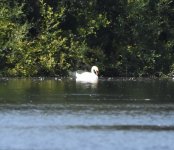
Double of subject at certain times

morgan

Suspended / Banned
Messages
2
Edit My Images
Yes
Evening,

I was hoping to get some help from people. For reference, I have a Nikon d7200 paired with a Sigma 150-600mm f5-6.3 Contemporary DG OS HSM lens which I have been using for wildlife photography.

I have recently noticed that my images are sometimes showing double of the subject. Almost a ghost like double of the subject right next to the subject.

If anybody has experienced this or knows what is causing that would be greatly appreciated.

Cheers!
 
Moved to Talk Equipment for more likely audience
 
Could be a reflection on a lens element depending on the lighting.

Do you have Double Exposure turned on? Moving while taking the images will cause 'ghosting'
 
Last edited:
Couldn't quite figure out how to attach an image before, but here is an example.

I don't believe I have double exposure turned on
 

Attachments

  • Double of subject.jpg
    Double of subject.jpg
    147.3 KB · Views: 79
See what you mean, odd it just seems to be the swan that's been doubled. I doubt an internal reflection would cause that although I could be wrong.
What were your settings, focal length, shutter speed, etc? Were you using OS?


Have you tried a factory reset? If it's caused by an inadvertently changed setting that should get you back to normal.
 
Couldn't quite figure out how to attach an image before, but here is an example.

I don't believe I have double exposure turned on
I've had an image similar to that when shooting through the glass window of a bird hide.
 
Couldn't quite figure out how to attach an image before, but here is an example.

I don't believe I have double exposure turned on

See what you mean, odd it just seems to be the swan that's been doubled. I doubt an internal reflection would cause that although I could be wrong.
What were your settings, focal length, shutter speed, etc? Were you using OS?


Have you tried a factory reset? If it's caused by an inadvertently changed setting that should get you back to normal.
As it is only the swan....................and I surmise the swan is moving but there is no wind of any note to disturb the woodland or the water and things floating on the water, does seem to suggest that is a some sort of double exposure.

Therefore, in advertently or not a "full (factory) reset should clear the erroneous action......might reveal a fault if the issue persists :thinking:

PS a Google says that the D7200 cannot do 'conventional double exposures' however these functions are available....

  • Multiple Exposure (Photo Shooting menu): With this option, you can combine your next two to three shots. After you enable the option and take your shots, the camera merges them into one file. The shots used to create the composite aren't recorded and saved separately. The Multiple Exposure option isn't available in Live View mode.

  • Image Overlay (Retouch menu): This option, available only through the regular Retouch menu (and not the Playback version of the i button menu), enables you to merge two existing Raw images to create a third Raw image.

So, @morgan maybe either check those specific parts of the menu of just(?) do a factory reset to all being well clear the settings.

PPS
Looks like you are not the only one to experience this oddity?
 
Last edited:
D7200 should also be capable of doing a HDR picture- which would also involve 2 pictures for 1 button press. The settings should be in the shooting menu. If it is on, switch it off.

Might be something up with the VR on the lens but I would expect the 2 images to be smeared together more.
 
Do you think there’s a possibility auto focus shifted mid-shot?
 
I'd expect similar double images of highlights if it were filter reflections and can't see any.
 
Back
Top