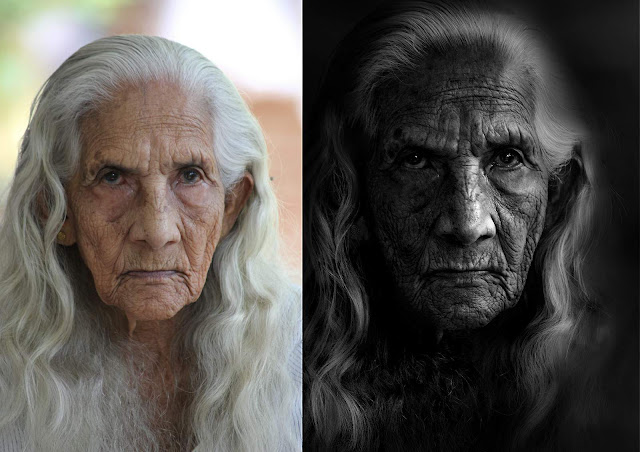
Does anyone know how to achieve this?

Vortice

Suspended / Banned
Messages
21
Edit My Images
Yes
http://www.flickr.com/photos/16536699@N07/3231634872/

That is just one of many portrait shots from LJ on Flickr. I mailed him a couple of weeks ago asking how he actually created images like that but never got a reply.

I would like to know if it relies on filters and what post processing goes in to such a shot? Also how does someone manage the lighting?

If you look at his stream you will see almost all of them looking similar. All are taken of homeless people on the street so no fancy lighting.
 
His shots are fantastic. That's all I know.
 
it looks like PP rather than filters. i guess its to do with the conversion to BW, probably using channels.

great photos too.
 
Yeah they are fantastic shots.

I don't suppose anyone would have an idea of what camera settings he is using? I would have thought the images would have to be naturally dark when being taken.

If anyone knows what PP might have been used as well ;)
 
Yeah they are fantastic shots.

I don't suppose anyone would have an idea of what camera settings he is using? I would have thought the images would have to be naturally dark when being taken.

If anyone knows what PP might have been used as well ;)

Don't know how he does them, but thanks for the link!! He's awesome. Oh and this was copied from his Flickr

Camera: Canon EOS 5D
Exposure: 0.001 sec (1/1000)
Aperture: f/2.0
Focal Length: 85 mm
Exposure: -0.38
ISO Speed: 100
Exposure Bias: 0 EV
Flash: Off

File Size: 3.0 MB
File Type: JPEG
MIME Type: image/jpeg
Image Width: 1957
Image Height: 1957
Encoding Process: Baseline DCT, Huffman coding
Bits Per Sample: 8
Color Components: 3
X-Resolution: 240 dpi
Y-Resolution: 240 dpi
Orientation: Horizontal (normal)
Software: Adobe Photoshop CS3 Windows

;)
 
I'm guessing that there's some Lucis going on there.
 
Looking at those camera settings it seems there is very little making the image any darker than a basic shot. -0.38 exp isn't going to make a massive amount of difference at all is it?

So it is looking like it is all done in pp. We need a pp expert to chip in ;)
 
I may be wrong but this may be the draganizer filter. It is recognisable as it turs skin tones almost metallic.
 
These are the settings in full:

Looks like quite a bit of PP

File Size: 3.0 MB
File Type: JPEG
MIME Type: image/jpeg
Image Width: 1957
Image Height: 1957
Encoding Process: Baseline DCT, Huffman coding
Bits Per Sample: 8
Color Components: 3
X-Resolution: 240 dpi
Y-Resolution: 240 dpi
Orientation: Horizontal (normal)
Software: Adobe Photoshop CS3 Windows
Date and Time (Modified): 2009:01:27 14:21:08
Copyright: Copyright Lee Jeffries
Exposure Program: Manual
Date and Time (Original): 2008:10:19 19:44:27+01:00
Date and Time (Digitized): 2008:10:19 19:44:27
Max Aperture Value: 1.2
Metering Mode: Partial
Color Space: Unknown (-1)
Focal Plane X-Resolution: 3086.925795053 dpi
Focal Plane Y-Resolution: 3091.29511677282 dpi
Custom Rendered: Normal
Exposure Mode: Manual
White Balance: Manual
Scene Capture Type: Standard
Compression: JPEG (old-style)
Copyright Notice: Copyright Lee Jeffries
Global Angle: 30
Global Altitude: 30
Copyright Flag: False
Photoshop Quality: 12
Photoshop Format: Optimised
Progressive Scans: 3 Scans
XMPToolkit: Adobe XMP Core 4.1-c036 46.276720, Mon Feb 19 2007 22:40:08
Orientation: Horizontal (normal)
Creator Tool: Adobe Photoshop CS3 Windows
Metadata Date: 2009:01:27 14:21:08Z
Lens: EF85mm f/1.2L USM
Image Number: 12
Flash Compensation: 0
White Balance: Custom
Temperature: 4619
Tint: -43
Shadows: 21
Brightness: +127
Contrast: +100
Saturation: -62
Sharpness: 100
Luminance Smoothing: 0
Color Noise Reduction: 0
Chromatic Aberration R: 0
Chromatic Aberration B: 0
Vignette Amount: -71
Vignette Midpoint: 41
Shadow Tint: +1
Red Hue: +3
Red Saturation: +13
Green Hue: +5
Green Saturation: -3
Blue Hue: -25
Blue Saturation: -48
Fill Light: 74
Vibrance: 0
Highlight Recovery: 0
Clarity: +100
Defringe: 0
Hue Adjustment Red: 0
Hue Adjustment Orange: 0
Hue Adjustment Yellow: 0
Hue Adjustment Green: 0
Hue Adjustment Aqua: 0
Hue Adjustment Blue: 0
Hue Adjustment Purple: 0
Hue Adjustment Magenta: 0
Saturation Adjustment Red: -36
Saturation Adjustment Orange: -21
Saturation Adjustment Yellow: -50
Saturation Adjustment Green: 0
Saturation Adjustment Aqua: -86
Saturation Adjustment Blue: 0
Saturation Adjustment Purple: 0
Saturation Adjustment Magenta: 0
Luminance Adjustment Red: 0
Luminance Adjustment Orange: 0
Luminance Adjustment Yellow: 0
Luminance Adjustment Green: 0
Luminance Adjustment Aqua: 0
Luminance Adjustment Blue: 0
Luminance Adjustment Purple: 0
Luminance Adjustment Magenta: 0
Split Toning Shadow Hue: 0
Split Toning Shadow Saturation: 0
Split Toning Highlight Hue: 0
Split Toning Highlight Saturation: 0
Split Toning Balance: 0
Parametric Shadows: 0
Parametric Darks: 0
Parametric Lights: 0
Parametric Highlights: 0
Parametric Shadow Split: 25
Parametric Midtone Split: 50
Parametric Highlight Split: 75
Sharpen Radius: +1.0
Sharpen Detail: 25
Sharpen Edge Masking: 0
Post Crop Vignette Amount: 0
Convert To Grayscale: False
Tone Curve Name: Strong Contrast
Camera Profile: ACR 3.3
Has Settings: True
Crop Top: 0.327873
Crop Left: 0.143731
Crop Bottom: 0.995749
Crop Right: 0.59465
Crop Angle: -0.362372
Crop Width: 1957
Crop Height: 1957
Crop Unit: pixels
Has Crop: True
Already Applied: True
Tone Curve: 0, 0
Legacy IPTCDigest: 2DD0C746EE9A3B31ACE883CA4D04BF36
Color Mode: 3
ICCProfile Name: Adobe RGB (1998)
Format: image/jpeg
Rights: Copyright Lee Jeffries
Color Transform: YCbCr
Flash Return: No return detection
Flash Mode: Off
Flash Function: False
Flash Red Eye Mode: False
 
How the hell can you pull that from the image?
 
That's standard exif data AndyB. Flickr saves all exif data and you choose whether to allow others to see it or not.

I believe every digital photo ever taken has exif data.
 
How the hell can you pull that from the image?

Go to the link and look to the right of the shot. Here you will see this:

Taken with a Canon EOS 5D.
More properties


Click on more properties and all will be revealed! :thumbs:
 
Yup, a bit of sharpening, a bit of contrast boost with curves, a few saturation tweaks, possibly a custom filter but PS tweaks alone can create that effect...
 
Looks like a lot of 'JoeyL' / 'Dave Hill' type of processing going on there. Have a google for those 2 names and you'll see.
 
If you use firefox as a browser there is a plug in called Exif Viewer
Install the plug in and all the above exif can be read just by right clicking and selecting 'View Image Exif Data' (provided it hasn't been stripped)

As for the PP on LJ's image, my guess is layer masks a plenty, selective curves layers and contrast masks.
Basically, non destructive dodging and burning via curves and contrast adjustment layers. Also, high pass filters are more than likely used.

All these techniques can be learned by running searches through google. There's video tutorials available on youtube too, just be patient with folk who ramble and your onto a winner.
 
It's the Dragan Effect for sure - all done in processing. You get all sorts of examples of it - some far more extreme than this which is very well done. A Google image seach will throw up loads of examples, and the web is awash with tutorials on the process.
 
TW - thanks for that link. What a sweet little add-on! Truly, too much information :)
 
It seems you can add a Dragan Effect filter to images you upload to Flickr, although I'm not seeing it, but enough people are saying you can. :shrug:
 
No idea what a Dragan effect filter is. Image was processed using a texture and blending in PS. Its a creative process with many layers doing different things to different parts of the image. Dont be afraid of dodging or burning texture layers to get the look you want either.

Dont get hung up on filter...or effects or all that mumbojumbo. Allow your creativity to take control and know your software inside out.
 
No idea what a Dragan effect filter is. Image was processed using a texture and blending in PS. Its a creative process with many layers doing different things to different parts of the image. Dont be afraid of dodging or burning texture layers to get the look you want either.

Dont get hung up on filter...or effects or all that mumbojumbo. Allow your creativity to take control and know your software inside out.
take a look at this demo by the man himself:

http://www.metacafe.com/watch/735941/dragan_effect_photoshop_tutorial/
 
why would i want to?

:thumbs: ...and welcome to TP.

It can certainly feel almost like an insult to have one's work compared to another's. Usually the comment is nothing but enthusiasm for both and an attempt to categorize styles that may be similar in some way.
 
If you have lightroom, one approach to the "hard high contrast" look is to wang the fill-light and blacks sliders to max (Or near max, depends on image) and the clarity slider to a high value. Then fiddle with the recovery slider if your highlights went away...

Max fill and max black (Or 70-80% ish) can be a good starting point for such crazy-contrast images.
 
I assumed, tried it

IMG_4875-copy-3.jpg


and recorded..

[YOUTUBE]87hV3bGZBkA[/YOUTUBE]​
 
Who cares about the technique. All this effort to try and work out what someone else has done... You think your images will be as good as this if you nail his technique?

You wanna know what makes these images so good? Read the words that go with that image in the link.... then you'll understand.

These images would be just as good no matter what he did to them. They connect with the people he's shooting... you become the photographer, and they are looking at you. You can't get that **** from a filter or a technique, and there's something in the gaze that does this. You won't get it from shooting from the hip, or sniping with a long lens.. or being sneaky.. you get this by getting people to talk to you and drop their guard.... you get this when you earn their respect to let you in. I usually HATE shots of homeless people... I think they exploit and objectify the subject, and most shoot them to get a great shot, not because they give a **** about the person, and then patronise the sitter with a bit of cash or something.. to ease their conscience, which is pathetic. This guy does it because there's something else driving him.... and it's that which shows in the images.
 
Last edited:
People want to know how something is done. What's the problem with that? You should get off your high horse. Frankly I'm interested in how things are achieved. Not necessarily to replicate but to learn from.
 
People want to know how something is done. What's the problem with that? You should get off your high horse. Frankly I'm interested in how things are achieved. Not necessarily to replicate but to learn from.

These pictures are usually produced using any HDR program, press a button and there you have it "A fried face"
done to death I'm afraid.
 
Weird. The original author has posted and explained his method, someone else has offered an alternative method, and yet people are still claiming it's done differently and bereft of the skills already demonstrated.
 
Weird. The original author has posted and explained his method, someone else has offered an alternative method, and yet people are still claiming it's done differently and bereft of the skills already demonstrated.

If you have a lot of time on your hands to do this to every picture by moving the sliders in Photoshop, playing with layers and blending modes, then fine, there is no skill involved in that. If you don't have all that time, just use HDR and your program will utilize the same sliders and blending modes automatically at the press of a button, again, no skill involved, what it all comes down to in answer to the OP is do you like Fried Faces, humans don't actually look like that, not even the homeless.
 
However he achieved them .. they are amazing images!
 
If you have a lot of time on your hands to do this to every picture by moving the sliders in Photoshop, playing with layers and blending modes, then fine, there is no skill involved in that. If you don't have all that time, just use HDR and your program will utilize the same sliders and blending modes automatically at the press of a button, again, no skill involved, what it all comes down to in answer to the OP is do you like Fried Faces, humans don't actually look like that, not even the homeless.

That is the biggest pile of drivel i've read in a long time. Unless you're obviously some kind of photoshop guru that can do blending modes, dodge, burn and layer masks in his sleep then I apologise. Quite a few of the techniques used will only be familiar to more experienced users of photoshop.

It's also nowhere near comparable to throwing the image at photomatix and adjusting a few sliders...if you can get the same outcome doing that, please share as i'm sure there are a heck of a lot of people that would like to know how.

The outcome obviously isn't to everyone's tastes, but judging by how popular it is, don't knock those that do like it.
 
If you have a lot of time on your hands to do this to every picture by moving the sliders in Photoshop, playing with layers and blending modes, then fine, there is no skill involved in that. If you don't have all that time, just use HDR and your program will utilize the same sliders and blending modes automatically at the press of a button, again, no skill involved, what it all comes down to in answer to the OP is do you like Fried Faces, humans don't actually look like that, not even the homeless.
That is quite possibly the most ridiculous thing I've ever seen posted on a photography forum.
:clap:
 
Just to chip in my 2 pence worth... the exif data shows 'clarity 100'... which basiclly means he's pushed the sharpness up as far as it will go in either adobe bridge or light room (not sure which).

Basically he's sharpened the image to within an inch of its life, which works great for people with 'interesting faces' i.e. wrinkles etc.

What you have to watch out for with this is a HDR like halo appearing around the subject, and usually you would use a layer mask with this excessive sharpening to selectively apply (or remove) the added sharpening so it was just the subject being sharpened and not everything else.

Usually this would be done using a high pass filter but not sure if he's done it this way or not tbh
 
If you have a lot of time on your hands to do this to every picture by moving the sliders in Photoshop, playing with layers and blending modes, then fine, there is no skill involved in that. If you don't have all that time, just use HDR and your program will utilize the same sliders and blending modes automatically at the press of a button, again, no skill involved, what it all comes down to in answer to the OP is do you like Fried Faces, humans don't actually look like that, not even the homeless.

Since when has photography been exclusively about making things appear exactly as they are in real life?

Another ridiculous statement from another one of those secretive internet demons with no links to his own work. Funny that... :lol:
 
Back
Top