cardiff_gareth
Suspended / Banned
- Messages
- 2,734
- Name
- Gareth
- Edit My Images
- Yes
Disk partition help!
Mirrored my existing Windows operating drive as it was just a 320gb drive, to a faster hard drive that's also larger and 1tb in size using Macrium Reflect.
All went well but the left over 698gb is currently either unallocated as is (see screenshot), or free space if I make a partition and then delete the new volume.
I have the option to extend the volume of the disks primary partition but it keeps failing as:
First the pop up says that it'll convert the selected basic drive to a dynamic drive and if I do then I will be unable to start the operating systems from any volume on the disk except the current boot volume and if I want to continue. When I say Yes it then gives a new pop up with a large red X on and says 'the operation is not supported by the object.'
I don't want to have 2 drives that I'll get if I make a new simple volume as I have a 2tb storage drive already in there so I want to make the OS drive the full 1tb in size
Doing my head in now as I can't seem to fathom out how to extend the current healthy drive thats 231gb in size larger?
I know the clone was successful as I've taken the old HDD out and put the new one in and it fired up like the old and all was good, identical and no issues so the last piece of the puzzle is getting this space allocated to the disks primary healthy partition?
Can anyone please point me in the direction of where I'm going wrong?!!
Thanks
Mirrored my existing Windows operating drive as it was just a 320gb drive, to a faster hard drive that's also larger and 1tb in size using Macrium Reflect.
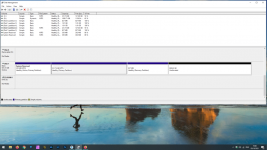
All went well but the left over 698gb is currently either unallocated as is (see screenshot), or free space if I make a partition and then delete the new volume.
I have the option to extend the volume of the disks primary partition but it keeps failing as:
First the pop up says that it'll convert the selected basic drive to a dynamic drive and if I do then I will be unable to start the operating systems from any volume on the disk except the current boot volume and if I want to continue. When I say Yes it then gives a new pop up with a large red X on and says 'the operation is not supported by the object.'
I don't want to have 2 drives that I'll get if I make a new simple volume as I have a 2tb storage drive already in there so I want to make the OS drive the full 1tb in size
Doing my head in now as I can't seem to fathom out how to extend the current healthy drive thats 231gb in size larger?
I know the clone was successful as I've taken the old HDD out and put the new one in and it fired up like the old and all was good, identical and no issues so the last piece of the puzzle is getting this space allocated to the disks primary healthy partition?
Can anyone please point me in the direction of where I'm going wrong?!!
Thanks