Developing question

Barney

Suspended / Banned
Messages
3,043
Name
Wayne
Edit My Images
No
Good afternoon,

Looking for some advice that hopefully will enable me to improve my negatives. Is it possible to increase contrast in the image recording phase without losing shadow or highlight detail?

I am starting out on an experimental series.

All tips and advice's appreciated.
 
That's not a simple question to answer. The short answer is that the contrast is the slope of the characteristic curve of the film. Increase development time (or use a high contrast developer) and the contrast goes up.

BUT note the curve in the film specs. Manufacturers usually only show values up to a specific density. That's for the simple reason that the bottleneck in the process is the printing paper, which can't handle anything like the range of the film.

Scanning might get you higher, but scanners have a maximum DMax they can handle.

Increase development time and shadow detail won't be lost, but highlights could become blocked.
 
I still think, based on what I see on my tablet and comparing with other black and white photos, that your photos are too high contrast, and you should be looking into reducing contrast not increasing it - that you're overdeveloping...
 
Thanks Gents for your advice!

Much appreciated
 
I think StephenM is spot on with his answers and I have nothing to add. But if you want further advice, might be a good idea to explain what your current process is and what type of 'improvement' you're trying to achieve.
 
Last edited:
I think StephenM is spot on with his answers and I have nothing to add. But if you want further advice, might be a good idea to explain what your current process is and what type of 'improvement' you're trying to achieve.
Hello Peter,

I am currently going through a "learning" process, I am predominantly using incident metering and I suspect failing miserably to take into account the tonal range of the scene.
 
Hello Peter,

I am currently going through a "learning" process, I am predominantly using incident metering and I suspect failing miserably to take into account the tonal range of the scene.
I was thinking of your processing methods. As you were asking about increasing contrast I assume you were asking about processing adjustments to alter the contrast. Knowing what film/dev combination you use and how you make prints might all help.

With modern films and standard processing, you won't be very far out whatever the tonal range is. If you're learning, better to start with proven processes. If you're then not happy with the results, define what it is you're not happy with then assess for possible causes. But don't adjust one thing to correct a problem somewhere else. For instance, don't adjust the processing to correct a problem with your scanning. I hope that make sense.
 
I was thinking of your processing methods. As you were asking about increasing contrast I assume you were asking about processing adjustments to alter the contrast. Knowing what film/dev combination you use and how you make prints might all help.

With modern films and standard processing, you won't be very far out whatever the tonal range is. If you're learning, better to start with proven processes. If you're then not happy with the results, define what it is you're not happy with then assess for possible causes. But don't adjust one thing to correct a problem somewhere else. For instance, don't adjust the processing to correct a problem with your scanning. I hope that make sense.
That makes perfect sense, my scanner is not the best out there. I have not yet printed from a negative but I am trying to find a decent photography course with a dark room to address that over winter.

I will shoot a roll next week and post my results for evaluation if that OK?
 
Just to add... Pushing film (under-expose & over-develop) will also generally increase contrast, but it's really difficult to answer the question without knowing what sort of contrast you are after.

I advise watching this if you're interested:
View: https://www.youtube.com/watch?v=OdpfRqDDZyw&t=1s
 
Are you shooting colour neg, colour pos or B&W?
 
B&W
 
OK, I think you need to add a filter to your system.
I am not a B&W person but I know red/yellow/blue filters can affect contrast at the point of exposure.

I'm sure someone will be along to correct me soon.
 
Quite correct that filters can affect contrast. As a bit of a simplification, sunlight is yellow and skylight (any light not directly from the sun) is blue. Any filter that cuts blue light more than yellow will deepen shadows - hence more contrast. But filters also change how colours translate into black and white. With no filter, red roses and green foliage will merge into the same grey. Filters can give black roses against white leaves, or the exact opposite (slight exagerstion there...). Plus many other effects - which is why I carry red, orange, blue, 2 different greens and two yellow filters.
 
Quite correct that filters can affect contrast. As a bit of a simplification, sunlight is yellow and skylight (any light not directly from the sun) is blue. Any filter that cuts blue light more than yellow will deepen shadows - hence more contrast. But filters also change how colours translate into black and white. With no filter, red roses and green foliage will merge into the same grey. Filters can give black roses against white leaves, or the exact opposite (slight exagerstion there...). Plus many other effects - which is why I carry red, orange, blue, 2 different greens and two yellow filters.
See, I knew someone smart would step up to the plate.
 
OK, I think you need to add a filter to your system.
I am not a B&W person but I know red/yellow/blue filters can affect contrast at the point of exposure.

I'm sure someone will be along to correct me soon.
There's nothing to suggest using contrast filters would benefit the OP.
 
Remember that in post processing, you can add contrast. Its a lot safer to add contrast to a relatively flat negative than it is to try to recover details in blocked shadows or burnt highlights.

if your subjects move and the light is poor (eg jazz club) high contrast baked in the negative might be a necessary by-product of the photographer attempting to freeze motion.

So undexposure to get faster shutter speeds or smaller apertures followed by an increase in developing time to salvage at least highlight density and (to a much lesser extent) midtone density at the expense of lost shadow detail.

Shadows will be blocked and contrast baked in the negative will be high, but at least the trumpeter might be frozen in action.

I think it'll depend on the kind of photography one has in mind.
 
Back in my press days we'd often alter the dev time to affect contrast. Back then gennerally speaking slower films had more contrast, and faster less contrast. We'd sometime s shoot a 400iso film at 200 and cut a 1/3 off the dev time time for a flatter neg, or we'd under expose slightly and over dev to up the contrast.
I'd suggest doing tests before you try this. I'm not sure how modern films will react to this system (I havent shot film for ages)
 
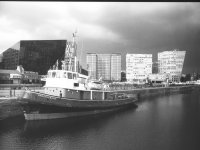
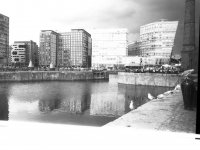
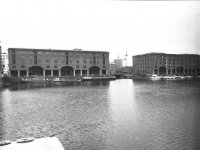
OK Then, Test shots. WARNING PICTURE HEAVY

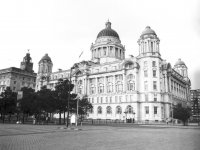
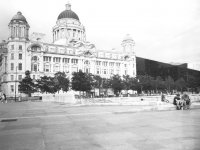
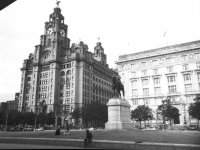
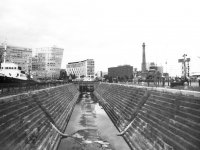
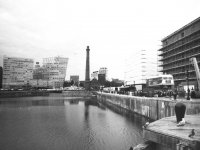
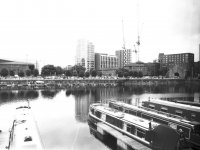
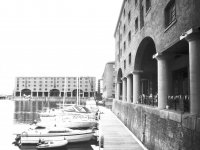
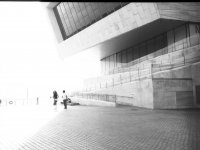
I could not wait so had a ride out to Liverpool One and Albert Dock last night and shot a strip

Bronica ETRS @50mm lens
Kentmere Pan 200 shot at box
Adox HC110 dilution H @ 9:30
Two images slight horizon straighten otherwise no post processing

Comments please regarding improvements I could make to exposure and/or development. The really bright one I feel compelled to explain - the objective was to get the two people in the "light" side of the frame, I had metered both Light side and dark side and there was only a stop difference so I shot it at dark side settings.

Liverpool 1 1.jpg

Liverpool 1 2.jpg

Liverpool 1 3.jpg

Liverpool 1 4.jpg

Liverpool 1 5.jpg

Liverpool 1 6.jpg

Liverpool 1 7.jpg


Liverpool 1 9.jpg

Liverpool 1 10.jpg

Liverpool 1 11.jpg
 

Attachments

  • Liverpool 1 8.jpg
    Liverpool 1 8.jpg
    136.9 KB · Views: 2
Last edited:
There's nothing to suggest using contrast filters would benefit the OP.
Asides the fact the OP wants to increase contrast in the image recording phase.
 
OK Then, Test shots. WARNING PICTURE HEAVY

I could not wait so had a ride out to Liverpool One and Albert Dock last night and shot a strip

Bronica ETRS @50mm lens
Kentmere Pan 200 shot at box
Adox HC110 dilution H @ 9:30
Two images slight horizon straighten otherwise no post processing

Comments please regarding improvements I could make to exposure and/or development. The really bright one I feel compelled to explain - the objective was to get the two people in the "light" side of the frame, I had metered both Light side and dark side and there was only a stop difference so I shot it at dark side settings.

How are you metering the scenes? If I'm manually metering then I almost always use incident readings and generally get a well balanced exposure. Your exposures appear to be favouring the dark areas and losing the highlights as a result. This isn't necessarily a bad thing (providing the exposure discrepancies are not too severe) as, with many negative films, it's much easier to recover detail from the highlights than from the shadows, but it does also depend on how you are developing / post processing the images too.
 
Last edited:
I am incident metering and developing as detailed. I have not used or developed this film before but straight off the bat I am encouraged. There is no post processing on these at all. I have had a mess about in capture one but cannot recover much at all really from the highlights.

On several of the photos I waited until the light adjusted to exactly match the settings, No Under or over. Not even half a stop.
 
Last edited:
Could I ask for clarification on a few points?

When you say that you metered both light and dark sides, do you mean you took two incident readings, one in sunlight and one in shade?

What temperature were you developing at, since that's as important as the time?

What was your meter, and have you checked it?
 

OK Then, Test shots. WARNING PICTURE HEAVY

I could not wait so had a ride out to Liverpool One and Albert Dock last night and shot a strip

Bronica ETRS @50mm lens
Kentmere Pan 200 shot at box
Adox HC110 dilution H @ 9:30
Two images slight horizon straighten otherwise no post processing

Comments please regarding improvements I could make to exposure and/or development. The really bright one I feel compelled to explain - the objective was to get the two people in the "light" side of the frame, I had metered both Light side and dark side and there was only a stop difference so I shot it at dark side settings.

View attachment 458400

View attachment 458401

View attachment 458402

View attachment 458403

View attachment 458404

View attachment 458405

View attachment 458406


View attachment 458408

View attachment 458409

View attachment 458410

Can you share a few phone pictures of the negatives for the above, against a bright uniform background?

It's very difficult to comment on exposure and development without seeing the negatives.
 
Thanks for that,

I don't have a light box any suggestions?

I think I have some opaque white plastic, i could illuminate that from below with a strobe or something?
 
figured I am looking at a light box all day. :) Exposure compensation +2 to avoid GREY.
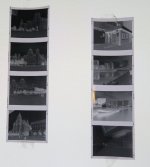
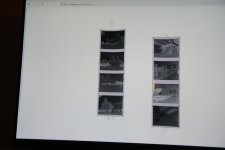
Test strips 2.jpg

Test strips.jpg
 
hope that ok and you did not mean individually.
 
Thanks for that,

I don't have a light box any suggestions?

I think I have some opaque white plastic, i could illuminate that from below with a strobe or something?
You can use a tablet, iPad what ever, just generate a bright white image over the entire screen and lay the negatives on the screen to photograph them with your phone or digital camera.


Edit: our posts crossed. That is the idea.

Some of them look great, some of them a bit over exposed and too dense. Top right and third down right look good.
 
Last edited:
Could I ask for clarification on a few points?

When you say that you metered both light and dark sides, do you mean you took two incident readings, one in sunlight and one in shade?

What temperature were you developing at, since that's as important as the time?

What was your meter, and have you checked it?
Sorry Stephen I don't know how I missed your post,

YES

20.2 degrees

My Meter is Minolta Auto meter V f - unchecked!

How do I check it? my other cameras are matrix or spot metering

EDIT: Checked against free phone app and more or less the same
 
Last edited:
Thanks for all your help guys,

I think the penny has dropped and I need to shoot another roll.
 
figured I am looking at a light box all day. :) Exposure compensation +2 to avoid GREY.

View attachment 458455

View attachment 458456

Hi Barney

This helps a lot thanks.

Many of these are strongly overexposed if your purpose is scanning. The most problematic are top left, left strip and bottom right, right strip.

They're also possibly moderately overdeveloped, but that is more a matter of taste.

The strong density in most of these means that the scanner is doing 'extra work' in trying to reconstruct the full dynamic range of the scene from the very compressed data in the negatives.

If you fix that overexposure first, you will have removed one source of error and your post processing will be vastly more straightfoward.

Notice that errors in exposure and development have a strong impact on grain size, structure, and halation of the highlights, so contrary to popular belief it is very difficult to 'fix' completely a less than optimal negative by acting in post processing alone.
 
Last edited:
Small point.... I've tried a few free light metering apps for my phone (using "Exposure" presently). None have readings that agree with my metering cameras.
My present app had to have -2 stops applied to get it to agree with readings from my TTL metering cameras. (which have generally worked very well). So I have "calibrated" my light meter app to match my best metering cameras. So far, I am happy with the app metering.
 
Asides the fact the OP wants to increase contrast in the image recording phase.
Contrast filters alter (not necessarily increase) the tonal values of different colours. Saying he 'needs a filter' is misleading at best.
 
Contrast filters alter (not necessarily increase) the tonal values of different colours. Saying he 'needs a filter' is misleading at best.
You are so 1000% correct.
I apologise for my unbounded ignorance.
 
Back
Top