Depth of field and blur

JohnN

Suspended / Banned
Messages
6,359
Name
John
Edit My Images
Yes
Evenin' all,

Something I've been struggling with for a bit is when I switch to AV mode (my preferred for a nice depth of field) I often get blur.

A quick trawl through my (or more accurately my wife's hijacked) flickr and you'll see small images that look okay but once you zoom in there almost always that accursed blur :(

Another thing I like to do is use what I call "paparazi" mode so capture lots of images and sheer bulk and elimination sometimes the nice look or pose from a moving target (most often my daughter who is a contact source of fun images)

Anyway if you could point me in the right direct.

Oh, 90%+ of the time I'll not be using a tripod because I find them cumbersome and by the time I'd be setup the moment would have gone anyway.

Cheers for any help.

John
 
you need to post a picture complete with exif info.. but at a guess your shutter speed is too slow..
 
Not 100% clear what your asking here John.

Are you saying you want pictures with a blurred background (shallow depth of focus) ?

If as you say you wish to use AV mode then select a wide aperture which is a lower number. In addition to getting a more shallow depth of focus you should be able to use faster shutter speeds than with a small aperture which (as you don't want to use a tripopd) should enable you to keep your subject free of "blur"

If you're lens doesn't have an aperture big enough for you to take pictures with a shutter speed fast enough to avoid blur then you should look at increasing the ISO setting on your camera as your lens isn't 'fast' enough.

If I was you I'd be looking to play around with your three variable settings (Aperture, Shutter Speed & ISO) in Manual mode.

Hope that makes sense.

If not - show us some examples and I'm sure folk can advise better.
 
I had thought to post, but if I recall the image allowed image size is quite small.

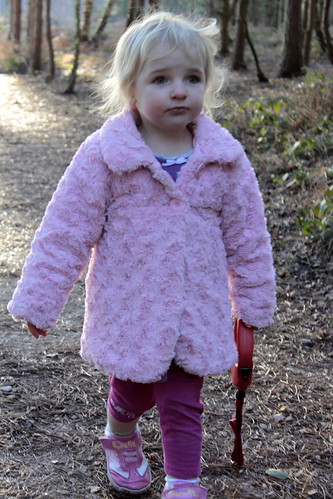
Heres one though (apologises for it being quite a poor piccy but is sore of shows what I mean - I have done better honest :))

4356104153_43d7d8fb08.jpg


You;re right in that the shutter speed is slow but AV mode is dictating that part for me :(

Anyway heres the data too (sorry its so long - I'm relatively new so don't know what data might be important - who knows maybe someone will spot something in there that is fundamentally wrong :)):

Camera: Canon EOS 500D
Exposure: 0.013 sec (1/80)
Aperture: f/5.6
Focal Length: 55 mm
ISO Speed: 500
Exposure Bias: 0 EV
Flash: Off, Did not fire

File Size: 5.8 MB
File Type: JPEG
MIME Type: image/jpeg
Image Width: 3168
Image Height: 4752
Encoding Process: Baseline DCT, Huffman coding
Bits Per Sample: 8
Color Components: 3
X-Resolution: 96 dpi
Y-Resolution: 96 dpi
Date and Time (Modified): 2010:02:11 15:34:24
White Point: 0.313 0.329
Primary Chromaticities: 0.64 0.33 0.21 0.71 0.15 0.06
YCb Cr Coefficients: 0.299 0.587 0.114
YCbCr Positioning: Co-sited
Exposure Program: Aperture-priority AE
Date and Time (Original): 2010:02:11 15:34:24
Date and Time (Digitized): 2010:02:11 15:34:24
Metering Mode: Multi-segment
Sub Sec Time: 53
Sub Sec Time Original: 53
Sub Sec Time Digitized: 53
Color Space: Uncalibrated
Focal Plane X-Resolution: 5315.436242 dpi
Focal Plane Y-Resolution: 5342.32715 dpi
Custom Rendered: Normal
Exposure Mode: Auto
White Balance: Auto
Image Unique ID: 585d8da34f4f66969fe6c30fc50d1e94
Scene Capture Type: Standard
Gamma: 2.2
Macro Mode: Normal
Quality: Fine
Canon Flash Mode: Off
Continuous Drive: Continuous
Focus Mode: AI Focus AF
Record Mode: JPEG
Canon Image Size: Large
Easy Mode: Manual
Digital Zoom: None
Contrast: Normal
Saturation: Normal
Camera ISO: Auto
Metering Mode: Evaluative
Focus Range: Not Known
Canon Exposure Mode: Aperture-priority AE
Lens Type: Canon EF-S 18-55mm f/3.5-5.6 IS
Long Focal: 55 mm
Short Focal: 18 mm
Focal Units: 1/mm
Max Aperture: 5.7
Min Aperture: 36
Flash Activity: 0
Flash Bits: (none)
Zoom Source Width: 0
Zoom Target Width: 0
Manual Flash Output: n/a
Color Tone: Normal
Focal Plane XSize: 1615.47 mm
Focal Plane YSize: 438.68 mm
Auto ISO: 100
Base ISO: 519
Measured EV: 3.88
Target Aperture: 5.7
Target Exposure Time: 1/81
White Balance: Auto
Slow Shutter: None
Sequence Number: 0
Optical Zoom Code: n/a
Flash Guide Number: 0
Flash Exposure Comp: 0
Auto Exposure Bracketing: Off
AEBBracket Value: 0
Control Mode: Camera Local Control
Measured EV2: 3.75
Bulb Duration: 0
Camera Type: EOS High-end
NDFilter: Unknown (-1)
Canon Firmware Version: Firmware Version 1.0.9
Serial Number: 0530128443
Highlight Tone Priority: Off
Camera Temperature: 14 C
Camera Orientation: Rotate 270 CW
Focus Distance Upper: 5.27
Focus Distance Lower: 1.82
Color Temperature: 5200
Picture Style: Faithful
High ISONoise Reduction: Low
Auto Lighting Optimizer: Standard
Firmware Version: 1.0.9
File Index: 5577
Directory Index: 100
Canon Model ID: EOS Rebel T1i / 500D / Kiss X3
AFMode: Single-point AF
Num AFPoints: 9
Valid AFPoints: 9
AFArea Widths: 115 115 115 162 200 162 115 115 115
AFArea Heights: 153 153 153 105 199 105 153 153 153
AFPoints Selected: 8
Original Decision Data Offset: 0
Bracket Mode: Off
Bracket Value: 0
Bracket Shot Number: 0
Raw Jpg Size: Large
WBBracket Mode: Off
WBBracket Value AB: 0
WBBracket Value GM: 0
Live View Shooting: Off
Flash Exposure Lock: Off
Lens Model: EF-S18-55mm f/3.5-5.6 IS
Internal Serial Number: Q0464109
Dust Removal Data: (Binary data 1024 bytes, use -b option to extract)
Tone Curve: Standard
Sharpness: 0
Sharpness Frequency: n/a
Sensor Red Level: 0
Sensor Blue Level: 0
White Balance Red: 0
White Balance Blue: 0
Digital Gain: 0
WBShift AB: 0
WBShift GM: 0
Measured RGGB: 568 1024 1024 957
Color Space: Adobe RGB
VRDOffset: 0
Sensor Width: 4832 (72-4823 used)
Sensor Height: 3204 (31-3198 used)
Black Mask Left Border: 0
Black Mask Top Border: 0
Black Mask Right Border: 0
Black Mask Bottom Border: 0
Color Data Version: 7 (500D)
White Balance RGGB Levels: 1910 1024 1024 1509
Color Temperature: 4690
WB_ RGGBLevels Measured: 1867 1023 1024 1527
Color Temp Measured: 4570
Raw Measured RGGB: 155125 277935 276337 257954
Peripheral Lighting: On
Peripheral Lighting Value: 62
Peripheral Lighting Setting: On
Exposure Level Increments: 1/3 Stop
ISOExpansion: Off
Flash Sync Speed Av: Auto
Long Exposure Noise Reduction: Auto
High ISONoise Reduction: Low
Highlight Tone Priority: Disable
Auto Lighting Optimizer: Standard
AFAssist Beam: Emits
Mirror Lockup: Disable
Shutter- AELock: AF/AE lock
Set Button When Shooting: Quick control screen
LCDDisplay At Power On: Display
Add Original Decision Data: Off
Compression: JPEG (old-style)
 
Camera: Canon EOS 500D
Exposure: 0.013 sec (1/80)
Aperture: f/5.6
Focal Length: 55 mm
ISO Speed: 500
Exposure Bias: 0 EV
Flash: Off, Did not fire


AV will always 'dictate' your shutter speed. You (by choosing AV) have chosen the aperture so the camera will select the required shutter speed to generate what it deems to be the correct exposure.

The ISO is already up to 500 and to be honest the exposure on this shot looks OK to me ?

I don't really see too much blur and to be honest - 1/80th of second should be fast enough to avoid shake at 55mm even on a none stabilized lens.

To me your settings look OK.

Perhaps it's the focus that you should be thinking about ?
 
Are you saying you want pictures with a blurred background (shallow depth of focus) ?

Yeah, thats pretty much it, but being a total pain I'd want to snap lots of shots to capture a nice image too and have started resorting to TV mode at 500 which I'm sure is overkill!

Anyway another example would be this:

4330625640_02134493b2.jpg


Again I know a rubbish picture but shows the blur more dramatically.

Main metadata below:

Camera: Canon EOS 500D
Exposure: 0.125 sec (1/8)
Aperture: f/4.0
Focal Length: 55 mm
ISO Speed: 400
Exposure Bias: 0 EV
Flash: On, Fired

File Size: 5.6 MB
File Type: JPEG
MIME Type: image/jpeg
Image Width: 4752
Image Height: 3168
Encoding Process: Baseline DCT, Huffman coding
Bits Per Sample: 8
Color Components: 3
Orientation: Rotate 270 CW
X-Resolution: 72 dpi
Y-Resolution: 72 dpi
White Point: 0.313 0.329
Primary Chromaticities: 0.64 0.33 0.21 0.71 0.15 0.06
YCb Cr Coefficients: 0.299 0.587 0.114
YCbCr Positioning: Co-sited
Exposure Program: Aperture-priority AE
 
Hehe sorry dinners I keep writing my posts as you replay :)

With that first pic, yeah focus definitely off, I think at the time I was scuttling backward trying to keep her in shot was she walked forward.

Just spotted the time so I'm off to bed but thanks for the feedback so far
 
You're indoors on this one (I think) which is different thing all together.

I think this time you have your shallow depth of focus from f4 that you desire but the blur in the hair is probably just down to the movement of the hair being too fast for the shutter speed.
 
The ISO is already up to 500 and to be honest the exposure on this shot looks OK to me ?
that would be an under exposed shot..
http://farm5.static.flickr.com/4051/4330625640_02134493b2.jpg

Again I know a rubbish picture but shows the blur more dramatically.

Main metadata below:

Camera: Canon EOS 500D
Exposure: 0.125 sec (1/8)
Aperture: f/4.0
Focal Length: 55 mm
ISO Speed: 400
Exposure Bias: 0 EV
Flash: On, Fired

File Size: 5.6 MB
File Type: JPEG
MIME Type: image/jpeg
Image Width: 4752
Image Height: 3168
Encoding Process: Baseline DCT, Huffman coding
Bits Per Sample: 8
Color Components: 3
Orientation: Rotate 270 CW
X-Resolution: 72 dpi
Y-Resolution: 72 dpi
White Point: 0.313 0.329
Primary Chromaticities: 0.64 0.33 0.21 0.71 0.15 0.06
YCb Cr Coefficients: 0.299 0.587 0.114
YCbCr Positioning: Co-sited
Exposure Program: Aperture-priority AE

ok you're shooting at 1/8th of a second, the flash has frozen the shot at the end of the exposure.

best way to learn the ins and outs of aperture and shutter speed in photography is to put your camera in M (manual) and have full control over everything that happens in a scene
 
I must confess to being a little wary of M mode just now as I'm very much learning still and don't fully understand the relationships between the settings.

I get the impression from reading threads that M is the way to go, but how on earth do you manage to fully understand what you want & get the settings right in just a couple of seconds - I suspect you'll say experience (which I why I love digital so such - playing about is free :))
 
Have you read "Understanding Exposure" by Bryan Peterson?

It will increase your knowledge of the relationship between light, ISO, Aperture and Shutter.
 
I must confess to being a little wary of M mode just now as I'm very much learning still and don't fully understand the relationships between the settings.

Wel theres only three

You already know what fstop you want for the depth of field so go set that..

now you only have two to worry about

You want to catch movement and your shutter speeds are too low.. so set your shutter for 500

Now you only have one to worry about

Point camera at subject and move iso until your bar is showing a perfect exposure..

thats it :)


However life is never that simple and the above will work nicely in perfect lighting...

If a bright day and your iso has gone as low as you want then up your shutter speed.. you can keep upping the shutter speed with no adverse effect... if a dull day and your iso has gone as high as you like to go (as higher produces more noise) then either open your lens (choose smaller fstop) or lower the shutter speed..

Depending on the lighting/conditions its up to you to decide if you want slower/faster shutter or more/less noise or bigger/smaller dof

my advice is to set two of the variable to what you would like... set lens to f4, set iso to 4oo then set shutter speed to whatever shows a good exposure... if shutter too slow then up the iso and you can then up the shutter


hows that? :)
 
@Kipax Thats perfect and made me laugh :)
@PsiFox I've not read the book but I have seen it mentioned so I think I'll pick up a copy

Cheers everyone
 
Hi John,

I concur with buying the book. I have read mine at least 5 or 6 times and still get useful information out of it.

I also concur that it is worth going manual to make sure you understand the relationship between the aperture and shutter speed.

Looking at your exif data you also appear to have ISO set to auto. I suggest you turn this off and control how you want it set. Only then will be close to getting what you want from the picture.

Best regards

Chris
ps. Someone was selling the book in the for sales the other day. Not sure if it is still there, if not go to Amazon.
 
when you elect to choose aperture priority you then let the camera choose the speed
it can be too low for long lenses where the ideal speed is 1/focal length...that is for a 300mm lens...1/300
this may not be possible with your iso setting
also long lenses dont give great amounts of dof so you are wasting aperture and sacrificing speed
 
It's worth remembering also that the reciprocal rule (1/focal length etc.) only holds true for stationary subjects. With moving subjects such as those in your two examples you'll need to use an even faster shutter speed (I suspect you would have needed at least 1/200th to freeze the movement in your first pic)

HTH :)
 
In your first pic it's mainly a focus problem - although the picture is very small to see detail - you can post up to 800px longest side! I would have used a little fill flash i that shot to brighten it up and add a bit more contrast. The second pic is very good - the blur greatly improves the picture!
 
Depending on what you want to do with the pictures, you may as well whack the ISO up to 1600 when there isn't much light. A bit of grain in the image is far better than motion blur!

1/80s shutter speed in your first picture is fine for someone that's posing, but I'm guessing your subject moves quite fast :), so you'll either need to use flash or get the speed up (by increasing ISO or using a brighter lens).

1/8s in your second pic is way too slow. But because you used flash, you've kinda got two images - the non-flash one with motion blur, and then the image that was captured when the flash went off (nice and sharp).
For future reference, you could probably have taken that shot at 1/200s and had a far sharper picture of equal brightness (all the goodness of flash, without the added motion blur)

As an alternative to buying a book, read this: http://digital-photography-school.com/learning-exposure-in-digital-photography
And follow some links in that website - free, easy to understand, and really helpful :)
 
Back
Top