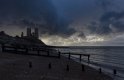
Cyan & Magenta banding in clouds

SeanJ

Suspended / Banned
Messages
12
Edit My Images
No
Hi,

I have constant problems with ugly cyan and magenta banding in dark clouds or stormy skies. It's really hard to fix in post too because whatever I try just seems to make it noisier and more pronounced. I have had a Canon 5D mk2, 5D mk3 and now a 5DS and it has been a problem on all of them. Is this something common to all DSLR cameras or just Canon? Is it something well known in digital photography? Is there a way to avoid or minimise it in-camera? Is there an 'easy' way to fix it in post that I don't know about?

Many thanks.

SJ.
 
Are you able to post a picture? What settings are you using and are you using a polariser or any other filters? I guess you've tried another lens? I use Nikon myself and haven't had this problem but banding is more common with clear skies I find
 
Last edited:
Are you using JPEGs on your camera?

This is a common problem when over processing JPEGs which can result in the banding you describe.

If you are using JPEGs in camera then either change to RAW or convert the JPEGs to TIFF files in DPP (which should be on the discs you got with the camera) and then edit the TIFF files which should mitigate some of the problems.
 
Hi,

Thanks for your responses.

I always shoot RAW fully uncompressed. I've had this problem with a 24-105mm f4 kit lens and a 16-35mm f4 lens. I usually shoot at f8. Here's a shot I took recently with my 5DS using my 16-35mm at f8 and 100 ISO. I did use a polariser on this shot but I still get the problem on shots when no filter was used. I haven't really done anything to it in post yet but you can already see some significant cyan/magenta banding in the main part of the sky. Once something like this appears everything I do just seems to make it muddier or uglier and I generally end up having to crop out the offending area or discard the entire image...


test3.jpg
 
Last edited:
Does seem a bit strange - does it happen only when pointing into the light and do you use grad filters? Just wonder if the camera is struggling with the dynamic range...
 
It doesn't seem to be just when the camera points toward the light source. In most cases the light source is hidden. Plus in this image it's occurring in an area that doesn't have a particularly great distance between the brightest and darkest tone. It only seems to happen in areas of predominently grey and blue tones. I wouldn't mind it so much if I knew an effective way to get rid of it in Lightroom or Photoshop.

Thanks again.

SJ.
 
That's very odd. My initial reaction is that it's a reflection from one or more filters,but you say it also happens when you aren't using a filter. Do you have a skylight or UV filter on the lens by any chance?

Another option is that it's a light leak at the lens mount. One thing you could try is to shroud the camera and lens completely with a cloth except for the lens opening and take a picture, then repeat without the cloth and see if there is any difference.
 
10499541_1458316924438672_8398410514985173963_o.jpg


Have you set up your Lens correctly?
 
Hi,

I'm not sure what you mean by 'setting up' my lens. Do you mean calibrating it for accurate focus? It's already set up in camera for lens aberration etc.
 
Last edited:
Do you use Lightroom? If so, try using the dehaze tool with a negative value; it's worked on some shots of mine with similar issues
 
Which colour space, I tried to look at the exif but it's been removed.
I remember having similar problems with my 5Dii for a week or two until I put everything on sRGB.
 
Sounds like a monitor 'issue'. What monitor / PC / Mac are you using?
I never used to get issues like this on my Dell but now get it on my Mac constantly.
One way to check it to convert the image to mono - still there? Another way is to colour sample the area or a point, the readout will tell you whether its a monitor issue or something else.
 
Last edited:
Hi

Thanks for the replies.

I never use sRGB for image capture or editing. The reason I don't is because it's the narrowest colour space. I have my camera set to Adobe RGB and when I'm in Photoshop or Lightroom I have everything set to Pro Photo. Once I'm done I may then convert to sRGB.

NeilA1975 my monitor is not a pro monitor by any stretch of the imagination. Could you see the issues I described in the shot I posted? If other people can see the issue I'm guessing it's not my monitor but I'll try the tests you suggest. I'm still getting the issue. Some stuff I took yesterday displays the same problem.

Very frustrating.
 
Hi

Thanks for the replies.

I never use sRGB for image capture or editing. The reason I don't is because it's the narrowest colour space. I have my camera set to Adobe RGB and when I'm in Photoshop or Lightroom I have everything set to Pro Photo. Once I'm done I may then convert to sRGB.

NeilA1975 my monitor is not a pro monitor by any stretch of the imagination. Could you see the issues I described in the shot I posted? If other people can see the issue I'm guessing it's not my monitor but I'll try the tests you suggest. I'm still getting the issue. Some stuff I took yesterday displays the same problem.

Very frustrating.

Can you post a link to downlad the original raw file?
 
You say you've had same problem with different bodies..... what's the common factor? Same lens..... filters?
 
Back
Top