
Credibility of iPhoto on Mac

josh-g

Suspended / Banned
Messages
8
Edit My Images
Yes
Hi guys,

I'm an absolute amateur at taking and editing photos.
So far I've only ever used iPhoto to crop my pictures and use the "enhance" function.

Here's one I did today of my Madagascan day gecko..
The first image is the original photo I took and the second is the cropped and "enhanced" one.
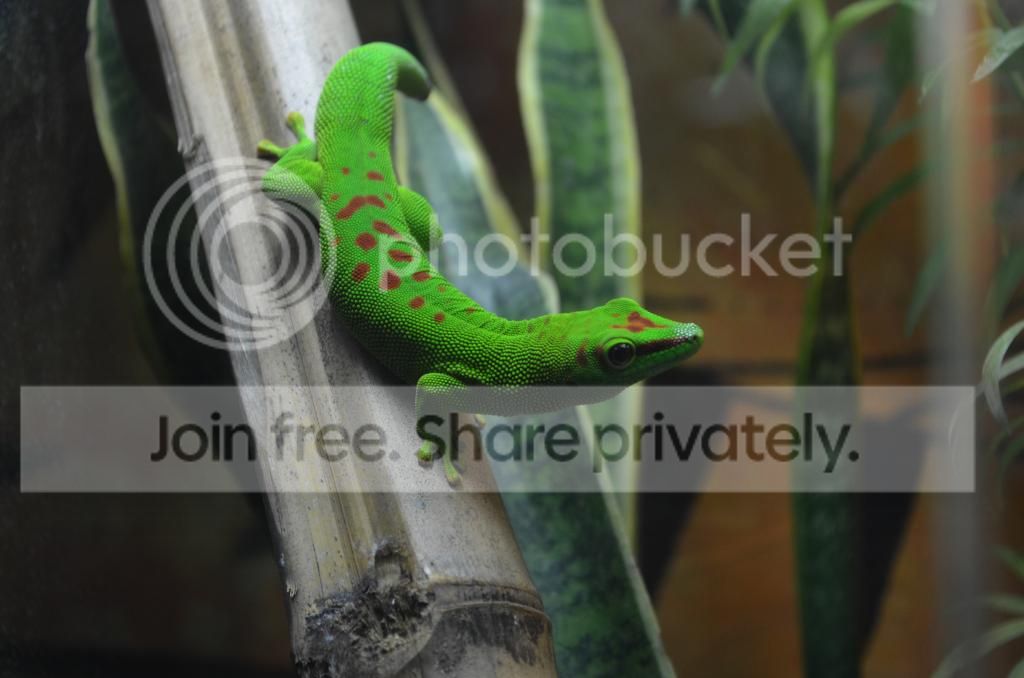
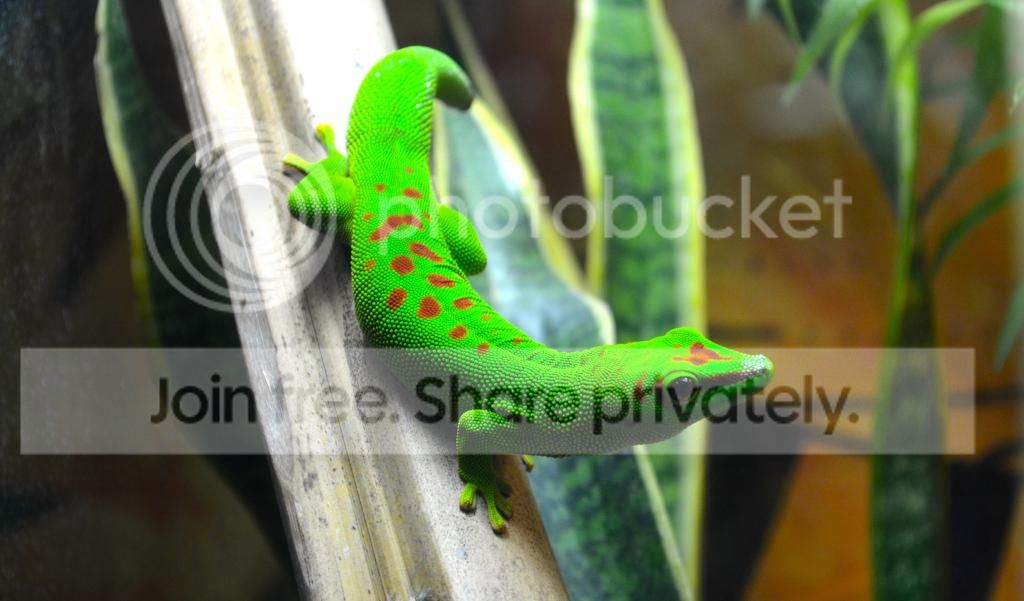


So what do you think, is the second one better?
What's good about it or what's bad about it?

Discuss!

Josh
 
Josh

you have lost the detail in the tail and the highlight on the nose is worse in your second image, plus you have intruded "blown high;lights" on the piece of wood that the geko is on - also you have two difference sizes
 
Hi Bill,
Yes you're right on all those things. I think iPhoto just likes to brighten the brightest, if that makes sense.The subject of the photo has been "enhanced" the most, which is why it stands out more than in the first photo… maybe.
What is a "blown highlight"?
The different sizes is caused by the crop yes? Is there an "acceptable" level of cropping?

Josh
 
Hi Bill,
Yes you're right on all those things. I think iPhoto just likes to brighten the brightest, if that makes sense.The subject of the photo has been "enhanced" the most, which is why it stands out more than in the first photo… maybe.
What is a "blown highlight"?
The different sizes is caused by the crop yes? Is there an "acceptable" level of cropping?

Josh

Morning Josh

Have you just increased the exposure?

Simple processing would be
decide what crop you want and keep it the same physical size, (or format), as the original image, unless you wanted to go to another recognised format, e.g. 1 x 1 or say 16 x 9.
Then I would check the white balance .. effectively setting the colour temperature of the image .. warm or colder
and then look at shadows and highlights …. and try to improve these whilst keeping as much detail as possible
and then maybe exposure, contrast and tone
clarity and saturation

all the above adjustment should be possible in the simplest image processing program

a blown white is when you increase the exposure of highlights to such a level that you loose all detail in the light areas

but I'm no expert but there are a few on here who can offer good advice … Rich, (Lynne), is a real expert

I'll have a quick go

Lizard_not_mine.jpg
 
Last edited:
Josh.

If I were you I would forget the Enhance feature in iPhoto, it's very basic and in my opinion adds nothing.

If you don't mind I had a quick play with your image and adjusted the settings as follows:-

Exposure. 0.19
Contrast. 1
Saturation. 50
Highlights. 58
Sharpness. 29

I also did a small amount of cropping to remove some of the leaves on the right, which I found distracting.
Please feel free to remove if you want. In iPhoto, there is no facility to lighten selective shadow areas, so I left as is, but I think you could have a play with shadow adjustment to lighten the underside of the animal, but it would also lighten the background.


View attachment 26336
 
Last edited:
Bill, I didn't use anything which said it increased exposure, but it would look like that's what it's done.
Thanks for the hints!
I like what you've done with the image.

Alan, I don't plan on using it any more! I'm going to get a proper bit of software.
I like the first one you've done. It looks like an "antique" photo from a reptile book form the 80's. Probably not what you were going for but I like it!

Josh
 
Bill, I didn't use anything which said it increased exposure, but it would look like that's what it's done.
Thanks for the hints!
I like what you've done with the image.

Alan, I don't plan on using it any more! I'm going to get a proper bit of software.
I like the first one you've done. It looks like an "antique" photo from a reptile book form the 80's. Probably not what you were going for but I like it!

Josh

Josh, you can probably grab a copy of an early LR, (Lightroom), application - LR 2 or LR 3 - from Adobe on the Web ……. I think that they give that away free ……. it will cope with all your "learning" needs and is very good

The latest LR 5 is £100 and is well worth it
 
Last edited:
auto enhance can be just as bad as the auto mode on the camera. In general it looks to increase the contrast and possibly the exposure as these are the common problems with cheap camera snaps. It can easily get it quite wrong from time to time. That version of iphoto clearly doesn't mind blown highlights. Oh well, expose properly and use manual adjustments next time.
 
Bill, I didn't use anything which said it increased exposure, but it would look like that's what it's done.
Thanks for the hints!
I like what you've done with the image.

Alan, I don't plan on using it any more! I'm going to get a proper bit of software.
I like the first one you've done. It looks like an "antique" photo from a reptile book form the 80's. Probably not what you were going for but I like it!

Josh
Don't forget that there are loads more controls for adjusting a photo in iPhoto besides the auto buttons. It looks simple however there are some very powerful tools there without the need to buy a proper bit of software.

Then there is expected the replacement of Aperture called Photo due in the early part of next year. Looking at the hooks that will be available through operating system frameworks it should become super fast and very powerful.
 
Paul- your input shows that for the likes of me with simple needs / ability iPhoto is 'capable' - Thanks
 
best advice is buy aperture for the mac its really good
 
Back
Top