Corrupt Micro SD Card

Blured eyes

Suspended / Banned
Messages
95
Edit My Images
No
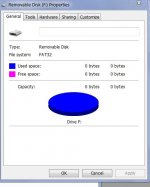
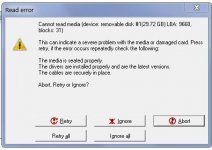
Used in a phone for a few years no problem and suddenly cannot access the image folders on it and phone says card is corrupted. Tried it in another phone and that says the same. Put it in a card reader in the computer and norton started to scan it and I could see it running through its scan and running throuth all the folders - Family - work- holiday ect - all the folders on the card, it took a long while but after I could still not open it.
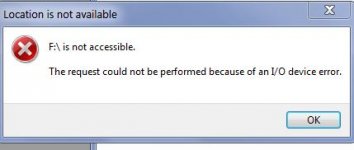
Windows sees it as a drive but only after what seems like an age and if i try to access it the computer freezes, lost my desktop at one stage.
I have tried a scandisk recovery program and that "cannot access data"
I have tried chkdsk and after a while i get a message "cannot open volume for direct access"
Some screen shots of notices
So any ideas please.
 

Attachments

  • card.JPG
    card.JPG
    21.3 KB · Views: 3
  • cardre.JPG
    cardre.JPG
    38.2 KB · Views: 3
  • cardure.JPG
    cardure.JPG
    35.4 KB · Views: 3
Ai says to try recovery software like Recuva, Photorec or Disk Drill (which is apparently free, up to a point). It's encouraging that you can access it, but that's as far as it goes.
 
Ai says to try recovery software like Recuva, Photorec or Disk Drill (which is apparently free, up to a point). It's encouraging that you can access it, but that's as far as it goes.
Thanks yes I have seen Recuva mentioned a few times.
When I try to access it in the phone it says corrupted -I have an option would you like to make this card "removable media" or "internal storage" but as yet I have not gone down that route as I think that will format the card and loose everything.
As my name - I am getting blurred eyes now so wiill have a look at recuva tomorrow
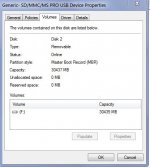
Tried through device manager and get this
 

Attachments

  • cardde.JPG
    cardde.JPG
    39.6 KB · Views: 5
At this time time....

Remove from the phone and set it aside.
When you run a recovery software such as Recuva use your card reader.

NB I have latterly used ProGrade Recovery Pro
In trial mode it runs the recovery and reports what it has found but to actually recover the files you need to pay for the software.
Apart from recovering the files I needed to, I also tried it on an SD card that I know I had formatted at least once and it recovered a surprising number of image files. This latter was just a test of its capabilities.
 
At this time time....

Remove from the phone and set it aside.
When you run a recovery software such as Recuva use your card reader.

NB I have latterly used ProGrade Recovery Pro
In trial mode it runs the recovery and reports what it has found but to actually recover the files you need to pay for the software.
Apart from recovering the files I needed to, I also tried it on an SD card that I know I had formatted at least once and it recovered a surprising number of image files. This latter was just a test of its capabilities.
That's why, when I'm chucking a card away, I do a complete format rather than a quick format which only deletes the drive 'map'. When I'm getting rid of a hard drive, I take it outside and put a pickaxe through it, that pretty much solves any security problems :). Mind you, I'm probably really not important enough to have anyone go through my hard drives.
 
That's why, when I'm chucking a card away, I do a complete format rather than a quick format which only deletes the drive 'map'. When I'm getting rid of a hard drive, I take it outside and put a pickaxe through it, that pretty much solves any security problems :). Mind you, I'm probably really not important enough to have anyone go through my hard drives.
I'm told formatting doesn't alter the recovery. You need to overwrite the data at least 3 times to stop expert recovery, I gather the security standard is seven overwrites.
I've had no bother recovering images from formatted cards, I had a customer who would regular as clockwork format her holiday snaps every year. When recovering the pics I got others going back years.
 
Recuver first found all the deleted files - some were unrecoverable but that didint matter as I didn’t want the deleted files I wanted the files that were on the card that 4 devices said was corrupted and I could not access. I then found an option in the recuver program to only look for un- deleted file which it now has and is going through the process of recovering them to another drive,
Says 9 hours though :oops: :$:oops: :$:oops: :$o_O and is stuck on 11% - so fingers crossed
 
Last edited:
I'm told formatting doesn't alter the recovery. You need to overwrite the data at least 3 times to stop expert recovery, I gather the security standard is seven overwrites.
I've had no bother recovering images from formatted cards, I had a customer who would regular as clockwork format her holiday snaps every year. When recovering the pics I got others going back years.
I'd better have my SD cards join my hard drives in pick-axe club in future then. :(
 
New update - it jumped from 11% to completed when my back was turned after around 1.40 hours. Out of about 700 images in files on the card it could not recover only about 80 I am wondering if those were in the file that caused to corruption.
Big thanks for all of your help :)
 
Last edited:
Next question. Is it safe to re format the card in the phone and carry on using it, starting from scratch. Or is it risky since it has suffered a corruption event.
Its a sandisk ultra 32GB micro
 
Next question. Is it safe to re format the card in the phone and carry on using it, starting from scratch. Or is it risky since it has suffered a corruption event.
Its a sandisk ultra 32GB micro
No, dont use it again. It might be fine, but and thats the big BUT. Why risk it they are cheap enough. The card probably has a faulty section, anything that writes to that section will be affected and that messes with the cards mind.
 
Last edited:
Next question. Is it safe to re format the card in the phone and carry on using it, starting from scratch. Or is it risky since it has suffered a corruption event.
Its a sandisk ultra 32GB micro

Bin it - don't even think twice.
 
If they are photos taken on the phone are those 80 files (along with the rest) in the cloud, automatically upload to apple or google.

At under a tenner for a new card just bin that one.
 
Last edited:
I'm told formatting doesn't alter the recovery. You need to overwrite the data at least 3 times to stop expert recovery, I gather the security standard is seven overwrites.
On a camera a quick format only marks the space as being available to overwrite. A full format only deletes the file mapping table (if your camera even offers it). A camera never actually deletes/overwrites the storage space, and it never does error checking/correction as part of that. The data is "unrecoverable" because the bytes are scattered and disassociated; but they are still there.

Many programs will not offer/do a secure format (full overwrite) of NVME storage; because that shortens the useful life of the card/drive.
 
Thanks everyone - right its not going back in. !!!
Its an android and didn’t use google backup.
it was used as a place to write photos and vid to so they didn’t use up the phones space. At some point I changed the default save area for camera photos from phone to card but then also made other folders with different apps that could not go on the card. So there is bit here and a bit there.
Recuver was very good.
 
When I'm getting rid of a hard drive, I take it outside and put a pickaxe through it, that pretty much solves any security problems :).
I did that with the drive sitting on some concrete, and it HURT! I never did manage to get the pickaxe through it, but after a dozen blows sitting on slightly softer ground, I did manage to severely dent it, which I reckon is good enough... Then personally put it into the humungous small appliances bin at the local tip, which mostly gets ground into little pieces. Hope that's enough!
 
I did that with the drive sitting on some concrete, and it HURT! I never did manage to get the pickaxe through it, but after a dozen blows sitting on slightly softer ground, I did manage to severely dent it, which I reckon is good enough... Then personally put it into the humungous small appliances bin at the local tip, which mostly gets ground into little pieces. Hope that's enough!
Hmm, pickaxe on concrete. You really didn't think that through, did you? :D
 
Bin the card! They're relatively cheap - certainly cheaper than even an hour of my time is worth to me!

As for hard drives, a couple of minutes with an angle grinder on both surfaces followed by a bit of folding makes my holiday snaps not worth the effort to recover!!!
 
I'm told a really powerful magnet or microwave work fairly well and knackering hard drives, best not to use your own microwave though.... Not tried this, but I did have a bakery that used to put the pies in tin baking cases in the microwave every day which was worth eating pies for :naughty:
 
When I was in the Air Force, we used to use a lot of video tapes with sensitive information on them. They were expensive and had to be erased and re-used and running them through a tape machine would have taken ages, so we had a de-gausser. It could erase an entire tape in about five seconds. It could also de-magnetise anything in the same five seconds so one had to keep things like digital watches and anything electronic well away from the machine. Probably a bit over-kill for disposing of an old hard drive every few years.
 
Back
Top