Copying movie files from D750

merv

Suspended / Banned
Messages
1,118
Name
Mervyn
Edit My Images
Yes
As a newcomer to movie/video recording with my Nikon D750, can I drag and drop the files from my memory card straight onto a pen drive for others to play on the devices eg computers?
I have heard about rendering. Do I need to take each clip into the likes of Adobe CC for rendering before it is of any use to others?
Merv
 
Always work on a copy is my best advice. So make a copy on your computer then try dragging the copy onto a pen drive and see if it works
 
Rendering won't be required until you start to do some editing, then the new sequence with bits cut out or adjustment applied needs to be 'rendered' as a new file.
A rendered file could be smaller than the original, bear in mind some older computers struggle to play even 1080p at high bitrate from the camera.
 
Can you explain what 'bitrate is please? I have goggled it and I don't understand what I am reading as the answers.

It goes on about codec and stuff - no idea what they are either.
 
Last edited:
You could think of it as how much data is packed into every second, a bit like resolution.
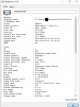
You can view a clip's bitrate (on windows) by right clicking the file and select media info.
For example here's a gopro clip and it's quite a high bitrate.
When rendering e.g. for youtube you could drop it to 20 or less and it would still look OK

Capture.JPG
 
Thank you - resolution I can get my head round ! I am now beginning to understand how newcomers to photography feel.
 
Back
Top