Little Man
Suspended / Banned
- Messages
- 1,062
- Name
- Sean
- Edit My Images
- Yes
Not so much a problem, but a niggle, at which i'm getting frustrated with.
I took some candid's at a mates, mum's wedding a month or so back, and as a present to say thanks to her for letting me take photos, I'm going to get them printed up and put into a little album for her to do as she pleases with.
In the RAW editor, they look spot on, nice, sharp etc, i'm happy with them. I converted them to JPEG, resized them, gave them a sharpen and posted them on here a couple of days after I took them, they looked the same as they did in the RAW editor, nice, sharp etc.
However, obviously I want the best possible quality when printing, so you print with the high res images right?
Frankly, the quality of the converted JPEG's look horrible, they don't look as smart, they've lost sharpness etc, but I know this is to be expected?
So, i've started organising for them to be printed, doing any PP to the converted JPEGS etc. I thought a sharpen would solve my problem with the softness, but it hasen't, they still don't look anything like they do in the RAW editor, and to be honest, i'm upset with it. (Not literally, but you get my point).
Can anyone help me out?
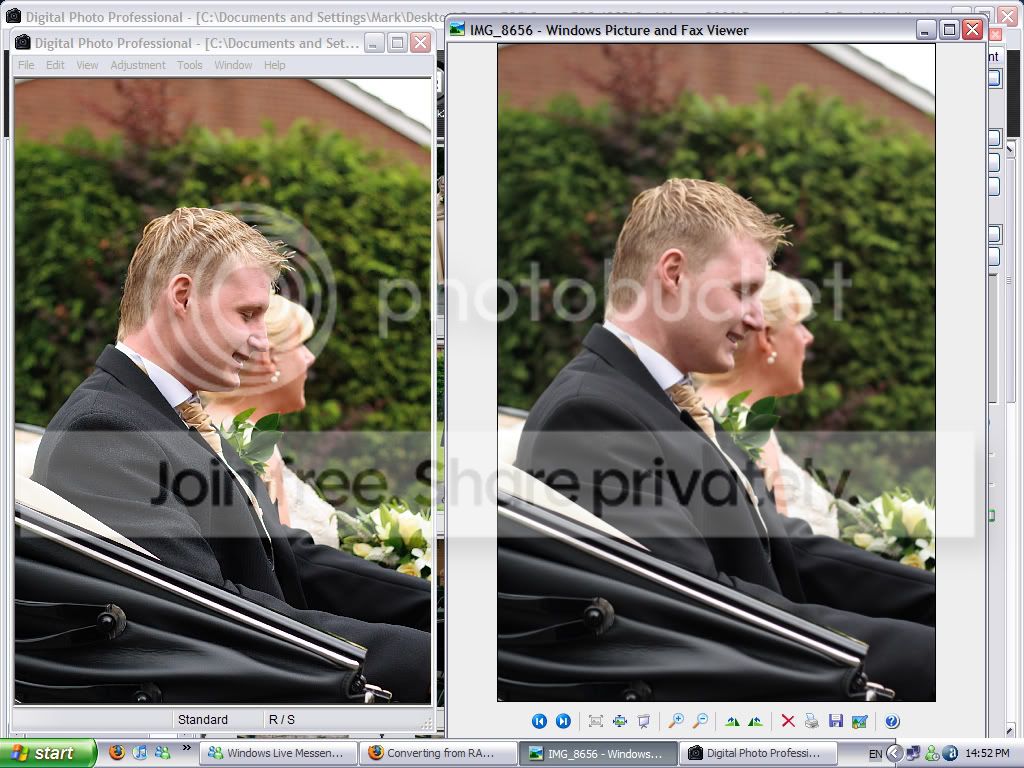
I'm going to try and get a print screen of the RAW photo and the JPEG photo side by side, hopefully showing the difference in quality.
I took some candid's at a mates, mum's wedding a month or so back, and as a present to say thanks to her for letting me take photos, I'm going to get them printed up and put into a little album for her to do as she pleases with.
In the RAW editor, they look spot on, nice, sharp etc, i'm happy with them. I converted them to JPEG, resized them, gave them a sharpen and posted them on here a couple of days after I took them, they looked the same as they did in the RAW editor, nice, sharp etc.
However, obviously I want the best possible quality when printing, so you print with the high res images right?
Frankly, the quality of the converted JPEG's look horrible, they don't look as smart, they've lost sharpness etc, but I know this is to be expected?
So, i've started organising for them to be printed, doing any PP to the converted JPEGS etc. I thought a sharpen would solve my problem with the softness, but it hasen't, they still don't look anything like they do in the RAW editor, and to be honest, i'm upset with it. (Not literally, but you get my point).
Can anyone help me out?
I'm going to try and get a print screen of the RAW photo and the JPEG photo side by side, hopefully showing the difference in quality.