
Colour shift after PP in CS4

Pete McC

Suspended / Banned
Messages
54
Name
Pete
Edit My Images
Yes
Anyone else get this? After tweaking a Raw file and getting all the colours and contrasts just right I go to email them or upload them on a web page as a jpeg and they look flat and lacking contrast and if anything leaning towards a yellow hue. These are images I've taken for clients and it's frustrating as I don't know what the heck I'm going to end up with, open them in photoshop again and they look ok. I don't know what's going on! I've taken a screen grab of the same image viewed in photoshop & preview on the Mac to show the difference, is there some setting I've missed someplace that says 'screw up the contrast & colour Y/N' ? I'm not a newbie to photoshop by any stretch either.. any ideas welcome!
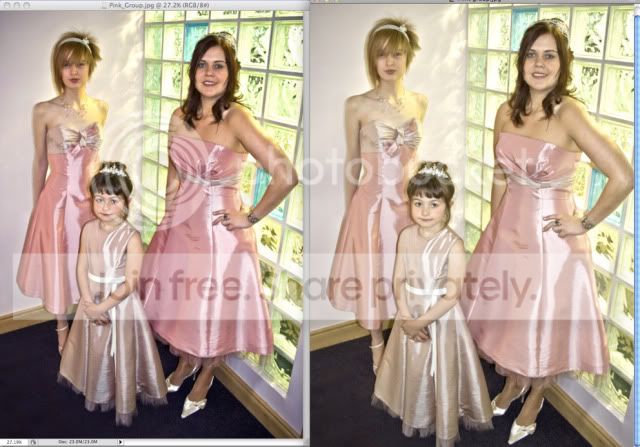
pink-difference.jpg
 
Are you using Adobe RGB as the colourspace in Photoshop? If so this may be the problem.

Try opting for sRGB for mail and web use. Non colour aware applications will either default to this or in the case of Macs revert to the monitor colourspace. Viewing images produced in Adobe RGB will look desaturated if viewed unconverted in sRGB or similar
 
Nope, Just did another batch and the colour profile is set at sRGB IEC61966-2.1 - same effect, as soon as you close ad open again in another program it's as dull as dishwater, really frustrated now!
 
wanna post a link to the original raw file as all the exif data is missing from the 2 you posted
 
Ok, I've uploaded the raw image onto my own webspace, link is:
www.spottydesign.co.uk/IMG_1747.CR2
and the jpeg after I tweaked it a bit:
www.spottydesign.co.uk/Pink.jpg
dunno what you'll get from this as you won't know what tweaks I've done and the jpeg may well look awful on your machine as I can't seem to get it to look the same in anything else as it does in photoshop.. which kinda baffles me and defeats the purpose of tweaking anything really!
 
Back
Top