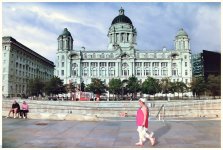
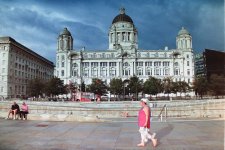
Colour casts on Film

Barney

Suspended / Banned
Messages
3,043
Name
Wayne
Edit My Images
No
What causes this?

I have noticed some images with a weird pink colour cast, is this feature from the developing and scanning or is it a characteristic of the film base. I have notice that some of my images have an oldie worldy look and yet others are clean and modern.

IS this down to the base and what colour base are each film?
 
Last edited:
IT is colour film shots of yours and lee's.

Pink

Are they developed at same place? or is it the base on the films

with lees it seems to be on any film on any camera, with yours its the portra's and the kodaks.

I have only used kodak gold and it seems to come out pretty normal my B+W shots are bothering me.
 
What causes this?

I have noticed some images with a weird pink colour cast, is this feature from the developing and scanning or is it a characteristic of the film base. I have notice that some of my images have an oldie worldy look and yet others are clean and modern.

IS this down to the base and what colour base are each film?
Hi Wayne,

seeing & correcting a colour casts is probably the hardest part of colour film developing and probably why some people avoid colour film; it's much easier now that it used to be with filters in the enlarger head!

During development the chemical temp is critical; 1/2 a degree WILL cause colour balance shifts - these can be corrected at the print stage/scan stage but it's a PITA having to keep modifying this due to inaccurate temp control - don't believe the YouTube videos about using a Souis Vide for the water bath - its ok for the odd colour film but not for regular developing IMO.

Everyone's eyes are different and some people just can't see a colour cast on an image.

Conversion software from the negative to positive is also different - you are basically trying to remove the 'pink' colour substrate of the film from the image and every film has a different shade of substrate.

Kodak Portra 160 6 x 6 Image (Home developed & scanned):


It's all about the steam. by Fraser White, on Flickr
 
Last edited:
Hi Wayne,

seeing & correcting a colour casts is probably the hardest part of colour film developing and probably why some people avoid colour film; it's much easier now that it used to be with filters in the enlarger head!

During development the chemical temp is critical; 1/2 a degree WILL cause colour balance shifts - these can be corrected at the print stage/scan stage but it's a PITA having to keep modifying this due to inaccurate temp contol - don't beleive the YouTube videos about using a Souis Vide for the water bath - its ok for the odd colour film but not for regular developing IMO.

Everyones eyes are different and some people just can't see a colour cast on an image.

Conversion software from the negative to positive is also different - you are basically trying to remove the 'pink' colour substrate of the film from the image and every film has a different shade of substarte.

Koday Portra 160 6 x 6 Image (Home developed & scanned):


It's all about the steam. by Fraser White, on Flickr

Hello Fraser,

Thanks for that, I was starting to convince myself I was going mad.

I have had a happy half hour going over my limited range of negatives and can see the subtle differences in the base on different films, this(assuming it is not a developing fault, which it could easily be with the amount of chops and changes I employ) must translate, however slight, through to the finished "look" of an image.

Just for clarity, do you mean every film, even of the same type, or each different type?

PS. Lovely job with the photo
 
Last edited:
Hello Fraser,

Thanks for that, I was starting to convince myself I was going mad.

I have had a happy half hour going over my limited range of negatives and can see the subtle differences in the base on different films, this(assuming it is not a developing fault, which it could easily be with the amount of chops and changes I employ) must translate, however slight, through to the finished "look" of an image.

Just for clarity, do you mean every film, even of the same type, or each different type?

PS. Lovely job with the photo

Each type of film should be the same e.g. Kodak Portra (This where very accurate temp control really helps) but different films even from the same manufacturer will be different; Portra 160 will be different from Portra 400. Silverfast allows yo to select the film in an attempt to succesfully remove the mask in the processing.
 
Last edited:
Just skipped back into the "show us your film shots" thread after reading this to have a peep and I see no pink colour casts in the last few images from @FishyFish . In fact I have always admired his home scanning, results I cannot replicate so I stick to lab scanning for 35mm and 120 and only scan LF at home. I find it easier to get one image right(ish) than 12 or more form the same roll.

I would be interested to see what you are seeing given your observations.

As mentioned above though, all different C41 stock will display different characteristics in colour and grain.
 
Is it a particular shot? I can't see any pink colour casts on my pictures.

Development should make no difference as long as it's done correctly. All C41 development is done the same way, unlike B&W which can vary significantly depending on the film and chemicals used.
Hi Nigel,

I am not being critical and apologies if it comes across as such. I am being inquisitive, where i see the pink is in the sky and cloud areas. of course I could be totally imagining it. my main concern are the different casts in my BNW images.

My processing and scanning is not a patch on yours. (y)

Edit; I cannot even take a photo with a sky in it. :(
 
Last edited:
Hi Nigel,

I am not being critical and apologies if it comes across as such. I am being inquisitive, where i see the pink is in the sky and cloud areas. of course I could be totally imagining it. my main concern are the different casts in my BNW images.

My processing and scanning is not a patch on yours. (y)

Edit; I cannot even take a photo with a sky in it. :(

No, don't worry, you didn't come across that way at all. :)

I was genuinely curious though as I can't see any pink colour casts on my recently posted pictures, even checking them on a number of different displays (home PC, work PC, phone, and iPad).
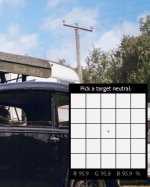
I also looked at them in Lightroom using the white-balance tool (which will show percentage of RGB in the individual pixels of a picture, and the white areas were uniform, e.g. in the screenshot below I sampled the white caravan roof next to the power pole.

Screenshot (2).jpg

How are you scanning your B&W images BTW? I always use 16bit Greyscale for B&W. Scanning at 48bit colour can pick up subtle tints from the film strip (sometimes purple or lilac tones, for instance).
 
A blown out area will always be white wont it?

My images are scanned on a small Reflecta scanner x66 its not a scan as such, it takes a digital photo and saves it as a J-peg image.

I have just looked at Kodak 400 film negative and that is orange/brown where is that colour going?
 
No, don't worry, you didn't come across that way at all. :)

I was genuinely curious though as I can't see any pink colour casts on my recently posted pictures, even checking them on a number of different displays (home PC, work PC, phone, and iPad).
I also looked at them in Lightroom using the white-balance tool (which will show percentage of RGB in the individual pixels of a picture, and the white areas were uniform, e.g. in the screenshot below I sampled the white caravan roof next to the power pole.

View attachment 460892

How are you scanning your B&W images BTW? I always use 16bit Greyscale for B&W. Scanning at 48bit colour can pick up subtle tints from the film strip (sometimes purple or lilac tones, for instance).

Actually. I can sort of see what Barney means. When I looked at your photo my first thought was that the clouds had a pinkish hue to them.
 
Actually. I can sort of see what Barney means. When I looked at your photo my first thought was that the clouds had a pinkish hue to them.

Which picture do you mean, Nev?

Some of the clouds do have a cast to them in some pictures (like the Austin Seven picture), but it's because there's a lot of smoke in the air from the traction engines.
 
Monitor calibration plays a huge part in the colour balance that we see on our screens. I'm using an older Spyder model to calibrate my monitor, and I'm never entirely sure if I'm seeing another photographer's colour balance in exactly the same way as they do. I haven't noticed any pink colour casts in the film threads here, but then I suspect that my own monitor isn't 100% accurate.
 
Which picture do you mean, Nev?

Some of the clouds do have a cast to them in some pictures (like the Austin Seven picture), but it's because there's a lot of smoke in the air from the traction engines.

The example you posted. Although, looking at it on a bigger screen it looks better.
 
I think that it is a characteristic of the Portra film, they all seem to have it.

It must be awesome film on Portraits of models with fair skin tones.

I seem to remember Velvia having idiosyncratic colours and rendering but was not into film so much back then so do not recall exactly "the look" of it.
 
I think that it is a characteristic of the Portra film, they all seem to have it.

It must be awesome film on Portraits of models with fair skin tones.

I seem to remember Velvia having idiosyncratic colours and rendering but was not into film so much back then so do not recall exactly "the look" of it.

I personally don't think it's a characteristic of Portra which I think is the best film available.

My previous post was taken on Portra as were these:


Black Country 4 by Fraser White, on Flickr


Natasha 1 by Fraser White, on Flickr
 
Last edited:
You have got that film process and scanning nailed Fraser more wonderful shots.

What scanner have you got?
 
You have got that film process and scanning nailed Fraser more wonderful shots.

What scanner have you got?
The first pic of the coal was an Epson perfection 850 & Silverfast, then It was a Nikon Coolscan 9000 but I now use a Z6 Camera & 105mm 2.8 Z Macro Lens with the Filmomat software & automat carriers which I find quicker and as good (y) (I use Filmomat produts for everything now including the classis for processing the film:)


D750 now replaced with Z6!
 
Last edited:
You would not think that was the same film, they are incredible Fraser

There's a lot of flexibility in colour film when it comes to scanning results. Take the same negative to five different labs and you'll get five different results, even if they're using the same model of scanner. Each person doing the scans will have their own methods and preferences on how the final output should appear, with variations in colour temperature, saturation, contrast, sharpening and all manner of settings.
The same goes for home scanning, with different scanners (or cameras), different software, and again, most importantly, the preference of the person doing the job. While each film has it's own characteristics, there's no single "look" with C41 film, it's mostly down to human input as to how the final result will appear.
 
There's a lot of flexibility in colour film when it comes to scanning results. Take the same negative to five different labs and you'll get five different results, even if they're using the same model of scanner. Each person doing the scans will have their own methods and preferences on how the final output should appear, with variations in colour temperature, saturation, contrast, sharpening and all manner of settings.
The same goes for home scanning, with different scanners (or cameras), different software, and again, most importantly, the preference of the person doing the job. While each film has it's own characteristics, there's no single "look" with C41 film, it's mostly down to human input as to how the final result will appear.
I have so much to Learn, thankfully I am in the right place.
 
T
A blown out area will always be white wont it?

My images are scanned on a small Reflecta scanner x66 its not a scan as such, it takes a digital photo and saves it as a J-peg image.

I have just looked at Kodak 400 film negative and that is orange/brown where is that colour going?
Check your monitor:-
w6lugQW.jpg
 
Bang on
 
So,

I am not seeing the colour cast with my eyes, or rather I am not experienced enough to look for one and there is not enough of one to trigger alarm bells.

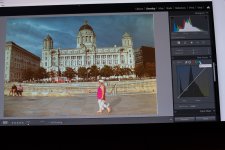
What I can see though is the histogram and it just does not look right to me.

Channels.jpg

The green channel is too prominent
 
This little exercise has made me realise that back in the day, before scanning and photoshop, a good printer would have been worth his/her weight in gold to sort out all the problems with a negative.
 
  • Like
Reactions: zx9
This little exercise has made me realise that back in the day, before scanning and photoshop, a good printer would have been worth his/her weight in gold to sort out all the problems with a negative.
Well I did lots of colour prints the old way in the darkroom maybe it's affected my brain in seeing colour casts o_O , I can't fault quite a few posted colour shots e.g, fishyface and would think he would be great for advice.
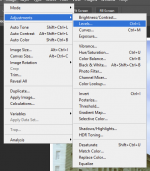
 
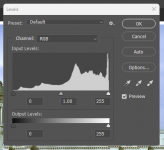
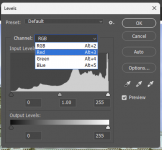
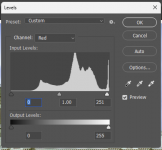
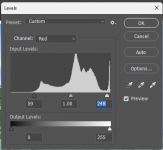
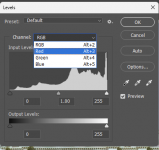
I use Photoshop so I don't know how to do this in other progs. Try this -

1755933504304.png

1755933549006.png


1755933615392.png

1755934007148.png


1755934040982.png

Move the sliders to the edge of the histogram for all three colours. Doesn't always work but gives a good starting point.

I think someone put this on here some time back but it's a method I've always used.
 

Attachments

  • 1755933586469.png
    1755933586469.png
    34.7 KB · Views: 3
Thanks for that Paul but one of the problems, as I see it maybe incorrectly, is that it is a JPEG scan of a colour negative rather than a RAW file and the colour channels are not so easy to separate out, they seem entangled to me.

If that makes any sense.

And even so I don't know with that assumption if I am even barking up the right tree.

@angelpaaul
 
Thanks for that Paul but one of the problems, as I see it maybe incorrectly, is that it is a JPEG scan of a colour negative rather than a RAW file and the colour channels are not so easy to separate out, they seem entangled to me.

If that makes any sense.

And even so I don't know with that assumption if I am even barking up the right tree.

I used a screen print of your attachment and it worked on that. Didn’t want to put it up here as you said no to edit photos.

What do you use to edit?
 
Last edited:
I used a screen print of your attachment and it worked on that. Didn’t want to put it up here as you said no to edit photos.
Please show in this instance. :)
 
Edit 1.jpg

Looks a little on the blue side here but OK on my monitor (claibrated) Still, a good starting point I suppose.

Other than colour correction I haven't adjusted the photo for contrast etc.
 
Last edited:
View attachment 461192

Looks a little on the blue side here but OK on my monitor (claibrated) Still, a good starting point I suppose.

Other than colour correction I haven't adjusted the photo for contrast etc.
Thanks Paul, that's a great starting point, far better than the mess I have got.

(y)
 
Thanks for trying to help NIgel,

My head is up my arse with it to be honest, I am trying to learn so many new skills all the same time, film cameras, developing, scanning, photoshop, lightroom.

It feels overwhelming, the scan I did was my own and is nothing like the scan that I received from the developer on their Noritsu, I learned this morning that the scanner I have has a colour correction and management menu which I had not been aware of and not used as previously only scanned black and white and those menus don't pop up on the BNW section.

I am grateful to all the people who have tried to help, but it is still leading to frustration.

My brain needs a rest and a rethink, as my preference is for taking the photos aspect of photography, and the developing has fulfilled a technical interest that I also enjoy. I don't know if I will ever take to photoshopping.

Edit: and no matter how many times I look at portra films shot on here and no matter how interesting and technically accomplished the subject matter and the image is, the pink color is so distracting I almost have to scroll past it fast.
 
Last edited:
That looks good on my iPad, the building is white whereas in the two previous images above the building has a blue/green tint.
 
Back
Top