I've just bought myself 2x lexar 1800x memory cards for the sole purpose of improving transfer speeds to my laptop. Moving from V30 Sandisk cars where I get about 80 mb/s download.
Just testing these cards I am only getting the same - but the advertised speed is 210mb/s download - so currently I've spend £70+ for no improvement!
The cards seem to have a second row of connections, but looking at my reader(s) I am not sure they are utilising this, and therefore my duduction is that its the card reader causing the slow transfer speed?
In theory a 100gb file (1,000,000 MB) @ 210mb/s should be able to download in 8 minutes - but I am only getting 80 mb/s so over 20 minutes. 2 cards thats 40+ minutes to download what i should be able to in 16!
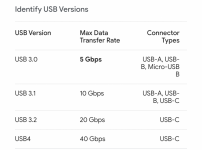
I've tried in both my built in SD card reader (Which is on a new Lenovo thinkbook bought a month ago..... and on my USB C multi card reader which can download my CF express cards at lightning speed, so its not the cable/bus thats the problem, and the card reader can transfer the CF Bs at lightning speed (but i know they are a LOT faster). Even so I was expecting to at least get the advertised speed for the SD cards?
Any suggestions? Is a new card reader in order?
Just testing these cards I am only getting the same - but the advertised speed is 210mb/s download - so currently I've spend £70+ for no improvement!
The cards seem to have a second row of connections, but looking at my reader(s) I am not sure they are utilising this, and therefore my duduction is that its the card reader causing the slow transfer speed?
In theory a 100gb file (1,000,000 MB) @ 210mb/s should be able to download in 8 minutes - but I am only getting 80 mb/s so over 20 minutes. 2 cards thats 40+ minutes to download what i should be able to in 16!
I've tried in both my built in SD card reader (Which is on a new Lenovo thinkbook bought a month ago..... and on my USB C multi card reader which can download my CF express cards at lightning speed, so its not the cable/bus thats the problem, and the card reader can transfer the CF Bs at lightning speed (but i know they are a LOT faster). Even so I was expecting to at least get the advertised speed for the SD cards?
Any suggestions? Is a new card reader in order?
Last edited: