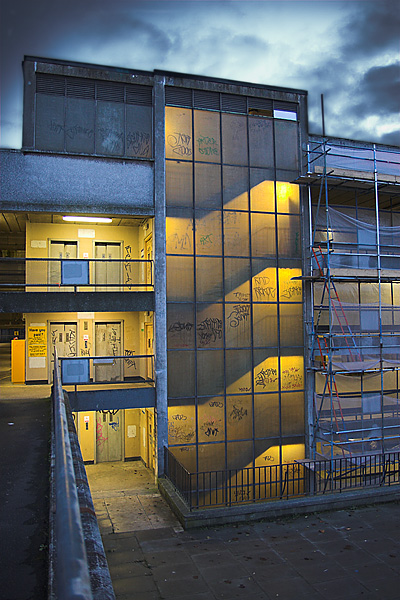
Car park portrait (help wanted)

fingerz

Suspended / Banned
Messages
1,100
Edit My Images
No
51.jpg


That's my blog shot for today but I'm not 100% happy with it. It's a double exposure job (once for sky, once for ground, both from same RAW file) and if you look at the join between the sky and the top of the building there's an obvious black line where I've not been able to make it look as good as it should.

Here's a link to a hi-res of the sky-exposed shot:
http://www.jameyhoward.com/filebucket/carpark_hires_sky.jpg

And here's a hi-res of the ground-exposed one:
http://www.jameyhoward.com/filebucket/carpark_hires_ground.jpg

Both are about half a meg. I've had to compress them but they should be good enough to work with.

Can anyone do a better job and tell me how they did it? At first I tried the magic wand (both feathered and unfeathered) but that looked really obvious so I ended up doing it by hand with a layer mask.

The problem I found was that the ground-exposed shot had very bright edges to the building (as you'd expect) and the sky-exposed one had very dark edges (again, as you'd expect) but there was no point in the middle where you could blend it without getting a line. It came down to a choice between a black line on the building or a white line on the sky, so I chose black.

If anyone knows a way to do it that looks seamless I'd love to see it. Thanks in advance.
 
Jamey I don't have time to help you with this.. soz. I think you're being way too fussy, it's a great shot, but it's easy to sort out.

Use a freehand mask to draw a straight line(s) around the building where you want the sky to start. You should end up with a mask containg part of the sky with one edge of the mask running along the building edge. Feather the mask by a few pixels to avoid a hard edge. Then set the clone tool small and just clone from inside the mask up to the edge of the building to get rid of your black line. You don't have to do it all in one mask - take it a bit at a time if you like.

You can do it. :)
 
I did have a quick stab at cloning over on the far right of the picture but the immediate results looked terrible, making me think it was a troublesome sky to so it with. Maybe I'll have another bash tomorrow if I get time.

Thank you. It's appreciated.
 
Is that first shot the one you're going to put on your blog? I can do a quick job on that if you like and post it up for you to copy.
 
Just had a go myself, Jamey. The building is slightly blurred in the sky-exposure, hence the black shadow. Also, I think the camera moved ever so slightly between exposures... Could you live with shooting a sky with no obstructions or buildings and combining the two otherwise-unrelated images?
 
CT - already put it up (click my sig to see). I know I said I wasn't 100% happy but I was still 90% happy, which was good enough for me.

Catdaddy - sorry, I didn't explain it very well. The two exposures are one and the same shot. They're both processed from the same RAW file. I didn't have a tripod with me otherwise I might have tried doing it the proper way. As it was I just took the one shot (from that location, anyway) and then exposed it twice.
 
Good eye for some nice subtle colour there. ;)
 
Jamey, as already mentioned because 1 shot has dark edges & the other light you would never get the look you want from the 2 shots without some airbrushing....unless you try the following :-

- Follow Tutorial I wrote on Alpha Masking ...or any other way you want to mask building from sky. I created an extra layer & played with curves to bleach out sky completely to aid Alpha Mask.....only took 1 minute to mask :)
- I then shrunk the sky picture vsn by 40 pixels (will explain why later)
- Pasted Sky photo over foreground photo (ensuring smaller building is inside orginal building) & applied mask
- Now reason for shrunk sky.......whilst having mask active choose filter -> other -> Maximum.
- Choose pixel number that eats back into mask to reveal more of sky. What this is actually doing in this example is replacing edge of building with sky. (If sky photo had not been shrunk, the above would just show more of building from sky shot)
- Apply Gaussian blur to edge of mask & voila
- Had to crop slighly due to smaller sky.

So in summary the edge shots of building of both shots were not to your liking....so get rid of em by shrinking the mask uniformly ;)

End result :-

carpark_hires_allcopy.jpg
 
Guy Edwardes showed his technique in either Practical Photography or Outdoor Photography to combine images. Copy the lighter one onto the darker one. Then use the eraser, set as a soft brush and at 100% and at a high pixel, take one sweep across the the top of the image; then try a second sweep just below at say 50% and then a third just below that at 33%. This tends to work better with shots with a large amount of sky.
 
I can't help thinking you missed an even better shot Jamey. Those stairs are screaming at me for an abstract in a sort of vertical pano.
 
Cheers guys. Reckon I've got enough there to see me through on the next one.

Dod - it would've been very tricky to get the sides level with the sides of the frame due to that scaffolding and the fact that my lens would distort at 18mm, and at 50mm I'd have to have been quite a way away, meaning converging verticals.
 
Back
Top