Capture One - Limited exporting?

mrk123

Suspended / Banned
Messages
290
Name
kane
Edit My Images
No
In lightroom, the export functions were simple, and I could fine tune the export down to the Kilobyte... Make my images 60kb for web, no problem...
Well in Captite One it seems very crude. I can not seem to get images below 200kb, no good for websites..
Is there a trick here?
 
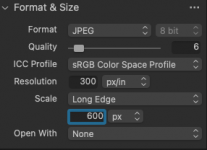
In the Export window, go to Format & Size menu select jpeg and enter the size you need, then use the Quality slider to bring the file size down.
 
In the Export window, go to Format & Size menu select jpeg and enter the size you need, then use the Quality slider to bring the file size down.
Screenshot 2024-11-06 at 18.00.03.png
Even with these settings, images is still 200kb?
 
Sorry I'm not sure why that is, I get down to 20kb with those settings (50mp image).
Hopefully someone will have an answer soon.
 
I can't upload a screen grab here, too big apparently!
But I managed to get to 49kb,but the quality is shocking! Definitely not what I would get out of lightroom?!
 
In the export window, the last option is Summary. This gives you the expected file size, dynamically.

If I use the settings above I get less than 20kb in the Summary, and a file size of 59kb.
If I use 50% Quality, I get 100kb.
 
In the export window, the last option is Summary. This gives you the expected file size, dynamically.

If I use the settings above I get less than 20kb in the Summary, and a file size of 59kb.
If I use 50% Quality, I get 100kb.
As an aside, C1 warn about these estimated sizes being very approximate as they are calculated from the raw "numbers" of pixels and don't take into account the image characteristics. The latter can have big effect on the eventual file size.

Edit: I've just tried this and a file that C1 estimated at 57kb exported at 106kb
 
Last edited:
Screenshot 2024-11-06 at 20.16.43.png
This is a bit of zoom in as I can't post the full screen grab here as too big... but that is not good95kb image..?!
 
View attachment 438023
This is a bit of zoom in as I can't post the full screen grab here as too big... but that is not good95kb image..?!
Out of interest, have you made a direct comparison between C1 and LR with the same file? Subject matter makes a big difference to file size, and it might be useful to make a direct comparison with LR and then check to see where settings might be different.

On the file I've just tried in C1 exported at a square 600px x600px (80% quality) I get a file size of 149kb, which is reduced to 106kb using my normal approach of using the Jpegmini C1 plugin to compress the file on export..

I'll try it n LR tomorrow if I have time.
 
Out of interest, have you made a direct comparison between C1 and LR with the same file? Subject matter makes a big difference to file size, and it might be useful to make a direct comparison with LR and then check to see where settings might be different.

On the file I've just tried in C1 exported at a square 600px x600px (80% quality) I get a file size of 149kb, which is reduced to 106kb using my normal approach of using the Jpegmini C1 plugin to compress the file on export..

I'll try it n LR tomorrow if I have time.
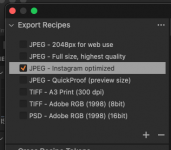
That's still too big for a good website tho, needs to be 50kb or so. I seem to have better luck using the 'instagram' recipes...? What recipes you using?

Screenshot 2024-11-06 at 20.56.58.png
 
That's still too big for a good website tho, needs to be 50kb or so. I seem to have better luck using the 'instagram' recipes...? What recipes you using?

View attachment 438027
I'm using recipes I've created for different resolutions recommended for different web platforms/uses.

I had one set up for 800px long edge, which I changed to 600px, just to match the size you were using.. I can't remember eve getting files as small as you are getting, even when I was using LR. But I've never gone less than 70% - 80% quality. Maybe I should try reducing the quality.

But, as said, I will try and have a look at LR tomorrow.
 
I have tried this same image in LR and C1 with, as far as I can tell, the exact same settings.

The image I tried last night, which was edited and cropped in C1, its 800px by 800px with a quality setting of 80 and optimised with jpeg mini giving a file that is 116kb:

JPEG - 800px for web use_gms_20241102_7533089 1.jpg

For comparison, I used the full uncropped file, with a basic curve and "auto" in both LR and C1. Both at 80% quality and both with long edge = 800px. Both are only exporting copyright information. Jpeg and sRGB colour space.

File sizes were:

LR = 309kb
C1 = 213kb
C1 + JpegMini plugin optimisation = 152 kb

Manually running the LR file through Jpegmini reduced it 193kb.

I may be missing a setting somewhere, but I appear to getting smaller files from C1 than LR
 
Back
Top