Capture One - Can't find raw images!

mrk123

Suspended / Banned
Messages
290
Name
kane
Edit My Images
No
I was tethered on Sunday, forgot to set the SAVE AS to card as well as computer. Despite setting this up the night before it seemed to have reset itself. They only saved on computer it seems.
They are all in the C1 library now, can view them, but any attempt to search for the filename.cr2 brings no matches on my mac...?
Any ideas?? I want to get the raws saved to my SSD at least.
 
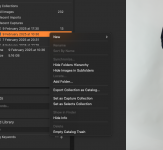
If you right click on the capture folder in C1 you have the option to “show in finder” on a Mac
 
It couldn’t have been saved on (a currently disconnected) external drive could it?
 
I don't think show in finder works with recent imports/captures folder. You need to scroll down and use the systems folders view. I haven't used C1 for tethering but this is the case when importing files, so probably worth a try.
 
Again it's greyed out. So at this stage C1 is holding my images to ransom???
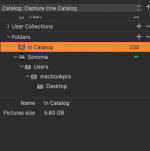
Screenshot 2025-02-10 at 18.28.41.png
 
Does the image show 'Offline' at the top?
 
Again it's greyed out. So at this stage C1 is holding my images to ransom???
View attachment 445299
Where have you told C1 to save files to?

I think the answer may be in this screen shot. Giving a number of Pictures "in Catalog" tells you that you have set C1 up to use a "Managed" catalogue.

This means the raw files are being stored "inside" the C1 database, and Finder won't automatically look inside the C1 database package file.

The default for C1 is to use a "referenced" catalogue where the raw files are stored in a folder on your Macs HD, or an external Drive. And tools like opn in finder, or locate or synchronize are greyed out because none of them are needed with a managed catalogue

I've never used a managed database, and it isn't recommended by C1 (even though they offer it as an option).

If you watch some of the C1 tutorials on setting up catalogues (and sessions) this should be easy to sort out. But everything with C1 needs a bit of learning


You may need to search through a few videos, but there is an overview here
View: https://www.youtube.com/watch?v=YbkBx8djtSw&t=63s


Note the longer videos are under the live stream tab.
 
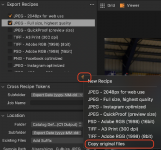
There's now an export orginials option within the export menu (you used to have to right click on thy images and choose to originals independent of export menu). Either way, I'd try one of those approaches to export originals to a new location. Assuming the raw files were saved, it will just copy them out to your new destination.
 
You might have to add it as an additional export recipe, but it's there as a default when you click the '+' sign:


Screenshot 2025-02-10 at 20.32.01.png
 
There's now an export orginials option within the export menu (you used to have to right click on thy images and choose to originals independent of export menu). Either way, I'd try one of those approaches to export originals to a new location. Assuming the raw files were saved, it will just copy them out to your new destination.
I "think" that if you set up a Referenced catalogue you should be able to drag the raws from the managed catalogue into the system folders used by the referenced catalogue.
 
You might have to add it as an additional export recipe, but it's there as a default when you click the '+' sign:
That sort of works but doesn't...

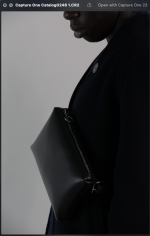
The brigher image is an image as shot, no editing... (I can't even upload it as this site won't let me upload anything more than 10kb image)

The darker image is the export... It's completely ruined the image

At this rate i think I will be leaving capture one, I have wasted my entire day trying to work this out... absolute scam.
 

Attachments

  • Screenshot 2025-02-10 at 21.01.38.png
    Screenshot 2025-02-10 at 21.01.38.png
    409.9 KB · Views: 4
Open finder and browse to pictures, hopefully in there you should have the capture one catalogue. Right click and select show package contents > select originals > and then look through folders to see if you can find your raw files.
 
That sort of works but doesn't...

The brigher image is an image as shot, no editing... (I can't even upload it as this site won't let me upload anything more than 10kb image)

The darker image is the export... It's completely ruined the image

At this rate i think I will be leaving capture one, I have wasted my entire day trying to work this out... absolute scam.
Have you read my post on referenced and managed catalogues? This is almost certainly the issue.

C1 offers four different ways of managing files (Referenced catalogue, Managed Catalogue, Sessions and Browser), which gives lots of flexibility, but also additional complexity to get your head around.

If you just want to get your images out of C1, rather than work out what went wrong and fix it, then you can follow the advice from @sep9001
 
Open finder and browse to pictures, hopefully in there you should have the capture one catalogue. Right click and select show package contents > select originals > and then look through folders to see if you can find your raw files.
OK that has worked... I can now find the CR2 files.. Now I can safely copy them onto extrnal.
 
Have you read my post on referenced and managed catalogues? This is almost certainly the issue.

C1 offers four different ways of managing files (Referenced catalogue, Managed Catalogue, Sessions and Browser), which gives lots of flexibility, but also additional complexity to get your head around.

If you just want to get your images out of C1, rather than work out what went wrong and fix it, then you can follow the advice from @sep9001
Thanks, I have now solved it, from sep9001 reply.
Thanks for your help on this.
 
Back
Top