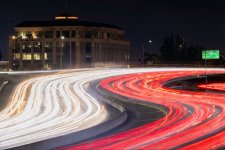
cant remove fence

I think that the race stewards might get a little feisty if the safety fence was removed.
 
Would be also interested if there is a way of removing the fence from the image, I don’t use photoshop though
Would one of the AI based software be able to remove the fence and leave a clean image?
If it was a small area to deal with I would use a healing brush in Affinity photo, photoshop has the same tools but that image would be a hard job I think
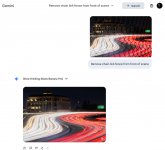
 
Generative fill using Gemini worked pretty well (uses credits). I used a very specific prompt; "remove chain link fence in front of scene." What remains could probably be cleaned up with the remove tool pretty easily.

Screenshot-2025-12-08-at-11.18.37 AM.jpg

But really, if you had just placed the lens closer to the fence, and/or used a wider aperture than f/29, then the fence wouldn't need to be removed at all. That might require using an ND or stacking multiple images instead, but it's the route I would have taken (depending if I actually had an ND with me).
 
Last edited:
Would be also interested if there is a way of removing the fence from the image, I don’t use photoshop though
Would one of the AI based software be able to remove the fence and leave a clean image?
If it was a small area to deal with I would use a healing brush in Affinity photo, photoshop has the same tools but that image would be a hard job I think
You can use Google Gemini Pro for free (it's very slow this way)... I'm sure there are some limitations, I don't know what they are...

Untitled.jpg
 
Last edited:
I did try the free version of google gemini worked quite well but the file size when you save the image is tiny unfortunately
I did look at google photos app too but they want full access to all my images, didn’t feel happy with that
Its not a problem was just curious its not something that I need to do very often :)
 
Back
Top