Hi all,
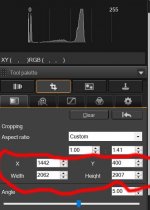
please can anyone tell me what are the numbers represent ,when setting a crop in Canon DPP software, are they pixels, mm or what ? I'm wanting to crop a CR2 file to A4 (210mm x 297mm).
Hi
I use an older version of Dpp I crop regular but usually stick to the Ratio selections from the menu 3X2 4x3 etc. If I use custom I'll type in the inches normally 16x9 I never see the pixel numbers which I assume your seeing. I sometimes just crop freehand but rarely as I would never get a frame to fit the print if it were to be printed.
Where it says custom if you click there is A4 listed ?
Alternatively type in the width and height see what happens
The only thing I found was you had to enter the ratio of an A4 in the custom settings. Off Memory 1.41 to 1. That could be wrong as I've skimmed ( plastered) 3 walls since reading that......
This site uses cookies to help personalise content, tailor your experience and to keep you logged in if you register.
By continuing to use this site, you are consenting to our use of cookies.