Can you export all the stacks together into Photomatix from Lightroom

russellsnr

Suspended / Banned
Messages
3,121
Name
Russell
Edit My Images
Yes
Hi, Some advice please.
I have a set of photos in 7 shot brackets and in a stack, there are five stacks in all in Lightroom. Can you export all the stacks together into Photomatix from Lightroom to batch process?
Thank You
 
Russell

I don't use Photomatix but for Nik HDR Pro, you select the shots you want then right click and scroll down to Export and select .... See if Photomatix is an option when you try that?
 
From within Lightroom I think you can only do it for a single set of bracketed images, in the way that Adrian describes. That is the way I do it.

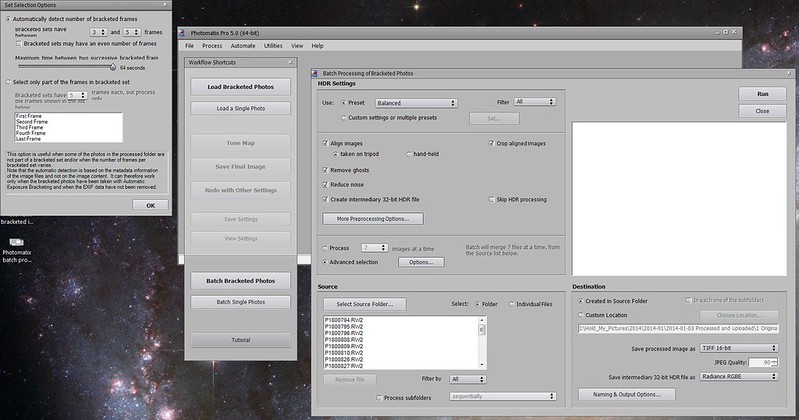
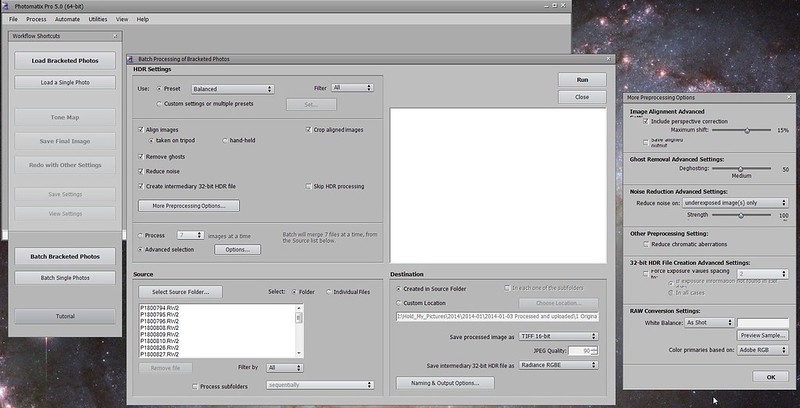
However, if you do it from the Photomatix end, then you can do batches. You can point Photomatix at the folder containing the sets of bracketed images. If all the sets contain the same number of bracketed images, as is the case for your five sets each containing seven images, you can tell Photomatix how many images are in each stack. Alternatively, you can let Photomatix work it out for itself. In this case the sets don't have to contain the same number of images. I just ran it on a folder containing bracketed sets containing three and five images.
 
Hi, Thanks for the replies. I also have NIK suite and SNS-HDR
So if I am reading this correct I can place the images into a folder, in my case it would be 35 images and Photomatix would work out what images should go where?
The reason I ask in the OP was because I am looking to photograph a number of interiors of some hotels so could possibly end up with more than a hundred images per hotel and that's a lot to keep going click and Ctrl Click for each set of 5 shots.
Thanks
Russ
 
So if I am reading this correct I can place the images into a folder, in my case it would be 35 images and Photomatix would work out what images should go where?

Yes. In fact you don't have to separate them out into a folder with only bracketed shots in it.

You can specify the maximum time difference (between 0.5 and 64 seconds) between successive bracketed shots.

It will handle RAW or JPEG.

Here are a couple of screen shots to illustrate the options. (This is Photomatix Pro.)

(For larger versions click on an image then right click and select "Original")


Photomatix bracketed images auto-selection options
by gardenersassistant, on Flickr


Photomatix batch processing options
by gardenersassistant, on Flickr
 
Yes. In fact you don't have to separate them out into a folder with only bracketed shots in it.

You can specify the maximum time difference (between 0.5 and 64 seconds) between successive bracketed shots.

It will handle RAW or JPEG.

Here are a couple of screen shots to illustrate the options. (This is Photomatix Pro.)

(For larger versions click on an image then right click and select "Original")


Photomatix bracketed images auto-selection options
by gardenersassistant, on Flickr


Photomatix batch processing options
by gardenersassistant, on Flickr
Hi, Many Thanks for this
Russ
 
Back
Top