bright colours screen - print dull?

bubblecatcher

Suspended / Banned
Messages
340
Name
Michael
Edit My Images
Yes
Hi, i have an image that when saved for web srgb, it have bright blue colour, but when printed the blue is muted?

I am printing on an epson 4800 pro with gold fibre silk in OSX lion.

Colour space in ProPhoto, using correct GFS profile, CS5 manages colours, Relative Colormetric.

The soft proof is between the print and srgb, what i do notice is that in print dialog, if check Gamut warning it does highlight some of the bluest areas!

Seems to be just with this image, but test some others.

Any ideas?

Here is the srgb version of image.

untitled-76-Edit.jpg


larger version

https://picasaweb.google.com/107881215981215514730/Forums?authuser=0&feat=directlink
 
Last edited:
I think somewhere my colour setup is not right?

When upload the image below to facebook it retains its vibrant colours, when i upload to Piscasa the colours become muted?

If view on my monitor the colours are vibrant.

What i did notice when saving for web in CS5 is that when i select

Preview Monitor Colours

the colours are muted, but when i select

Preview Internet Standard (no colour management)
Or
Preview Use document profile

The colours remain vibrant.


I have just reinstalled OSX and software after SSD died, so may have missed something?

cheers

new_forrest_29_30-Jan-2011-316-Edit-Edit.jpg


Larger

https://picasaweb.google.com/lh/photo/v1EtxmKI77od1s64UFjjqNMTjNZETYmyPJy0liipFm0?feat=directlink
 
When you soft proof do you tick show paper white and blacks.

Also when you get the gamut warning what do you do, reduce the blue saturation, until it comes into gamut or simply go ahead and print? Naturally if the printer cannot reproduce the extreme blues it will try and compact them down to a range that the machine can handle. Try switching to Perceptual rather than Relative and see if this makes any difference

Have you tried switching from ProPhoto to something smaller such as Adobe RGB and does it make any difference ( It shouldn't but who knows)


What monitor are you using, is it a conventional one or a wide gamut version.

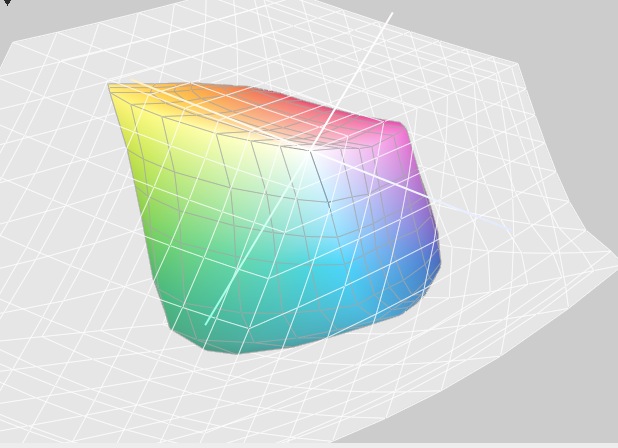
You might like to use the Color Sync facility on the Mac to look at the monitor profile and the GFS profile to see which is larger
 
Thanks for reply.

Don't think it is the gamut issue as the second picture does not give the out of gamut warning and its colours are muted?


Relative is recommend for OSX, burt will try perceptual.

Thing is everything looks to be setup as i had it before and i did not have this issue?

I am using Diamond Pro 2070sb monitors, these have been calibrated using Eye-One and the Lion i1 profiler software.

The monitors are good, but will have to wait till i can afford newer monitor.

The profile quality report does show that two colours are not within the allowed parameters, but over all monitor passes.

That said it was ok before with these!
 
You don't seem to be doing anything obviously wrong.My 2880 does have some trouble with very vibrant blues going out of gamut, but then that's to be expected I suppose.

You might want to check the print dialogue box and make sure that all the settings are correct, although Lion should take care of that automatically, but it's worth checking

You could try selecting the "Printer Manages Colours" option in Photoshop and see if that makes any difference.
 
I tried printing with perceptual and i can see no difference!

I change the proof setup from relative to perceptual and the out of gamut blue got closer to print, but not the same. Though is probably due to it being out of gamut.

What i find strange is when converted to srgb i do get the vibrant blue?

With perceptual proof the second image still has dull colours for prints?

May try printer handles colour for that one.

cheers
 
Ok tried using printer manages colour, adobeRGB, perceptual.

Both are much better and closer to soft proof/screen!

Now to work out why CS5 is not doing the same?

cheers
 
pointless using prophoto - printer cann't output the gamut. set colourspace to sRGB
 
pointless using prophoto - printer cann't output the gamut. set colourspace to sRGB


That goes against everything i have read on colour space?

The epson 4800 pro can do a very big gamut!
 
As you are on a Mac you can use the Color Sync utility to compare colour spaces of your 4800 and standard ones such as Adobe RGB. Downloading the generic sRGB profile, it looks as though the 4800 GFS profile would suite sRGB better. OK some of the printer/paper gamut is wider than sRGB, but there is also parts of the sRGB colour space that is larger than the 4800/GFS combination.

You could opt for Adobe RGB rather than ProPhoto, which would encompass the full 4800/GFS profile, but it to, is significantly larger than the 4800/GFS profile, and unless your monitors can encompass AdobeRGB there probably isn't much point.
 
Back
Top