
and please use their services
You are using an out of date browser. It may not display this or other websites correctly.
You should upgrade or use an alternative browser.
You should upgrade or use an alternative browser.
Beginner Blurry pictures
- Thread starter U01
- Start date


- Messages
- 114,434
- Name
- The real Chris
- Edit My Images
- No
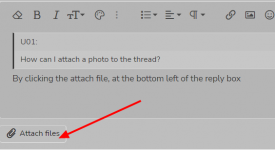
By clicking the attach file button at the bottom left of the reply box, and select what ever image you want thatHow can I attach a photo to the thread?
is stored on your device..
Last edited:


Harlequin565
Suspended / Banned
- Messages
- 8,684
- Name
- Ian
- Edit My Images
- No
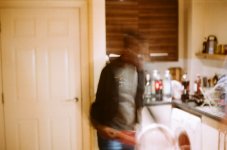
At a glance, I'd say this is a combination of a shutter speed that is too slow and subject movement (as well as photographer movement probably)
If your camera is on auto, it will try and expose properly. One of the controls it uses to let light in is the shutter speed which is the amount of time the shutter stays open. The other two are aperture (the size of the hole in the lens that lets light through) and ISO (broadly speaking the sensitivity of the sensor)
If the shutter speed is quite long, any movement in the image (subject, and photographer) will blur.
Taking sharp pictures like this often require shutter speeds of 1/125sec or faster. I'd guess this was down at 1/4sec. On auto, the camera chooses all the settings for you and in this case, it's chosen the wrong shutter speed. It's highly likely (considering modern cameras) that the light was just too poor to get a well exposed image.
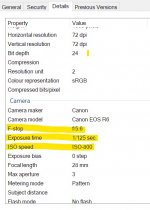
The only way to tell for sure is to know the aperture, shutter speed and ISO that the photo was taken at. I can't get it from the images you've posted but it will be in the original image file if you right click it and select "properties" and "details". (If you have an iThing I don't know)
e.g.
If your camera is on auto, it will try and expose properly. One of the controls it uses to let light in is the shutter speed which is the amount of time the shutter stays open. The other two are aperture (the size of the hole in the lens that lets light through) and ISO (broadly speaking the sensitivity of the sensor)
If the shutter speed is quite long, any movement in the image (subject, and photographer) will blur.
Taking sharp pictures like this often require shutter speeds of 1/125sec or faster. I'd guess this was down at 1/4sec. On auto, the camera chooses all the settings for you and in this case, it's chosen the wrong shutter speed. It's highly likely (considering modern cameras) that the light was just too poor to get a well exposed image.
The only way to tell for sure is to know the aperture, shutter speed and ISO that the photo was taken at. I can't get it from the images you've posted but it will be in the original image file if you right click it and select "properties" and "details". (If you have an iThing I don't know)
e.g.

4wd
Suspended / Banned
- Messages
- 3,224
- Name
- North York Moors
- Edit My Images
- Yes
I assume this is an old OM10 film camera so adjusting ISO means different film.
Provided it's working Ok you could still get decent photos in a brightly lit indoor scene and daylight ISO film e.g. 200 ASA
Focusing manually through viewfinder on them takes some practice and gets ever more difficult with wide aperture as only a narrow slice of your scene is in focus.
In this sort of scene try to keep shutter no slower than 1/125 by lowering aperture value or somehow increasing light.
Provided it's working Ok you could still get decent photos in a brightly lit indoor scene and daylight ISO film e.g. 200 ASA
Focusing manually through viewfinder on them takes some practice and gets ever more difficult with wide aperture as only a narrow slice of your scene is in focus.
In this sort of scene try to keep shutter no slower than 1/125 by lowering aperture value or somehow increasing light.

I can't get the shutter speed and ISO details this may be because I got the film developed by a camera store. Thank you very much for all the advice and information. I truly appreciate it.
How would I go about setting the shutter speed to 1/125?
I'm assuming the camera is working Ok and it may be due to me being a beginner and not knowing much about film photography.
How would I go about setting the shutter speed to 1/125?
I'm assuming the camera is working Ok and it may be due to me being a beginner and not knowing much about film photography.
Harlequin565
Suspended / Banned
- Messages
- 8,684
- Name
- Ian
- Edit My Images
- No
Heh... I didn't realise it was a film camera which is a bit embarassing!! Lesson to self to read the OP rather than looking at the pictures and just hitting reply!
The manual for the cameras is here: https://www.butkus.org/chinon/olympus/olympus_10fc/olympus_om10fc.htm
The OM10 doesn't appear to have shutter speed controls. And with film, you only have one ISO which depends on the film choice. If you picked up cheap standard film, it's likely to be ISO 100 or 200 which isn't going to be good enough for indoor shots. This leaves aperture as your only "control".
If you're taking photos indoors in poor light, you need the highest speed film you can get. I'd recommend Lomo 800 as a cheap choice, or Portra 800 as an expensive one. I'm not aware of any faster films in colour. Alternatively shooting black and white with Ilford Delta 3200 or Kodak P3200 will give you better results. With a film that's got the highest ISO you've got the best chance of getting decent indoor photos. Don't forget to set the ASA dial on the top to the speed of the film you insert into the camera!
When you're taking pictures, the shutter speed should show in the viewfinder (see p18 of the manual linked). If it's lower than 1/125, and your subject is moving about, you're going to get blur, so you need to rotate the aperture ring to open the aperture. You should see the shutter speed indicator change as you rotate the aperture ring. It's likely, in poor light, you'll be setting the aperture to f/2.8 or f/1.8.
Further information:
View: https://www.youtube.com/watch?v=j4BuMXKD-N0
The manual for the cameras is here: https://www.butkus.org/chinon/olympus/olympus_10fc/olympus_om10fc.htm
The OM10 doesn't appear to have shutter speed controls. And with film, you only have one ISO which depends on the film choice. If you picked up cheap standard film, it's likely to be ISO 100 or 200 which isn't going to be good enough for indoor shots. This leaves aperture as your only "control".
If you're taking photos indoors in poor light, you need the highest speed film you can get. I'd recommend Lomo 800 as a cheap choice, or Portra 800 as an expensive one. I'm not aware of any faster films in colour. Alternatively shooting black and white with Ilford Delta 3200 or Kodak P3200 will give you better results. With a film that's got the highest ISO you've got the best chance of getting decent indoor photos. Don't forget to set the ASA dial on the top to the speed of the film you insert into the camera!
When you're taking pictures, the shutter speed should show in the viewfinder (see p18 of the manual linked). If it's lower than 1/125, and your subject is moving about, you're going to get blur, so you need to rotate the aperture ring to open the aperture. You should see the shutter speed indicator change as you rotate the aperture ring. It's likely, in poor light, you'll be setting the aperture to f/2.8 or f/1.8.
Further information:

- Messages
- 49,339
- Name
- Nod (UK)
- Edit My Images
- Yes
I can't get the shutter speed and ISO details this may be because I got the film developed by a camera store. Thank you very much for all the advice and information. I truly appreciate it.
How would I go about setting the shutter speed to 1/125?
I'm assuming the camera is working Ok and it may be due to me being a beginner and not knowing much about film photography.
IIRC, the OM 10 needs an adapter gizmo to allow the user to select a shutter speed. However, a work around is to adjust the aperture to get the required shutter speed. For indoor use, I would use a faster film - ISO400 or faster.

Garry Edwards
Moderator
- Messages
- 13,475
- Name
- Garry Edwards
- Edit My Images
- No
The OM-10 is a perfectly capable camera, and there's nothing wrong with using this type of camera if that's what you want to do. BUT learning the basics of photography with a film camera is much more time-consuming, difficult and frustrating than with a digital camera, so it may be a good option for you to get yourself an old, cheap but perfectly capable SLR digital camera such as the Nikon D70/D70S https://www.ebay.co.uk/itm/165376057768?hash=item26812e61a8:g:lFwAAOSwfeFh6xPz or the Canon equivalent, to learn on.
Arguably, even an old digicam will give you better image quality but that isn't the point - the point is that there are no running costs and you get to see the results instantly, which is a massive learning aid.
Arguably, even an old digicam will give you better image quality but that isn't the point - the point is that there are no running costs and you get to see the results instantly, which is a massive learning aid.

dmb
Suspended / Banned
- Messages
- 2,360
- Edit My Images
- No
For advice on using film and film cameras the Talk Film & Conventional forum might get wider range of feedback from folks who have used an OM10.Hi, I recently got a Olympus om10 camera. I took some pictures and they all came out blurry can anyone help me with how to fix this and some tips?

john.margetts
Suspended / Banned
- Messages
- 2,996
- Name
- John
- Edit My Images
- Yes
I don't want to be insulting, but you are aware this is a manual focus camera?

Rossjukes
Suspended / Banned
- Messages
- 46
- Name
- Ross
- Edit My Images
- No
I would make sure you study the exposure triangle and get a good understanding for it - working out how different settings will impact your image really is critical to 'knowing' how to get sharper images 