

Best way to achieve "natural" feeling photos when blending exposures

boccers_2000

Suspended / Banned
Messages
379
Name
Andrew
Edit My Images
Yes
Hi All,

The subject heading says it all but I would love to be able to get a natural looking picture whilst blending exposures but so far I don't think i've been able to do it.

Ive tried HDR (which always gives a certain feel). Blending exposures by overlaying pictures and painting away the over exposed sky etc (and filters on occasions). Below is a recent example of a picture i took. Whilst I like the picture it does have a certain HDR feel about it.

Ive also found that the painting away the overexposed areas to reveal the exposure beneath can be terribly tricky where you are shooting for example a city scape (as per the picture below for example).

So, any hints/tips to get a cleaner looking photo? How do you guys go about it?

Not sure if Ive expressed what i'm on about all that well here but any comments much appreciated.

Kind regards
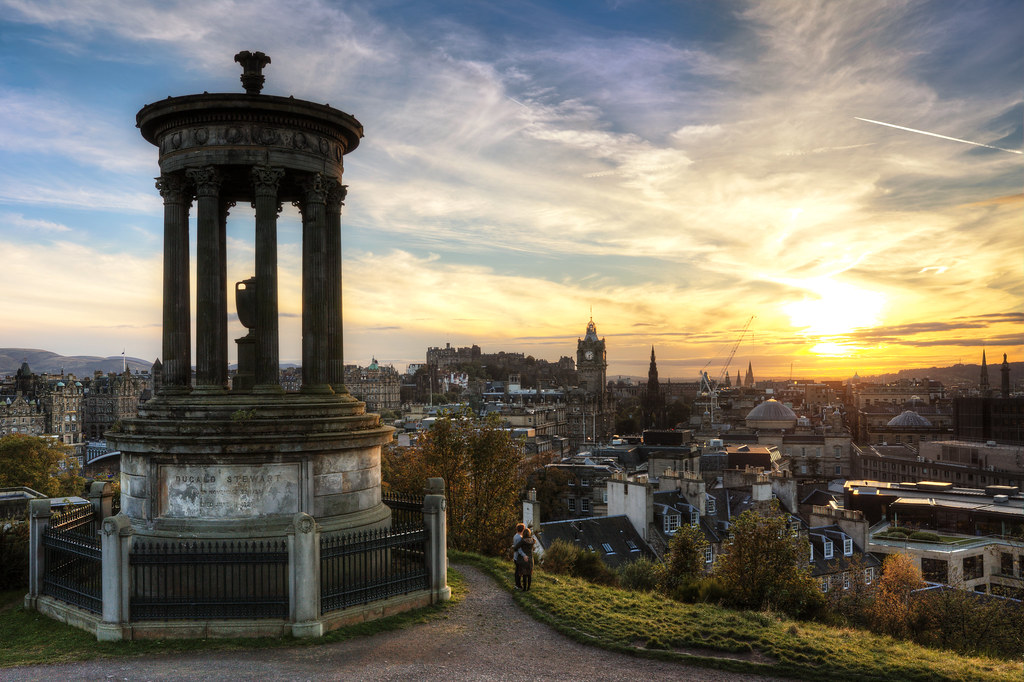

Calton Hill Couple Enjoy Sunset by boccers, on Flickr
 
Hi there Andrew .
Hand blending images to make them look natural is all most an art form in its self and can take years to fully master
I personally hate the HDR look , it looks to me like some kind of garish cartoon , Micky mouse on LSD .
If you want clean looking shots get all the exposures right in camera then subtly blend them together using a soft brush low opacity and go very slowly . the biggest mistake is pushing things in photoshop , especially in the shadows / saturation .
 
Hi there Andrew .
Hand blending images to make them look natural is all most an art form in its self and can take years to fully master
I personally hate the HDR look , it looks to me like some kind of garish cartoon , Micky mouse on LSD .
If you want clean looking shots get all the exposures right in camera then subtly blend them together using a soft brush low opacity and go very slowly . the biggest mistake is pushing things in photoshop , especially in the shadows / saturation .

Thanks. When you say get things right in camera, what exactly do you mean? I usually bracket the photos (3 shots, +2 and -2). Then I sit down pic the best one for the foreground, best one for Sky, tweak the exposure as I need to so they are not miles apart (which I think makes then look odd) then overlay and start painting etc.

I'd be interested to know peoples workflow for blending exposires from in camera to the end product.
 
They don't look natural because even the eyes can't handle that much dynamic range.

Subtlety is the key in my opinion and try and give a result that you could actually see in reality. In your example image the foreground would be darker in reality and that is what your eyes would expect to see. Could you lessen the exposure in the foreground and see if it looks more natural?
 
They don't look natural because even the eyes can't handle that much dynamic range.

Subtlety is the key in my opinion and try and give a result that you could actually see in reality. In your example image the foreground would be darker in reality and that is what your eyes would expect to see. Could you lessen the exposure in the foreground and see if it looks more natural?

I think you're probably right. Maybe I get so focussed on producing a picture with a full tonal range that I forget what we would actually see in the real worls. There is perhaps a conflict in people wanting to see the perfect curve on the histogram and not realising that at a sunset there will be areas that are dark in the foreground.

I'll definately give more thought to a darker foreground
 
I find it difficult to achieve a natural feel without doing local tonal adjustments. I used HDR for a while, and was rarely satisfied with the output from photomatix, so I always used that as the start point in my workflow rather than the end point. I then realised I could get more satisfactory results by just blending the images manually, and making local adjustments using dodging and burining, or masks and levels / curves adjustments.
 
Check out Photoshop guru Guy Gowan's website. Subscribers can get access to an action set that he has developed which deals with the solution that you are looking for.

http://www.guygowan.com/
 
I think that photo doesnt look too "HDR" at all, the only thing I would say is that the big monument thing is still a bit too dark compared to the rest of the near foreground and buildings in the background. Did you definitely mask in/out that bit when doing the blending?

Also I might be tempted to clone out the con trail top right and maybe the tip of the crane too you could get away with.
 
Last edited:
It looks too HDR to me because I look at the sky and then know what the foreground would look like, only it doesn't it looks unnaturally bright.

Nothing wrong if that is what you are going for but in regards to natural feel I don't think it meets it.
 
ernesto said:
It looks too HDR to me because I look at the sky and then know what the foreground would look like, only it doesn't it looks unnaturally bright.

Nothing wrong if that is what you are going for but in regards to natural feel I don't think it meets it.

Thanks. I never said I thought that photo looked natural, hence the email. To ask the forums opinion as to how to achieve a natural look. I Agee though
 
They don't look natural because even the eyes can't handle that much dynamic range.

Are you sure on that one?

The eye is an extreamy good camera, along with the processor that sits behind it. It's dynamic range is far beyond that of your camera. When you look at the ground, through your eyes, the sky isn't white is it?

How hard is it to shoot in a church for a wedding? Your usually at 800 or 1600 ISO on a 2.8 lens. Yet your eyes are just fine with that level of light.

I think the image posted is very good, I could tell it was a HDR because of its detail but I don't think it is overbaked at all. Anyone without HDR knowlege would not be able to tell. The forground building is a little dark, along with a few buildings in the distance. Perhaps the exposures could be taken a bit closer together, or tweaked a little?

Is it what you are used to looking at in a photograph that skews the view that more detail looks unnatural?
 
Last edited:
Thanks. I never said I thought that photo looked natural, hence the email. To ask the forums opinion as to how to achieve a natural look. I Agee though

Sorry, wasn't having a dig at your photo. Just using as an example of why to me it can look unnatural and therefore what would make it look more natural (less of a difference, closer to reality etc,.)

I even find that fairly subtle reduction of shadows can look unnatural as my eyes/brain have an expectation of what to see and anything outside that is going to not sit with that. Again, nothing wrong with that and some people love it but not natural looking.
 
The eye is an extreamy good camera, along with the processor that sits behind it. It's dynamic range is far beyond that of your camera. When you look at the ground, through your eyes, the sky isn't white is it?


The eye isn't that great as a camera in fact - plenty of resolution but a relatively poor lens etc. What makes eyesight so fabulous is the processor - the brain. That's what gives us the dynamic range.

IMO, the image posted is one of the better HDRs I've seen and I generally hate them! It doesn't look to be too big a range between the blended shots (maybe a couple of stops?) and it looks almost natural. When the HDR is too overdone, images look plastic and completely fake in my eyes - basically, if my eyes/brain scream HDR, it's overdone but if they don't, it's probably OK.
 
Are you sure on that one?

The eye is an extreamy good camera, along with the processor that sits behind it. It's dynamic range is far beyond that of your camera. When you look at the ground, through your eyes, the sky isn't white is it?

Yep, very sure. If I was in that scene in reality with that amount of light coming from the sky the foreground would not be that light.

The shot is way closer than some of the wild HDR stuff but it is still not how my eyes would have seen it hence unnatural (if natural means nature, i.e human eyes)

Yes the human eyes and brain have a higher dynamic range than a camera but it still has limits. Open to debate but some schools of thought suggest a dynamic range of 10 - 14 f stops which isn't that much higher than a DSLR.
 
on that shot it would look a lot more natural just by turning down the saturation a bit
 
Back
Top