Beginner's questions. Raw or J Peg, and edit advise.

Oldbones

Suspended / Banned
Messages
422
Edit My Images
Yes
Number 1.
I have a Nikon D3100 Dslr equipped with the kit lens
In the set up, I can chose between J Peg and Raw, or I can have both.
Reading about it Raw is considered a better file.
So if I decide on Raw, will I need to get editing software installed, and which one would I need to get.
Perhaps I should I use J Peg, till at least I can take and produce some thing worth looking at.
 
Shoot both for the time being but just use the JPGs for the time being. Concentrate on getting as much as possible as good as possible and you might find you don't need to do much to get pleasing shots. Once you get to that stage, you'll have a better idea as to what you want/need to go further.


ETA... The reason I suggest keeping the raw files as well is that storage is cheap and should you decide you want to play more, the raw files allow more playing - repeated save and open cycles of JPEGs causes a drop in image quality (IQ) after a few times.
 
Last edited:
I started myphotography journey with a d3100 in 2011

Was actually thinking in the last couple of weeks how i wished i had some of those images in raw to edit

If you think you want to make edits to your shots i’d suggest you take both jpg & raw until you have an editor and are comfortable using it. Then you can compare the camera jpg to your edited jpg from raw and decide.

That said you should still try to understand the changes you can make to camera settings to get the best output for the shot you’re taking. There are some photographers who shoot many images only to jpg in camera but they will make the fine setting tweaks to get the most out of the camera edit

I’d like to point you to lightroom and photoshop but the annual sub i object to. Im trying out affinity on a 6 month trial to see how it compares , i’d suggest something like that or one of the free options, gimp or darktable

Good luck
 
Raw allows more flexibility in editing and allows you to change things that in a jpeg are set once you have taken the picture, such as white balance (WB)
For software, Nikon NX Studio is free and will read all your cameras settings, and if you shoot raw allow you to change them in the computer. For example you can set the camera to shoot Auto WB and then pick a different WB in NX Studio. You can even shoot Black and White and then select colour once in NX Studio.
As NX Studio reads all the camera data and applies it you do not have to edit a picture if you are happy with it.
 
I’d like to point you to lightroom and photoshop but the annual sub i object to. Im trying out affinity on a 6 month trial to see how it compares , i’d suggest something like that or one of the free options, gimp or darktable

Good luck

I too objected to the Photoshop sub but I relented and now I think I'd actually recommend it because you get updates and compared to the price of buying it it's arguably not too bad a deal. I think it is worth thinking seriously about.
 
Like Nod said. Raw files give you more flexibility when editing. If it's not something you're into now, but think you might get into in the future, you'll thank your past self when you have raws to play with. That's if you can manage the storage and file management of course. Put your raws in a dump folder for future use and just work with the jpegs for now.

As far as editing software goes there's a lot out there, all with different learning curves. If you're up for it, settle down with a cuppa and sign up for the free trials almost all of them offer. Editing software is an investment, not just money, but the time and practise to use it, and switching is a royal pain once you've got used to something. I'd suggest Lightroom purely because it has file management and editing all in one package. And despite the monthly sub is a great piece of software. I'd switch tomorrow if there was something that better fit my needs, but there just isn't. For me :)

Prime Day is coming up soon (Black Friday shortly after) and for Amazon Prime members that means a hefty chunk off the annual fee. Most of the other offerings do a good deal on Black Friday too, so if you take the time to trial stuff, by the time you've decided to buy, you might get a good deal.
 
Sage advice in above posts....all but for IMO for shooting in jpg only.

It is worth bearing mind that AFAIK NX Studio will show, if you have configured your in camera jpeg settings, what the raw would look like based on those settings......but having the raw file allows you more latitude to make the processing choices that you want. With jpg only shooting the camera has baked in much of the settings latitude :(

In case you also need the manual, all downloads here including NX Studio that has been suggested in post #4

 
Last edited:
Shoot RAW, manipluate and save as jpeg. Affinity Photo wins hands down on price
 
The advice to use jpg and raw is the best. I have a number of pictures taken in jpg from early on that I wished had been in raw to give me a greater range of options to edit them. As said, storage is cheap, and as you progress there's a good chance you will wish to go back and re-edit some of your early work.
 
Shoot RAW, manipluate and save as jpeg. Affinity Photo wins hands down on price
CLONE TOOL is trade mark. I mean it's copyright to adobe. So how does affinity get away with using a tool that does the exact thing and call it "clone tool."
 
Raw allows more flexibility in editing and allows you to change things that in a jpeg are set once you have taken the picture, such as white balance (WB)
For software, Nikon NX Studio is free and will read all your cameras settings, and if you shoot raw allow you to change them in the computer. For example you can set the camera to shoot Auto WB and then pick a different WB in NX Studio. You can even shoot Black and White and then select colour once in NX Studio.
As NX Studio reads all the camera data and applies it you do not have to edit a picture if you are happy with it.
Thank you so much. I have now downloaded NX Studio and had a wee play about,
It works fine even with other pics from other cameras.
Very good when it tell you all the details of the pic, which will help me tremendously as I go along.
 
Thank you so much. I have now downloaded NX Studio and had a wee play about,
It works fine even with other pics from other cameras.
Very good when it tell you all the details of the pic, which will help me tremendously as I go along.

It should be agnostic with jpg images, but will likely only edit NEF raw files.
 
The advice to use jpg and raw is the best. I have a number of pictures taken in jpg from early on that I wished had been in raw to give me a greater range of options to edit them. As said, storage is cheap, and as you progress there's a good chance you will wish to go back and re-edit some of your early work.
When you say storage is cheap, what does that actually mean, is it storage on the computer, on the cloud, or simply left on an SD card and used at a later date.
I don't quite understand storage as you can see
 
When you say storage is cheap, what does that actually mean, is it storage on the computer, on the cloud, or simply left on an SD card and used at a later date.
I don't quite understand storage as you can see

Hard drives for computer. If you don't have enough space on your computers hard drive, consider buying a 2 or 4 TB hard disc drive plus an external caddy and use it to back up or store your pictures. consider doing that anyway, even if you do have enough space.
 
Hard drives for computer. If you don't have enough space on your computers hard drive, consider buying a 2 or 4 TB hard disc drive plus an external caddy and use it to back up or store your pictures. consider doing that anyway, even if you do have enough space.
I will have to look into that.
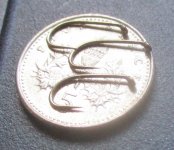
Here is a small example of what I have been photographing for a while now.
Fly fishing is another hobby and tie my own flies.
These are the hooks I use to create the fly,
And I usually take a pic.
IMG_0007.JPG
 
CLONE TOOL is trade mark. I mean it's copyright to adobe. So how does affinity get away with using a tool that does the exact thing and call it "clone tool."
Not sure clone tool is a trademark ... quite common actually. ACDSee, Liminar Neo etc etc.
 
Not sure clone tool is a trademark ... quite common actually. ACDSee, Liminar Neo etc etc.
It is a trademark. I knew the guy who did Gimp for linux back in the day. He said it's trademark. And if you read adobe photoshop license it says clone tool is copyrighted.

It's funny. But it's kind of like someone stealing one of my images and making lots of money out of it. And then doesn't even admit he stole it.
 
Just a note on the cost for Lightroom/Photoshop, and possible discounts.

There are 3 Adobe Photography plans, the one I use (and I suspect many others here as well) is the £9.99/month LR Classic + Photoshop + 20Gb online storage.
This works out at ~£120/year.

Amazon sell 12 month bundles - either a 1 off, or a recurring subscription.
A few times a year they discount these, by varying amounts, typically £70-£90 for a year.
Make sure you get the 1 off version, not the recurring subscription (the one off will add to any Adobe subscription you have, the recurring version will set up a second licence!)
The bundle from Amazon give you a code, you enter it in on the Adobe site, and get 12 months credit - and they stop taking payments while you are in credit.
You can then add another bundle to extend this credit at any time. I usually look at how much credit I have when I see a decent offer appear, and if less than a year bet another years worth.
 
It is worth getting a couple of raw pictures and having a play with the settings in Nikon Studio. You can do most of the same things in the camera settings but it is a lot easier to see what they do on a computer. If you copy and paste a picture into the same folder, you can set it up to show the original and new one side by side so you can see the changes.
 
It is a trademark. I knew the guy who did Gimp for linux back in the day. He said it's trademark. And if you read adobe photoshop license it says clone tool is copyrighted.

It's funny. But it's kind of like someone stealing one of my images and making lots of money out of it. And then doesn't even admit he stole it.
Wouldn't know either way but judging by the universal (?) use of clone tools in all/most editing software, I rather suspect that the methodology deployed in cloning is copyrighted but cloning per se is not ... same principle for cars else all we'd have driving down our roads would be Ford's.
 
Last edited by a moderator:
I would also advise to shoot in Raw and JPEG
Even if you for now just use the jpeg , you may want to go back and rework on your shots in the future
I recently went back and re-edited some of my old shots from a long time ago luckily I’ve shot raw since I started in 2006
 
Thank you so much. I have now downloaded NX Studio and had a wee play about,
It works fine even with other pics from other cameras.
Very good when it tell you all the details of the pic, which will help me tremendously as I go along.
Move the NX Studio settings to the extremes to see what happens, you can't really go wrong because you can always put them back. As for storage, at some point your SD card will be full of photographs so just get ready ahead of time to copy all the photographs from your SD card either to your hard drive on your computer, or get a USB 'plug in' separate hard drive and copy everything to that instead (just to keep hold of them all). Then format your SD card in the camera, take loads more photos and repeat the copy/format!
 
When you say storage is cheap, what does that actually mean, is it storage on the computer, on the cloud, or simply left on an SD card and used at a later date.
I don't quite understand storage as you can see

It may be helpful to describe my workflow:

Create a parent folder for the year called 2024 images.
Create sub-folder inside named by date yyyy.mm.dd plus anything else useful.
COPY the images taken since the last save, from the card into the folder.
Keep a spare card in the camera bag in case you fill a card.
Always, always, always format the card in camera when it's time to delete images - don't delete on computer, which can cause corruption issues.

Memory cards are volatile, and can't be relied on for long term storage, even though they *may* last years.
 
It may be helpful to describe my workflow:

Create a parent folder for the year called 2024 images.
Create sub-folder inside named by date yyyy.mm.dd plus anything else useful.
COPY the images taken since the last save, from the card into the folder.
Keep a spare card in the camera bag in case you fill a card.
Always, always, always format the card in camera when it's time to delete images - don't delete on computer, which can cause corruption issues.

Memory cards are volatile, and can't be relied on for long term storage, even though they *may* last years.
Nice to hear of others workflow. Mine is by category; so People, Landscapes, Still Life etc and each divided so Landscapes into geographical areas Surrey, Cornwall etc which then means you don't rely on remembering dates. I tend to bulk delete card images via computer rather than in camera so very interested to hear your qualification on that aspect - Gulp!
 
When you say storage is cheap, what does that actually mean, is it storage on the computer, on the cloud, or simply left on an SD card and used at a later date.
I don't quite understand storage as you can see


These days, a gigabyte of storage is cheaper than a megabyte was 20 or so years ago. In VERY basic terms, a gigabyte is 1,000,000,000 bytes which is 1,000 times more than a megabyte which is 1,000,000.
 
I tend to bulk delete card images via computer rather than in camera so very interested to hear your qualification on that aspect - Gulp

It's a little historical but deletion can cause database mismatch and problems for the camera - people who know much more about it than me have described it on here. Just good practice really, and easy to do.
 
It's a little historical but deletion can cause database mismatch and problems for the camera - people who know much more about it than me have described it on here. Just good practice really, and easy to do.
With Sony, for example, the in camera format includes an additional step after the format which creates an image database the camera uses for image preview/review on the rear screen - there is a menu option to rebuild this file if it's missing or corrupted, but you have to figure out where this is in the menus - and that isn't the easiest thing on modern cameras with their huge list of different settings. Much easier just to always format in camera.
 
I think that the advice to shoot in both formats concurrently and to store the raw files for possible future use is right.

There isn't really a one-size-fits-all answer, for many people the potential of the raw files will hardly ever be used and they will just take up storage space. But for others, like myself, raw files are essential, even though they involve quite a lot more work.
 
I think that the advice to shoot in both formats concurrently and to store the raw files for possible future use is right.

There isn't really a one-size-fits-all answer, for many people the potential of the raw files will hardly ever be used and they will just take up storage space. But for others, like myself, raw files are essential, even though they involve quite a lot more work.

Only specialized programs can open RAW files. Any program out there even a internet browser can open a jpg no problem. jpg's can contain more information, similar to RAW files, not as much dynamic range, but some of that range you can't use anyway. The programs that open RAW files and create a thumbnail of them take some time to build. Jpg's thumbnails are made almost instantly. - This is the argument I was read over and over again back in the day.
 
Only specialized programs can open RAW files. Any program out there even a internet browser can open a jpg no problem. jpg's can contain more information, similar to RAW files, not as much dynamic range, but some of that range you can't use anyway. The programs that open RAW files and create a thumbnail of them take some time to build. Jpg's thumbnails are made almost instantly. - This is the argument I was read over and over again back in the day.
That argument is a bit like suggesting you should only shoot Polaroid rather then standard film, as film need to be developed, and then printed, while Polaroids can just be viewed.
RAW's aren't meant to be the 'final image' - they are a starting point for creating a final image, which will be in a format that can be easily read by things like browsers.
 
I often shoot dual formats - a JPG and a RAW.

Ultimately a RAW image file gives a lot more control, and potential to tweak the image - but that requires investment in time and money, as well as the overheads of increased file sizes which require managements. You may decide that for your particular needs, JPG is perfectly servicable, so I would recommend saving to dual formats if your camera permits, and then you can see the difference between a JPG which has been processed by the camera, and a RAW which you have to process yourself.
 
Only specialized programs can open RAW files. Any program out there even a internet browser can open a jpg no problem. jpg's can contain more information, similar to RAW files, not as much dynamic range, but some of that range you can't use anyway. The programs that open RAW files and create a thumbnail of them take some time to build. Jpg's thumbnails are made almost instantly. - This is the argument I was read over and over again back in the day.
Back in the day is a while ago.

RAW processing now is quite fast. My computer is over 4 years old and processes RAW files just fine.
 
I often shoot dual formats - a JPG and a RAW.

Ultimately a RAW image file gives a lot more control, and potential to tweak the image - but that requires investment in time and money, as well as the overheads of increased file sizes which require managements. You may decide that for your particular needs, JPG is perfectly servicable, so I would recommend saving to dual formats if your camera permits, and then you can see the difference between a JPG which has been processed by the camera, and a RAW which you have to process yourself.
Raw file is processed by the camera :P

If you go on a trip with a girlfriend/wife/husband/partner/friend and you don't want them looking at your images on a shared computer. Shoot raw. Only specific programs can open them. Just about anything can open a jpg. :P
 
Raw file is processed by the camera :p

If you go on a trip with a girlfriend/wife/husband/partner/friend and you don't want them looking at your images on a shared computer. Shoot raw. Only specific programs can open them. Just about anything can open a jpg. :p
Wonder how often that happens? Going away with someone you don't entirely trust and sharing a computer with those same individuals and in that knowledge also leaving your SD cards accessible for them to plug into said computer. Assumes also that you have been photographing some dodgy stuff in the first place for anyone to have an interest in taking a sneaky view of the images. An odd set of circumstances all round for it to be of serious concern ... I would imagine.
 
Wonder how often that happens? Going away with someone you don't entirely trust and sharing a computer with those same individuals and in that knowledge also leaving your SD cards accessible for them to plug into said computer. Assumes also that you have been photographing some dodgy stuff in the first place for anyone to have an interest in taking a sneaky view of the images. An odd set of circumstances all round for it to be of serious concern ... I would imagine.
Yeah sure. But who has a perfect Ken and Barby relationship.
 
I've heard their sex life isn't too great.
 
Back
Top