

Vantage
Suspended / Banned
- Messages
- 781
- Name
- Roger
- Edit My Images
- Yes
Here are two pics.
1. As from camera
2. Processed. Exposure, temp, wb, sharpness all played with a little. basically most of the nobs and buttons in Lightroom 3.
Maybe its the best it could be for what it is but I'm going to have a nerve and ask your kind selves to have a muck around. And maybe list out what you did to make it better, if indeed it can be made better. Cheeky-little-blighter, i know And of course, cc welcome, on composition and all that.
#1
 [/url] Da Lat-Nha Thrang-203-2.jpg by Vantage
 , on Flickr[/IMG]
#2
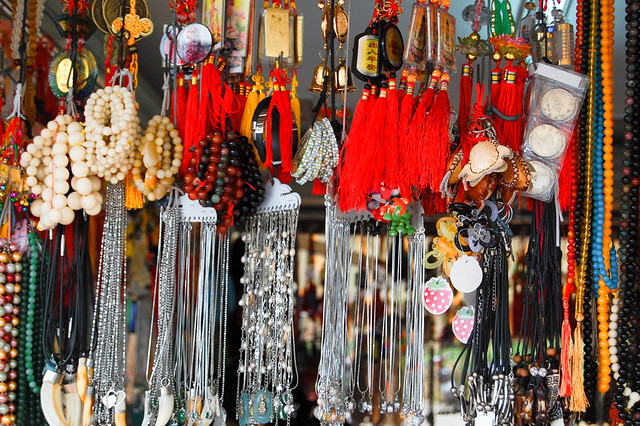
Da Lat-Nha Thrang-203.jpg by Vantage, on Flickr
Thanks so much if you able to help. just trying to understand all this.
1. As from camera
2. Processed. Exposure, temp, wb, sharpness all played with a little. basically most of the nobs and buttons in Lightroom 3.
Maybe its the best it could be for what it is but I'm going to have a nerve and ask your kind selves to have a muck around. And maybe list out what you did to make it better, if indeed it can be made better. Cheeky-little-blighter, i know
And of course, cc welcome, on composition and all that.#1
, on Flickr[/IMG]#2
Da Lat-Nha Thrang-203.jpg by Vantage
, on FlickrThanks so much if you able to help. just trying to understand all this.
